40
GRINDER
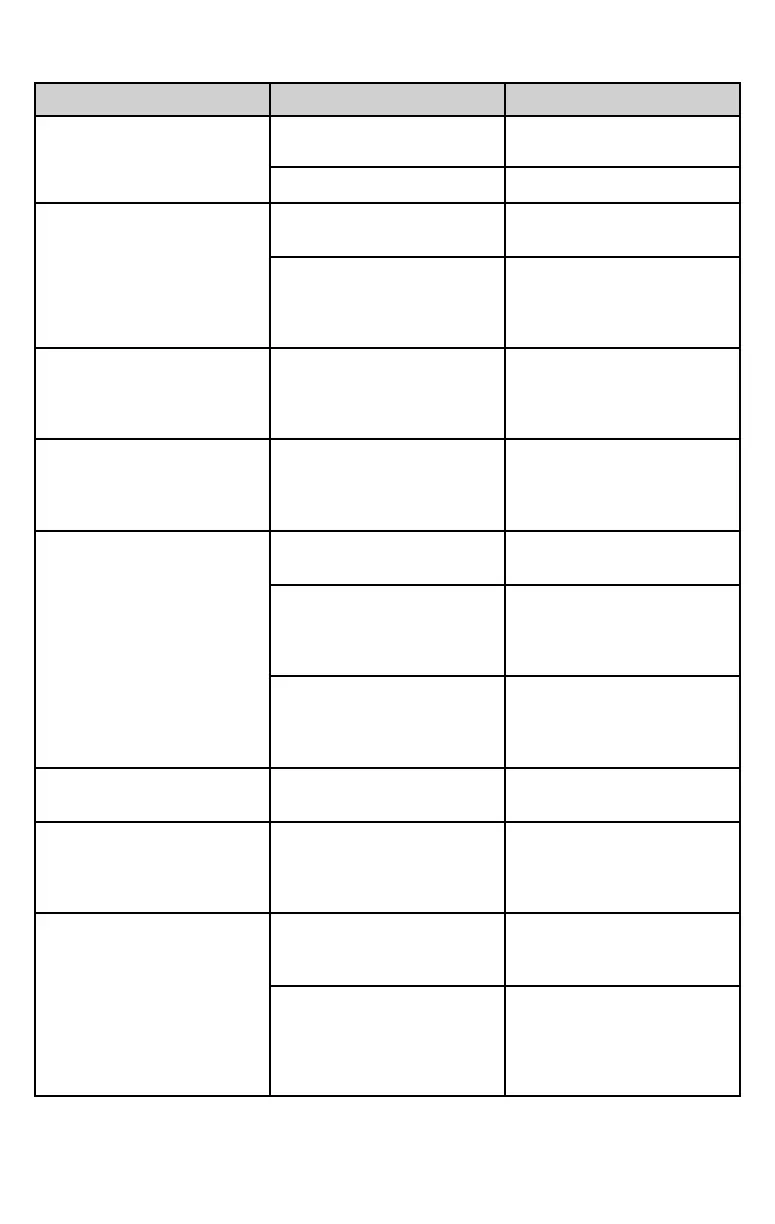
PROBLEM POSSIBLE CAUSES SOLUTION
Selected grinding settings
produces under extracted
shots
Beans are no longer fresh
Always use fresh coffee
beans.
Not enough coffee
Increase coffee dose.
Grinder light does not work
after pressing on/off button
Appliance is not plugged to
the power source
Connect and switch on.
Bean Hopper not properly
inserted
Insert the Bean Hopper
using a clockwise movement
until lock and bottom door is
open.
Grinder light slowly flashes
when trying to grind beans.
Bean Hopper gates are
closed or not fully open
Insert the Bean Hopper
using a clockwise movement
until lock and bottom door is
open.
Grinder light flashes quickly
Grinder has been used
continuously over long
periods of time. The motor is
in protection mode
Stop using for 10 minutes.
No coffee grinds coming
from the grinder outlet
The Bean Hopper is empty
Fill the Bean Hopper with
freshly roasted coffee beans.
Bean Hopper not properly
inserted
Insert the Bean Hopper
using a clockwise movement
until lock and bottom door is
open.
Grind outlet is blocked
For grinder cleaning
instructions, see the
“Grinding System” section in
the “Care and Cleaning”.
Espresso is under extracted
even with a fine coffee grind
Not enough coffee
Increase coffee dose.
Grinder is not working at all
Bean Hopper not properly
inserted
Insert the Bean Hopper
using a clockwise movement
until lock and bottom door is
open.
Bean Hopper cannot be
locked into position
Top Burr collar not aligned
Make sure the Top Burr
collar aligned to the
appliance.
Coffee beans and/or grind
still present after removing
Bean Hopper
Remove the Bean Hopper.
Use the Cleaning Brush or
vacuum cleaner as
necessary to clear loose
coffee beans or grinds.








 To Next Page