9
*Always refer to Service Sheet and Use and Care Manual for information specic to the refrigerator you are servicing.
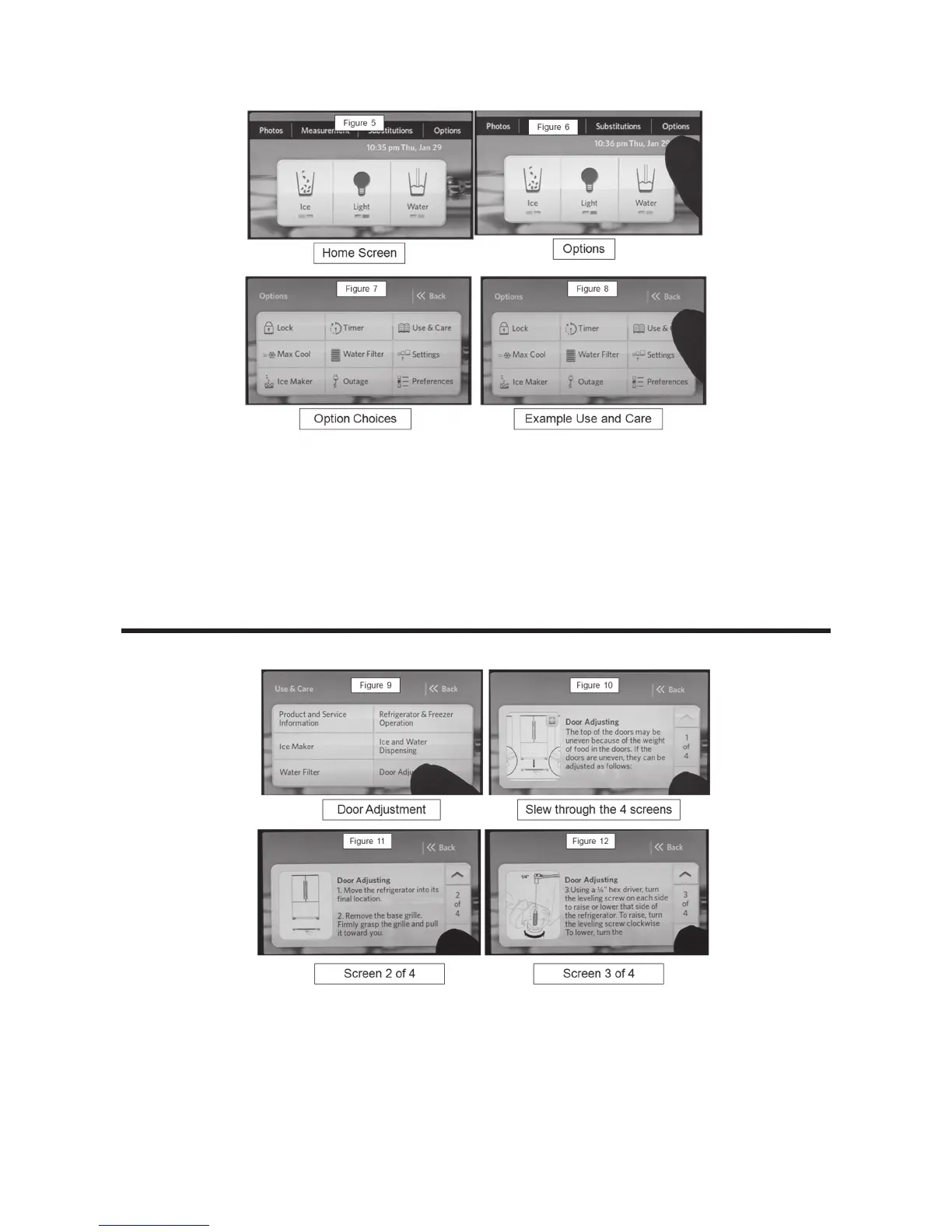
Options
New Use and Care Option
Figure 5 – Home Screen: Photos, Measurements, Substitutions, Options, Displays
Time and Temperature, Ice, Light, and Water.
Figure 6 – Select Options.
Figure 7 – Options Screen Lock , Max Cool, Ice maker, Timer, Water Filter, Power
Outage, Use and Care, Settings, and Preferences.
NOTE: The Use and Care Option is new.
Figure 8 – Select Use and Care Option. A unique feature of The KA Tempest is the
Use and Care Option – This option allows the consumer to view a portion
of the information contained in the Use and Care Manual.
Figure 9 –
Use and Care Screen Product and Service Information, Ice Maker, Water Filter,
Refrigerator and Freezer Operation, Ice and Water Dispensing, Door Adjustment.
(Example of Information: Door Adjustment Selected)
Figure 10 – Page 1 of 4 of Door Adjustment Instructions Page through the information
using the Up/Down arrows.
Figure 11 – Page 2 of 4
Figure 12 – Page 3 of 4



 To Next Page