12
*Always refer to Service Sheet and Use and Care Manual for information specic to the refrigerator you are servicing.
Uploading Photos
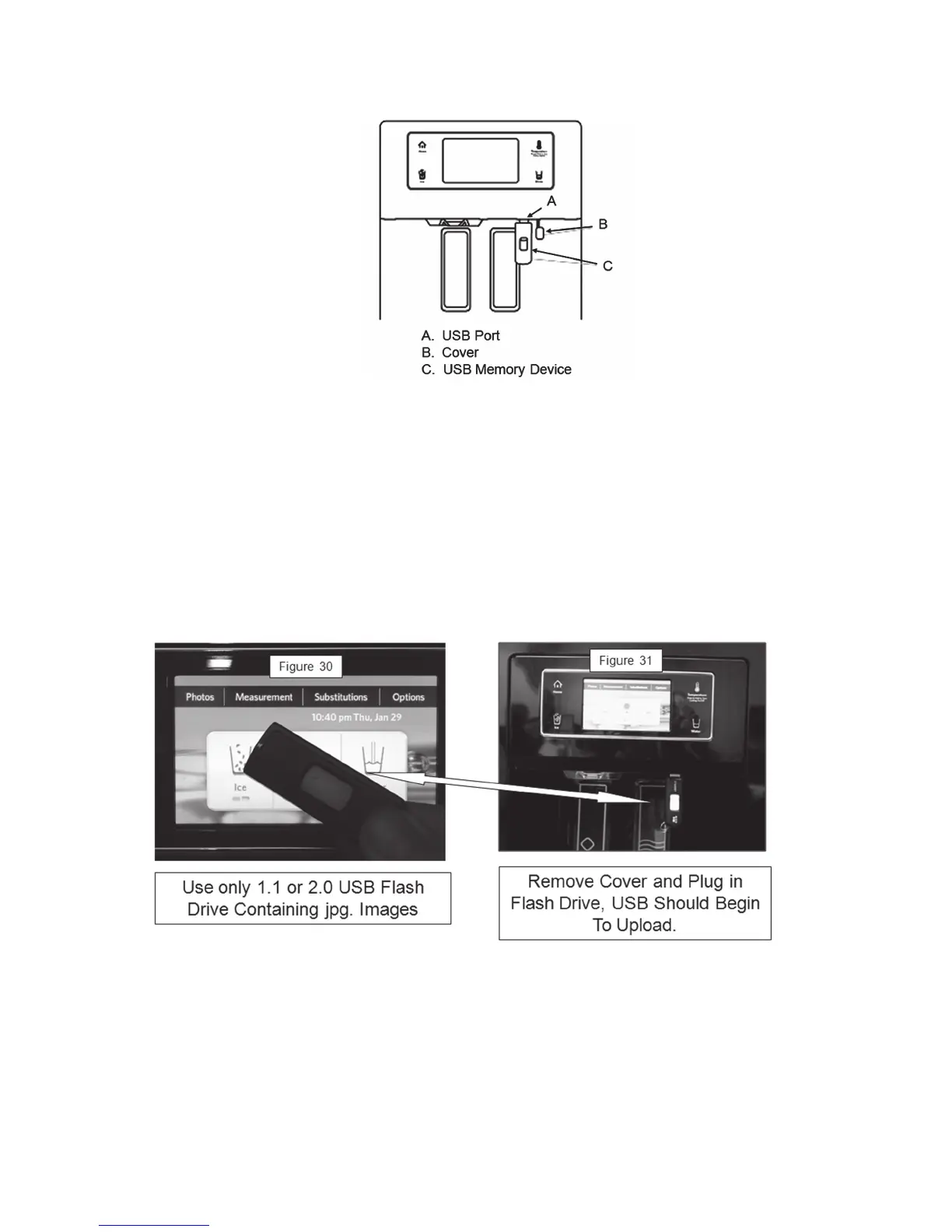
A USB port is located under the display screen in the dispenser area.
Important:
A USB memory device is not provided with the refrigerator. Some USB
memory devices are not readable.
u
The USB port supports only USB 1.1 and 2.0 standard memory devices.
Photos to be uploaded must be stored in the main directory of the USB device,
not in a folder.
u
The USB does not work as a charging device.
u
The ice and water dispensers will not function when the USB memory device is
inserted into the USB port.
Important: Photos uploaded cannot be retrieved or transferred.
u The memory has a capacity of 100 photos. The device converts any size jpg.
image to a xed 480x272 pixel size. The higher the resolution of the image, the
longer it will take to upload (convert), therefore you may notice a difference in
upload times.
u When a picture is uploaded multiple times, only one copy of the picture will be
stored.



 To Next Page