EasyManua.ls Logo

KitchenAid KUDM220T - Changing Front Panels.20-22

KitchenAid KUDM220T
24 pages
Print Icon
To Next Page IconTo Next Page
To Previous Page IconTo Previous Page
Loading...
Changing
Front
Panels
Your
new
KitchenAid
dishwasher
comes
with
a
stainless
steel
trim
kit
and
one
front
and
lower
reversible
panel.
You
can
choose
from
black
or
white.
If
you
want
to
change
the
color
of
the
panels,
follow
one
of
the
options
below:
OPTION
A
may
be
used
if
your
dishwasher
front
sticks
out
several
inches
from
the
cabinets.
OPTION
B
may
be
used
if
your
dishwasher
front
is
flush
with
the
cabinets.
Electrical
Shock
Hazard
Disconnect
electrical
power
supply
to
dishwasher
before
changing
panels.
Failure
to
do
so
could
result
In
electrical
shock
or
personal
Injury.
OPTION
A
Upper
Panel:
1.
Disconnect
electrical
power
supply.
2.
Pull
door
open
and
on
either
side
of
the
dishwasher
door,
remove
the
three
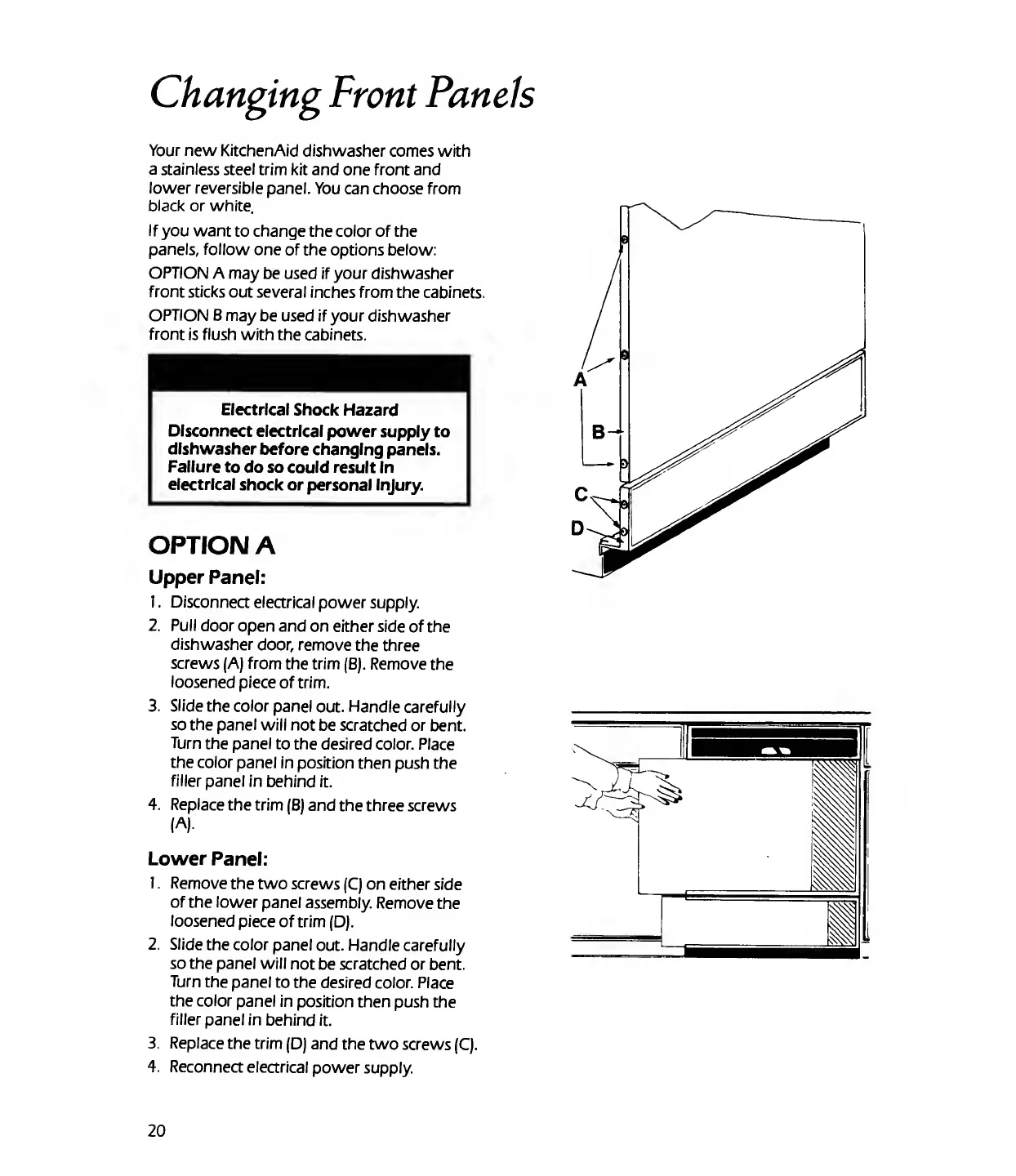
screws
(A)
from
the
trim
(B).
Remove
the
loosened
piece
of
trim.
3.
Slide
the
color
panel
out.
Handle
carefully
so
the
panel
will
not
be
scratched
or
bent.
Turn
the
panel
to
the
desired
color.
Place
the
color
panel
in
position
then
push
the
filler
panel
in
behind
it.
4.
Replace
the
trim
(B)
and
the
three
screws
(A).
Lower
Panel:
1.
Remove
the
two
screws
(C)
on
either
side
of
the
lower
panel
assembly.
Remove
the
loosened
piece
of
trim
(D).
2.
Slide
the
color
panel
out.
Handle
carefully
so
the
panel
will
not
be
scratched
or
bent.
Turn
the
panel
to
the
desired
color.
Place
the
color
panel
in
position
then
push
the
filler
panel
in
behind
it.
3.
Replace
the
trim
(D)
and
the
two
screws
(C).
4.
Reconnect
electrical
power
supply.
20

Related product manuals