EasyManua.ls Logo

KitchenAid KUDM220T - Optional Front Panels.22

KitchenAid KUDM220T
24 pages
Print Icon
To Next Page IconTo Next Page
To Previous Page IconTo Previous Page
Loading...
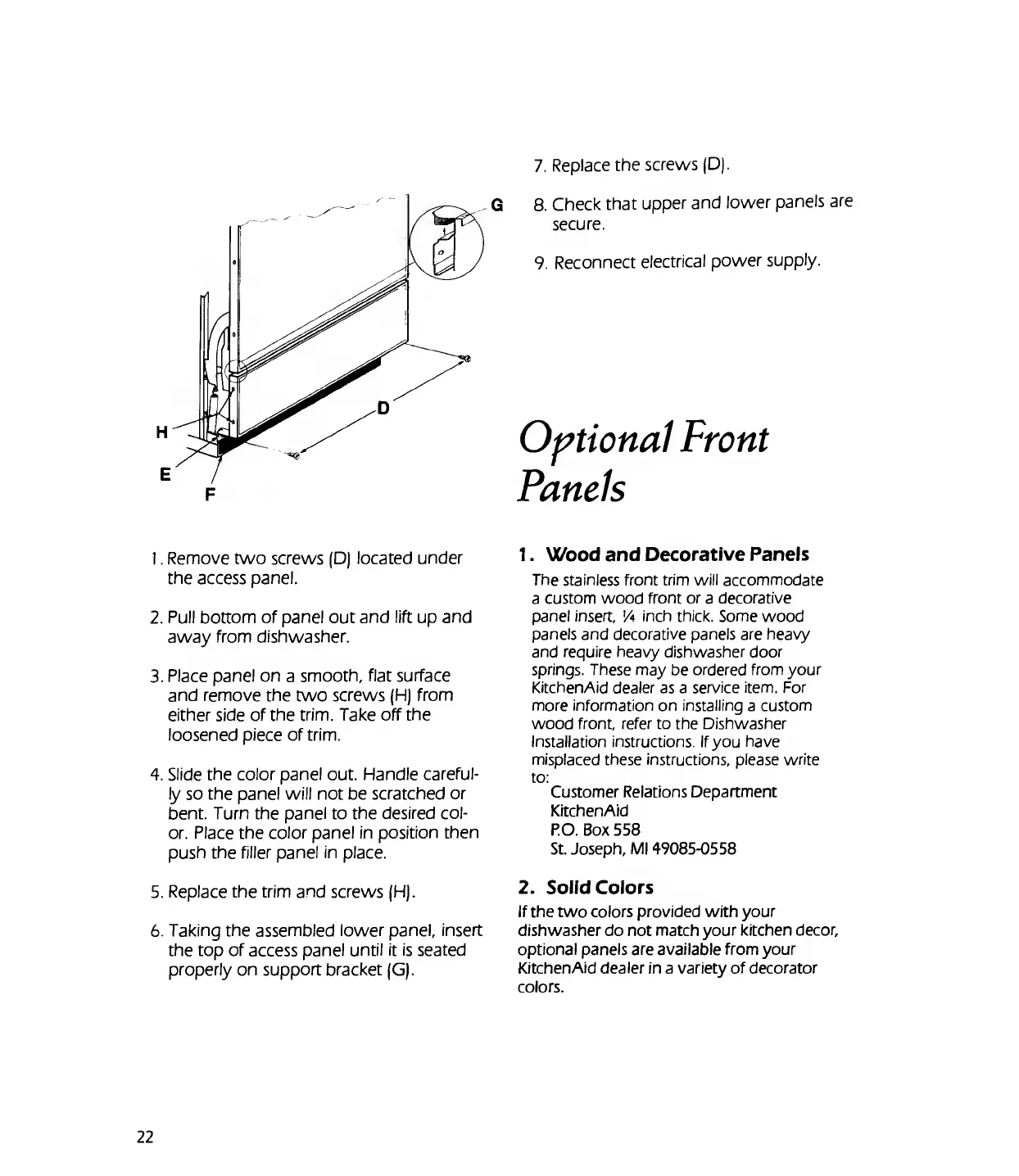
7.
R
eplace
the
screws
(D).
F
1.
Remove
two
screws
(D)
located
under
the
access
panel.
2.
Pull
bottom
of
panel
out
and
lift
up
and
away
from
dishwasher.
3.
Place
panel
on
a
smooth,
flat
surface
and
remove
the
two
screws
(H)
from
either
side
of
the
trim.
Take
off
the
loosened
piece
of
trim.
4.
Slide
the
color
panel
out.
Handle
careful¬
ly
so
the
panel
will
not
be
scratched
or
bent.
Turn
the
panel
to
the
desired
col¬
or.
Place
the
color
panel
in
position
then
push
the
filler
panel
in
place.
5.
Replace
the
trim
and
screws
(H).
6.
Taking
the
assembled
lower
panel,
insert
the
top
of
access
panel
until
it
is
seated
properly
on
support
bracket
(G).
8.
Check
that
upper
and
lower
panels
are
secure.
9.
Reconnect
electrical
power
supply.
Optional
Front
Panels
1.
Wood
and
Decorative
Panels
The
stainless
front
trim
will
accommodate
a
custom
wood
front
or
a
decorative
panel
insert,
'A
inch
thick.
Some
wood
panels
and
decorative
panels
are
heavy
and
require
heavy
dishwasher
door
springs.
These
may
be
ordered
from
your
KitchenAid
dealer
as
a
service
item.
For
more
information
on
installing
a
custom
wood
front,
refer
to
the
Dishwasher
Installation
instructions.
If
you
have
misplaced
these
instructions,
please
write
to:
Customer
Relations
Department
KitchenAid
P.O.
Box
558
St.
Joseph,
Ml
49085-0558
2.
Solid
Colors
If
the
two
colors
provided
with
your
dishwasher
do
not
match
your
kitchen
decor,
optional
panels
are
available
from
your
KitchenAid
dealer
in
a
variety
of
decorator
colors.
22

Related product manuals