5
OPERATING INSTRUCTIONS
TEMPERATURE MEASUREMENT
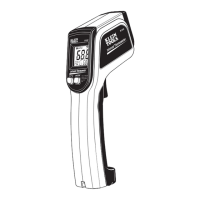
To measure temperature with the IR1, aim the meter at the object to
be measured, pull the trigger
2
and hold it depressed for at least 2
seconds. Releasing the trigger initiates Data Hold, "HOLD" will show
on the display, and the measurement will be held on the display.
If the display shows "OL" or "–OL" following a measurement, this
indicates that the surface temperature of the object being measured
is either above or below the measurement range of the meter.
TARGETING
The IR1 features a laser
5
to assist in targeting the measurement
area. Measurement areas located far away from the meter will be
larger than those close to the meter.
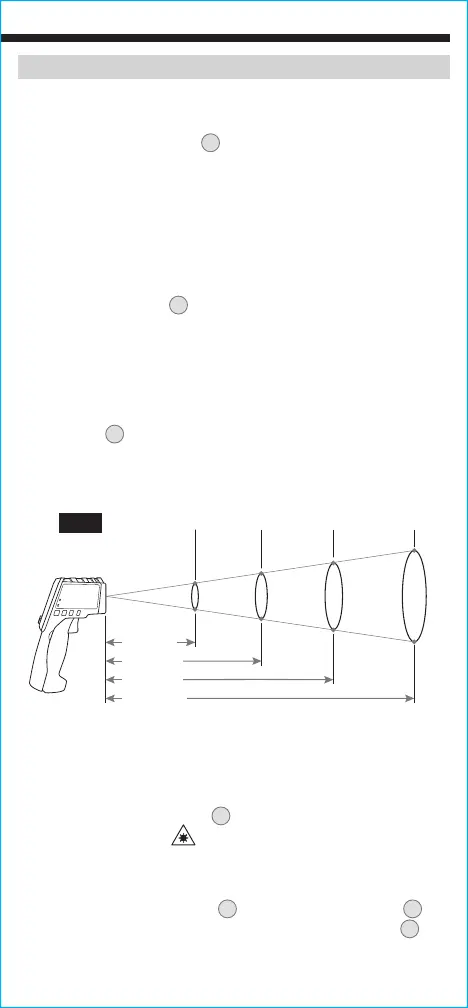
The meter is configured with 10:1 optical resolution (distance-to-spot
ratio). The distance-to-spot ratio defines the size of the measurement
area relative to the distance between the measurement location and
the IR sensor
4
. Typical diameters of the measurement area as a
function of the distance between the meter and the target area are
depicted below for 10:1 optical systems (FIG. 1).
(13 mm)
(25 mm)
(51 mm)
5"
(127 mm)
10"
(254 mm)
(102 mm)
20"
(508 mm)
FIG. 1
Distance-to-Spot
TARGETING LASER
The laser is on when the trigger
2
is held, and is off when released.
When on, the laser icon "
" will be visible on the display.
SELECTING A TEMPERATURE SCALE
The default scale is Fahrenheit (°F). To change, l
oosen the screw in
the Battery Compartment Door
3
and push the °F/°C Switch
6
to
change to Celsius (°C). Replace the Battery Compartment Door
3
and
tighten screw to secure, taking care not to over-tighten.
NOTE: Increased distance from target may affect reading accuracy.


 To Next Page