TICAL
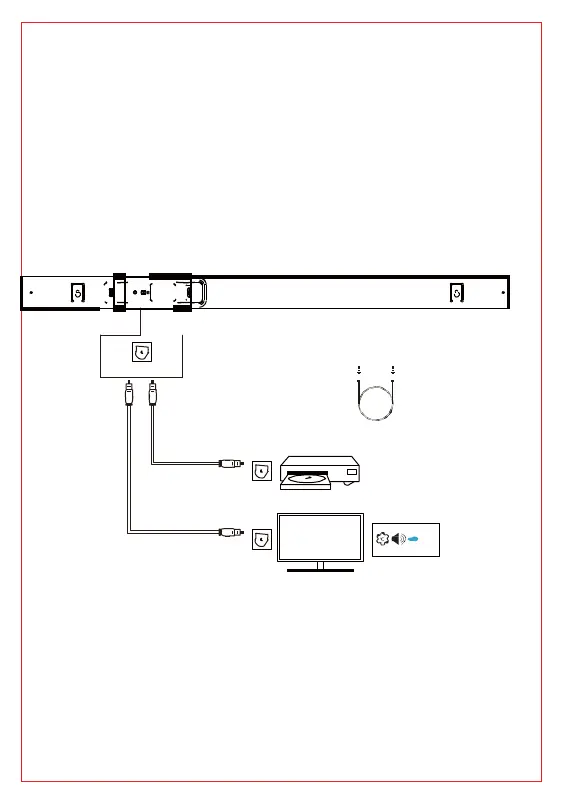
Plug the one terminal of OPTICAL cable into the soundbar
L port and another into TV OPTICAL port .
Turn on the soundbar.
Press the "OPT" button on the remote or press the "SOURCE"
n on the soundbar to enter OPTICAL mode.
Set up your TV as the following steps: Setting-Sound-Output-OPT
-Digital output-PCM
Using the native controls on your connected device, make sure
o settings are set to OPTICAL Audio and are turned on.
Audio from the connected audio source will be played through
C)
AUX IN OP
OPTICAL IN
OPTICAL IN OPTICAL (Supplied
) OPTICAL OUT
TV PCM
OPTICAL OUT
: Confirm to set your TV or other device audio settings
“external speakers” and disable the built-in TV speakers.
t with the supplied 3.5mm AUX cable
Plug the one terminal of 3.5 mm AUX cable into the soundbar
t and another into TV audio output port .
Turn on the soundbar.
Press the "AUX" button on the remote or press the "SOURCE
n on the soundbar to enter AUX mode.



 To Next Page