Getting Started
Power
Connect the unit to a standard Eurorack +- 12v power supply using the ribbon cable
provided.
Midi
Connect the Midi Out of the unit to the Midi In of any midi synthesiser. A stereo trs to trs
cable is provided for connecting to Knobula synth modules such as Poly Cinematic or any
synth that uses the trs-A standard. By default Chords are output on midi channel one.
Playing Chords
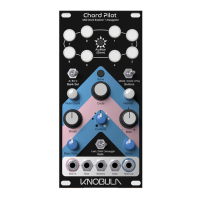
Press the Audition button to preview a chord. The audition button plays a chord according to
the current settings of the knobs and switches on the front panel. With the Buttons switch set
to ‘Play’, previously saved chords can be played from the 8 illuminated Preset Buttons that
surround the audition button. With the audition button held down, try changing some of the
knob settings, the chord will update as settings are changed and you can begin to
experiment with different parameters.
CV Gate Connections
Connecting a gate signal to gate input allows you to automate Chord Pilot by triggering the
device from other modules. A control voltage connected to the Buttons input can select
different chord presets, different modal settings or circle settings. A control voltage can be
connected to the Bias input for creating variations of chords.


 To Next Page