40
7.3.3 Span Calibration【Cal】
Press key【Pause】to enter Pause state with red sign ‘■’ displaying.
Use truck scale to get the seft-weight [Tare Weight] of the wheel loader.
Load a bucket of materials, and use truck scale to get the gross weight of the wheel loader and
the materials.
Calculate Calibrating Weight [Calibrating Weight = Net Weight of Materials = Gross Weight –
Tare Weight]
BUCKET-UP: Flip the bucket upward to the limit position.
ARM-DOWN: Put the lift-arm down so that the bucket goes down to the lowest position.
Press key【Load】to display the blue sign ‘▲’ .
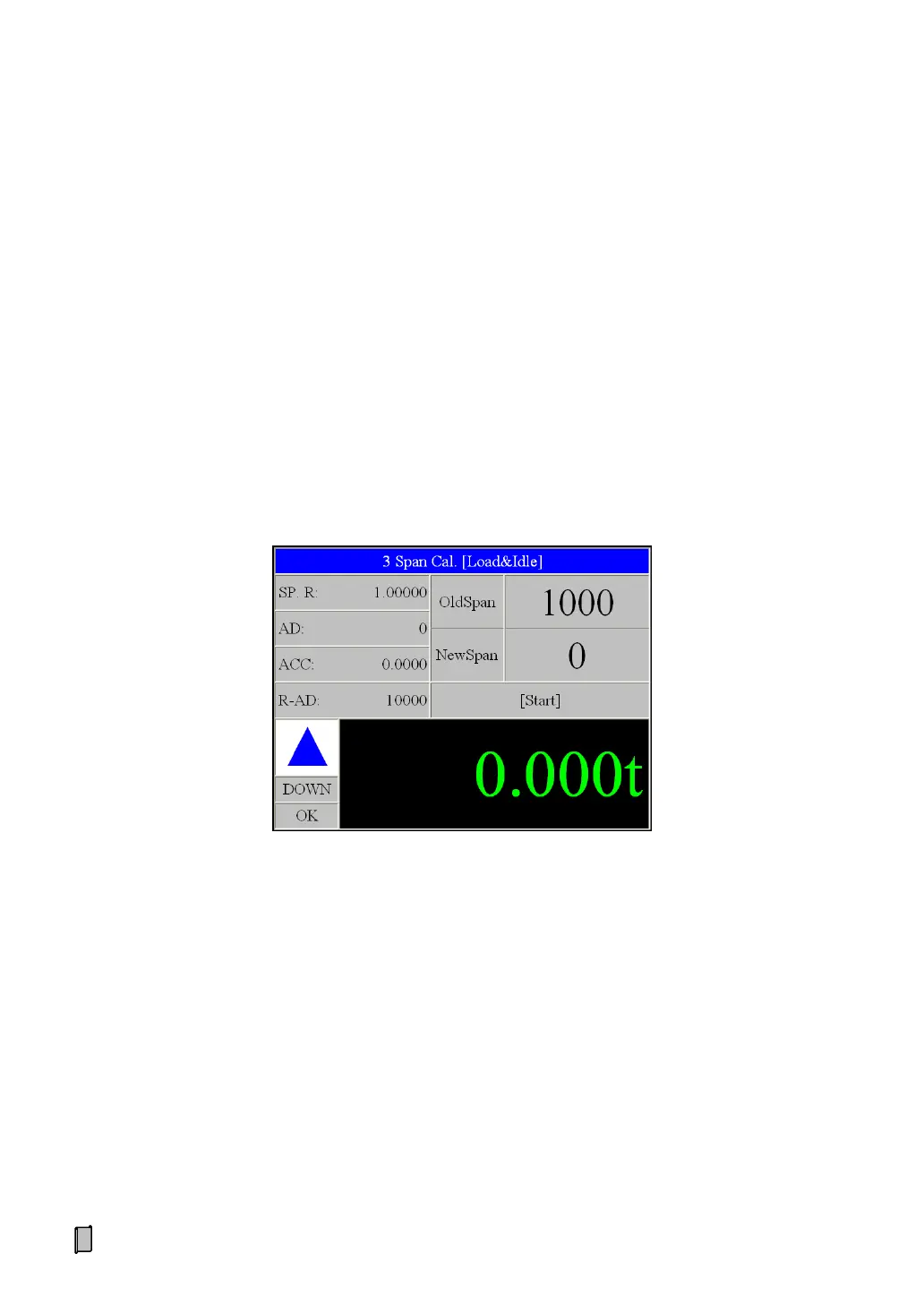
Press key【Cal】to display interface ‘Span Calibration’:
Lift the lift-arm and bucket with idle speed.
After the Magnet Block passed by the Weighing Segment, display:
Blue sign ‘▼’.
Weighing Result.
Message ‘【Ent】: Input Cal. Weight’.
Press key【Ent】to display the interface ‘Input Calibrating Weight’.
After inputting the value of Calibrating Weight, press key【Ent】to display:
New Span Coefficient.


 To Next Page