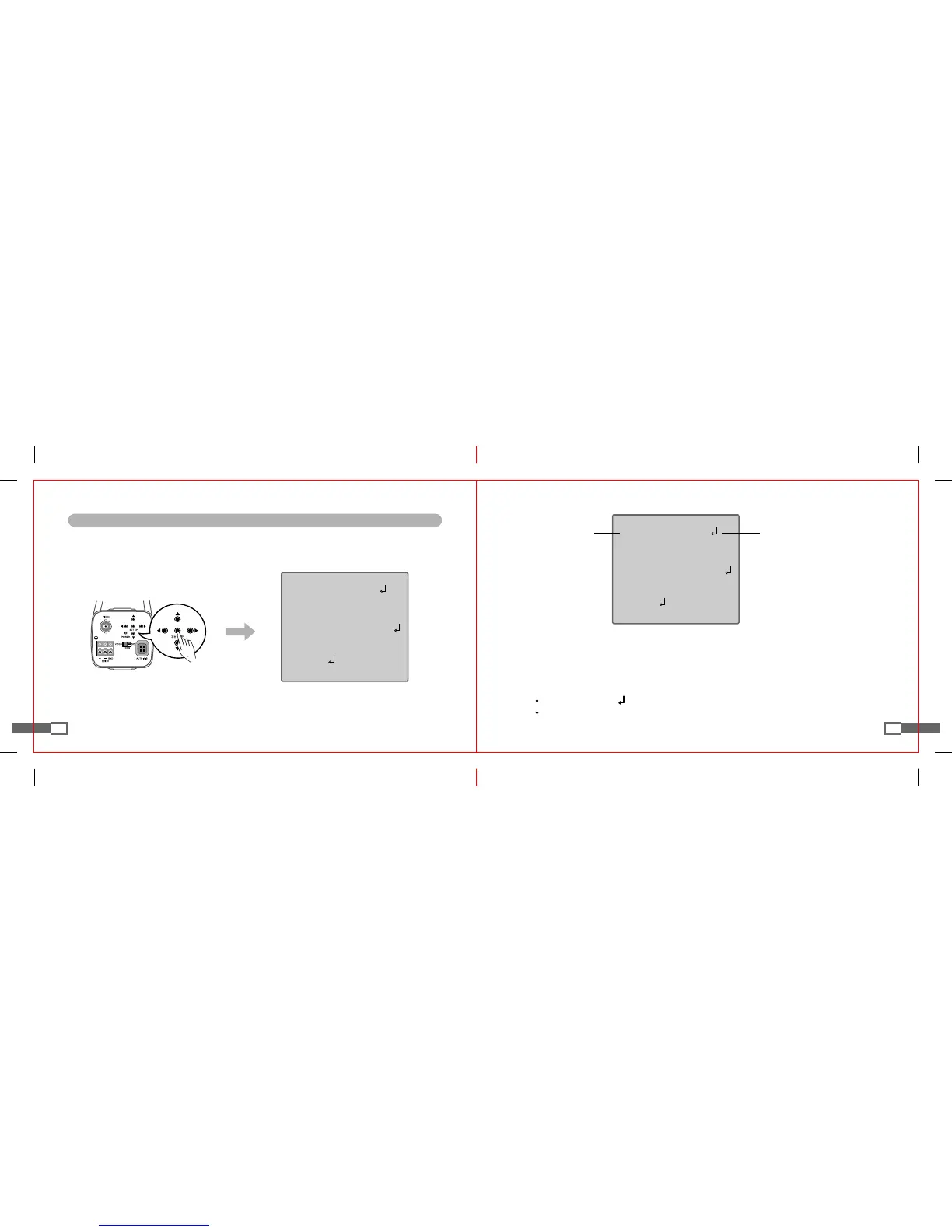
3. Change the present mode using LEFT or RIGHT button.
- Pressing LEFT or RIGHT button, selectable values or states are displayed in order.
(Press button until the desired mode or state are displayed).
4. To finish set up mode, select EXIT in OSD MENU and then press SET UP button of camera.
[Note]
For the modes displaying symbol, press SET UP button to go to sub menus.
For the modes displaying - - - symbol, such mode cannot be used according to the present set up states.
18
Using LEFT or RIGHT button
to change the present modes.
SETUP
DC▶LENS
SHUTTER ---
WHITEBAL. ATW
BACKLIGHT OFF
AGC MIDDLE
DNR LOW
SENS-UP OFF
SPECIAL
EXIT
Using UP or DOWN button
to select a desired menu item.
Functions of OSD MENU Buttons
1. Press SET UP button
- Product goes to the functional set up state.
(SET UP menu is displayed in the monitor screen connected to camera).
2. Select a desired menu item using UP and DOWN buttons.
- Pressing UP or DOWN button, an arrow moves up or down, respectively.
(Make the arrow point the desired menu item).
17
◉SETUP
SETUP
DC▶LENS
SHUTTER ---
WHITEBAL. ATW
BACKLIGHT OFF
AGC MIDDLE
DNR LOW
SENS-UP OFF
SPECIAL
EXIT


 To Next Page