EasyManua.ls Logo

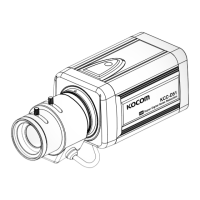
KOCOM KCC-D51 - User Manual

KOCOM KCC-D51
19 pages
Print Icon
To Next Page IconTo Next Page
Loading...
KCC-D51 07.04
This user's manual may be changed for the enhancement of product quality without notice.
KCC-D51 User's Manual
High Resolution Day& Night Color Camera
5
4
0
T
V
l
i
n
e
s
O
n
S
c
r
e
e
n
D
i
s
p
l
a
y
M
e
n
u
S
u
p
e
r
D
i
g
i
t
a
l
N
o
i
s
e
R
e
d
u
c
t
i
o
n
S
D
N
R
Please read User's Manual carefully before installing or using the product.

Questions and Answers

Summary

Product Features

Warnings & Attentions

Product Components

Names of Product Parts

Front Side

Details the front panel components and mounting points.

Lens Protection Cap

Instruction for using the lens protection cap when no lens is mounted.

Names of Product Parts

Back Side

Details the rear panel connectors and controls of the camera.

Installation

Lens Installation

Information on selecting and installing camera lenses.

Automatic Iris Lens Connection

Steps for connecting an automatic iris lens.

Installation

C-mount Lens Installation

Procedure for mounting C-mount lenses.

CS-mount Lens Installation

Procedure for mounting CS-mount lenses.

Monitor Connection

Power Connection

Camera Operation

OSD Menu Overview

Overview of the camera's On-Screen Display menu structure.

OSD Menu Setup Introduction

Introduction to using the OSD menu for configuration.

Functions of OSD MENU Buttons

How to Set OSD MENU SET UP Functions

Lens Selection

How to select the camera lens type (DC/VIDEO) via OSD menu.

Shutter Mode and Speed Adjustment

Configuring electronic shutter speed and modes.

How to Set OSD MENU SET UP Functions

White Balance Adjustment

Setting the white balance for accurate color reproduction.

Backlight Compensation

Compensating for strong backlight to improve visibility.

How to Set OSD MENU SET UP Functions

AGC Function

Adjusting automatic gain control for brightness.

DNR Function

Reducing digital noise in low-light conditions.

How to Set OSD MENU SET UP Functions

SENS UP Function

Enhancing sensitivity in low light conditions.

Special Functions

Accessing advanced camera functions.

How to Set OSD MENU SET UP Functions

Camera ID Input

Setting and displaying a unique camera identifier.

How to Set OSD MENU SET UP Functions

Color Day & Night Function

Managing automatic switching between day and night modes.

Sync and Line Lock

Synchronizing camera output with external signals.

Motion Detection

Configuring motion detection areas and sensitivity.

How to Set OSD MENU SET UP Functions

Privacy Masking

Hiding specific areas of the video feed.

Mirror Function

Enabling or disabling horizontal image reversal.

Sharpness Adjustment

Adjusting image sharpness for clarity.

System Reset and Exit

Restoring default settings and exiting menus.

Troubleshooting

Product Specifications

Summary

Product Features

Warnings & Attentions

Product Components

Names of Product Parts

Front Side

Details the front panel components and mounting points.

Lens Protection Cap

Instruction for using the lens protection cap when no lens is mounted.

Names of Product Parts

Back Side

Details the rear panel connectors and controls of the camera.

Installation

Lens Installation

Information on selecting and installing camera lenses.

Automatic Iris Lens Connection

Steps for connecting an automatic iris lens.

Installation

C-mount Lens Installation

Procedure for mounting C-mount lenses.

CS-mount Lens Installation

Procedure for mounting CS-mount lenses.

Monitor Connection

Power Connection

Camera Operation

OSD Menu Overview

Overview of the camera's On-Screen Display menu structure.

OSD Menu Setup Introduction

Introduction to using the OSD menu for configuration.

Functions of OSD MENU Buttons

How to Set OSD MENU SET UP Functions

Lens Selection

How to select the camera lens type (DC/VIDEO) via OSD menu.

Shutter Mode and Speed Adjustment

Configuring electronic shutter speed and modes.

How to Set OSD MENU SET UP Functions

White Balance Adjustment

Setting the white balance for accurate color reproduction.

Backlight Compensation

Compensating for strong backlight to improve visibility.

How to Set OSD MENU SET UP Functions

AGC Function

Adjusting automatic gain control for brightness.

DNR Function

Reducing digital noise in low-light conditions.

How to Set OSD MENU SET UP Functions

SENS UP Function

Enhancing sensitivity in low light conditions.

Special Functions

Accessing advanced camera functions.

How to Set OSD MENU SET UP Functions

Camera ID Input

Setting and displaying a unique camera identifier.

How to Set OSD MENU SET UP Functions

Color Day & Night Function

Managing automatic switching between day and night modes.

Sync and Line Lock

Synchronizing camera output with external signals.

Motion Detection

Configuring motion detection areas and sensitivity.

How to Set OSD MENU SET UP Functions

Privacy Masking

Hiding specific areas of the video feed.

Mirror Function

Enabling or disabling horizontal image reversal.

Sharpness Adjustment

Adjusting image sharpness for clarity.

System Reset and Exit

Restoring default settings and exiting menus.

Troubleshooting

Product Specifications

KOCOM KCC-D51 Specifications

General IconGeneral
Lens3.6mm
IR Distance20m
Power SupplyDC12V
Ingress ProtectionIP66
Video CompressionH.264
Sensor TypeCMOS
Day/NightYes (ICR)
Network InterfaceRJ45
Operating Humidity10% to 90% (non-condensing)