2120
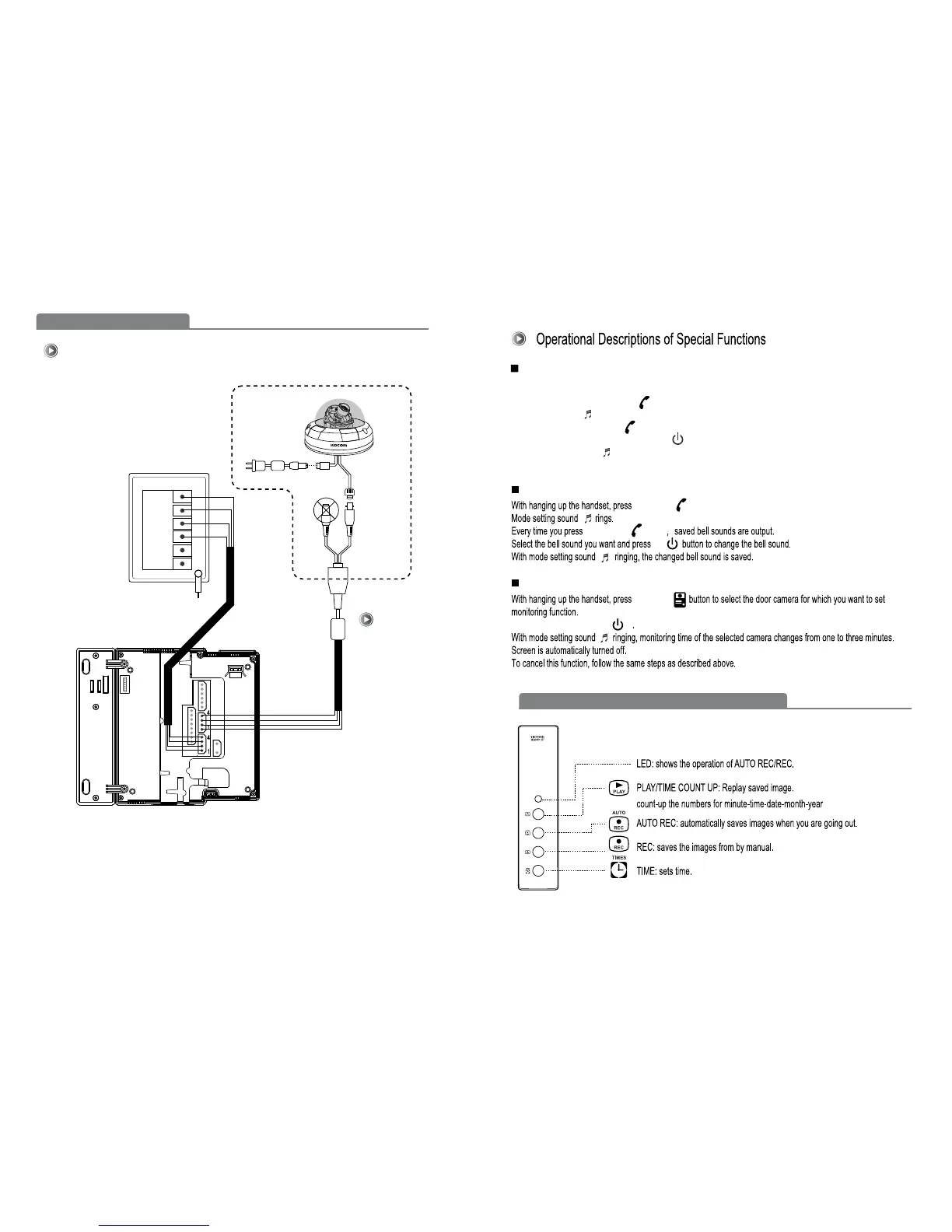
Wiring Diagram
Wiring Diagram [CCTV Camera B type]
B type
ADAPTOR
Video
BNC
CCTV
KC-MB30
CAM1
①
②
③
④
⑤
⑥
FG
Main monitor
With hanging up the handset, select the camera 1 or camera2 using monitoring function.
While screen is on, press Extension button for three seconds.
Mode setting sound rings.
Every time you press Extension button, saved bell sounds are output.
Select the bell sound you want and press set button to change the bell sound of related door camera.
With mode setting sound ringing, the changed bell sound is saved.
Screen is automatically turned off.
Door Camera Call Melody Selection (5 Melody)
Extension Call Melody Selection (5 Melody)
CCTV Monitoring (3min)
Ex
t
e
n
s
i
o
n b
u
t
t
o
n
E
xte
n
sio
n
b
u
tt
o
n
ca
m
e
r
a
CCT
V
set
While screen is on, press set button for three seconds.
External Memory Equipment (KVR-300) User's Manual



 To Next Page