8
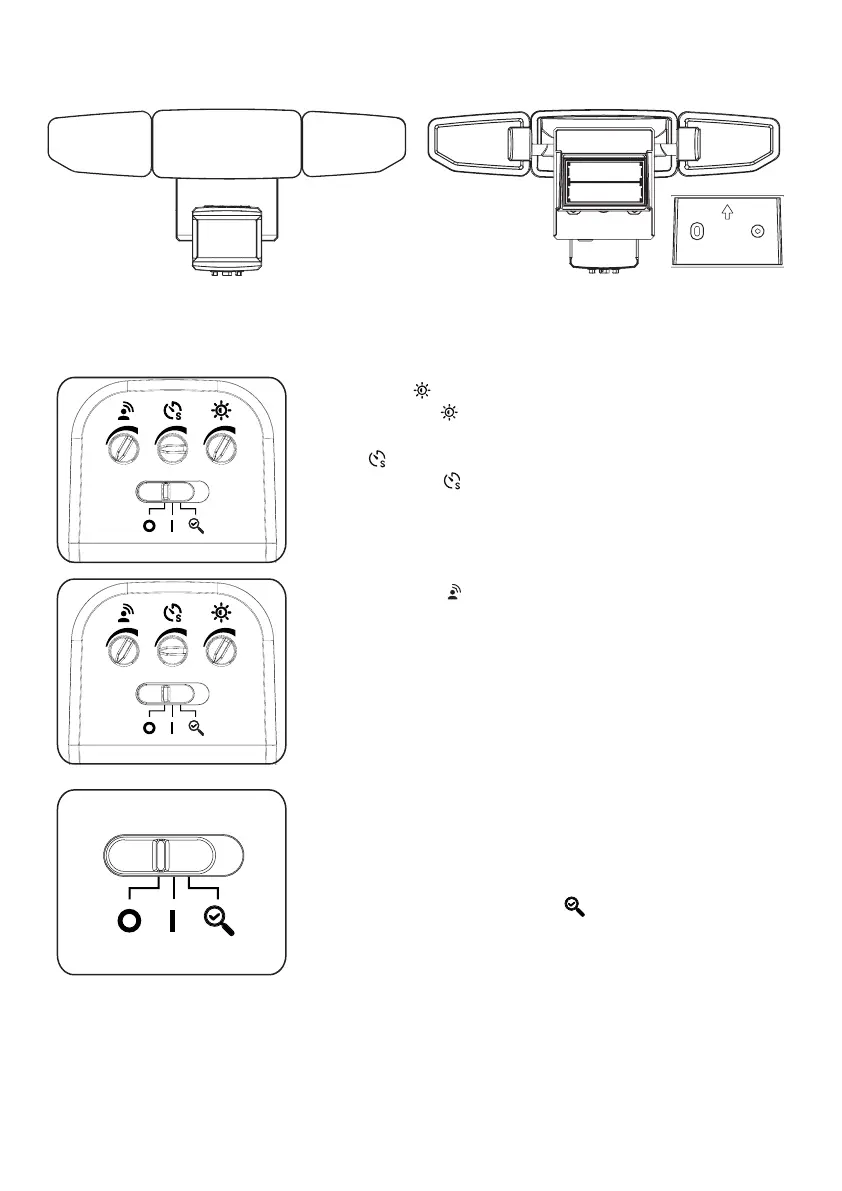
Brightness :
Rotate the dial counterclockwise to your desired
brightness (Max. to Min.)
Timer
Adjust the dial from 30 to 120 seconds to
determine how long the oodlight will remain on
when motion is detected.
Sensitivity Dial :
• To increase the detection zone, turn the dial from
Min. to Max. (high position).
• To decrease the detection zone, turn the dial from
Max. to Min. (low position).
On/Off/Test Control:
Slide the control switch to the OFF(O) position to
turn the light off and to conserve the battery life.
(Unit should be in OFF(O)) position when replacing
batteries as well)
Slide control switch to TEST position to calibrate
motion sensor detection zone. Slide control to ON (|)
position for normal operation.
120s30s
120s30s
CONTROLS INSTRUCTIONS


 To Next Page