7
1. ADJUSTING THE DETECTOR
After installing the LED Floodlight, you are ready to set /aim the
motion detector.
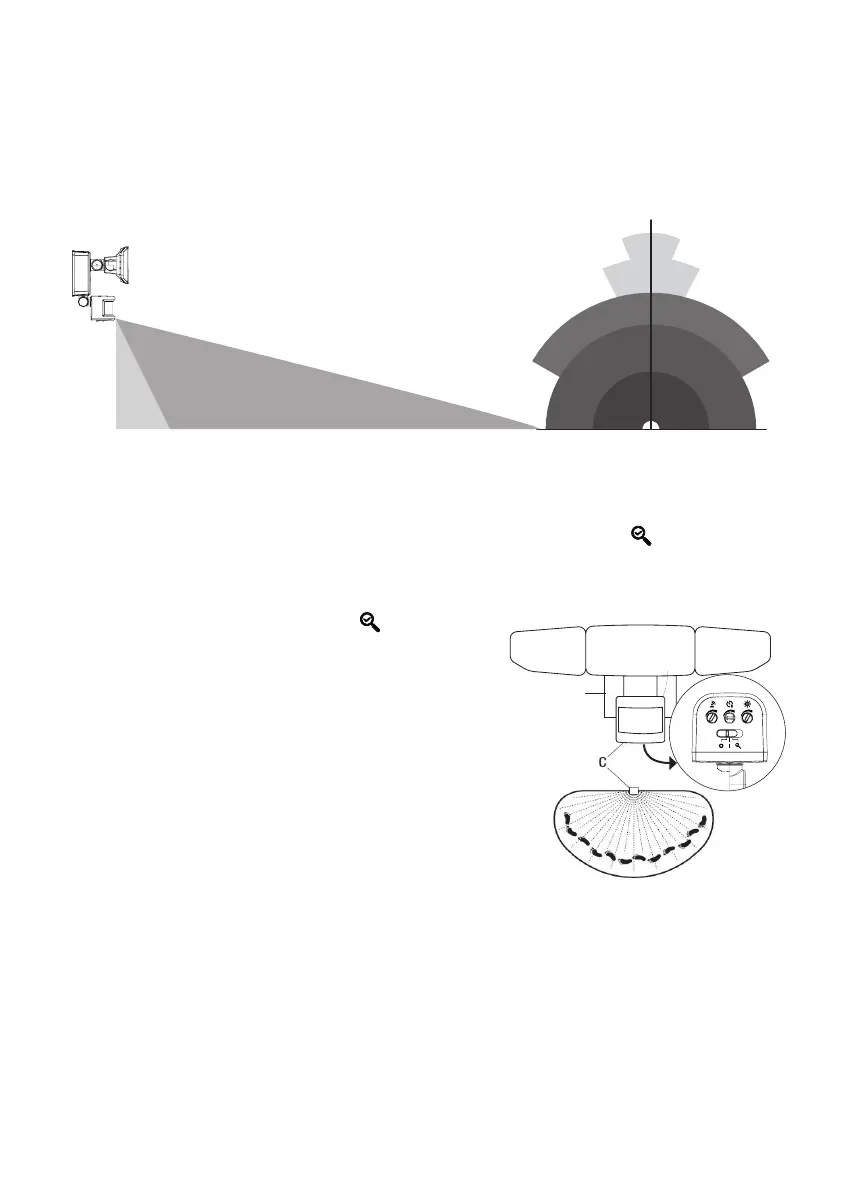
Detection Range: around 13.7 m / 45 ft x 240 degrees ( Max ).
2. DETERMINING THE MOTION SENSOR DETECTION ZONE
NOTE: When the motion sensor control switch is set to the TEST
position, the light will operate during the day or night. The light will
stay on for 4-6 seconds after all motion is stopped.
Adjust the sensor head horizontal for long coverage.
OPERATION
2.5m /
8.2ft
1m / 3ft 13.7 m / 45 ft
1m / 3ft
12m / 39.3 ft
18m / 59 ft
12m / 39ft
13.7m / 45ft
180º
140º
20º
10º
• Slide the control switch to the TEST position.
• Decrease the “Sensitivity” dial to the low position.
• Perform a “walk test”: walk in an arc across the front
of the motion sensor (C).
• Watch the light (B). The light (B) will come on,
indicating motion has been detected.
• Stop, wait for the light (B) to turn off, and then begin
walking again.
• Continue this process until the detection zone has
been established.
• If needed, gently grasp the motion sensor (C) and
move it from side to side or up and down to adjust the
detection zone.
B


 To Next Page