EasyManua.ls Logo

Kodak CAROUSEL 800 - Page 9

Kodak CAROUSEL 800
20 pages
Print Icon
To Next Page IconTo Next Page
To Previous Page IconTo Previous Page
Loading...
toward the next
lower
number;
for
example,
the
bordered,
trademark,
(or
emulsion)
side
of
slide No. 2
should
face
toward slide No. 1; No. 6
should
face
toward
No.
5,
etc.
Replace the
lock
ring,
turning
it
in the
direction
of
the
arrow
marked
LOCK
until
the
detented action can be
felt
at
least once
or
twice
and the ring is secure on the tray.
NOTE:
If
you wish
continuous-repeater
operation,
or
the
addition
of a
title
slide,
or
the darkening of
the
screen
after
the
showing
of
80
slides, see the note on page
12
under
"Editing
Slides."
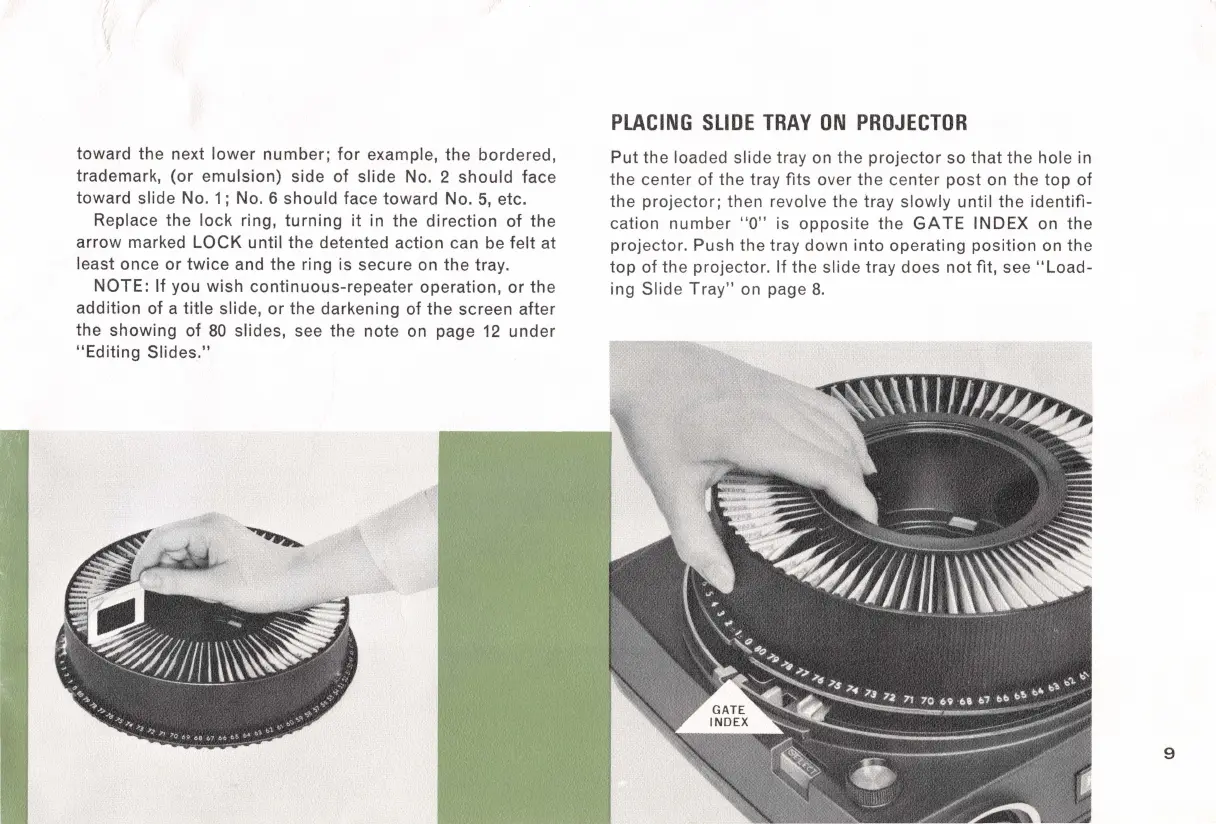
PLACING
SLIDE
TRAY
ON
PROJECTOR
Put
the loaded slide tray on the
projector
so
that
the
hole in
the
center
of
the tray
fits
over
the
center
post
on
the
top
of
the
projector;
then revolve the tray
slowly
until
the
identifi-
cation
number
"O" is
opposite
the
GATE
INDEX
on
the
projector. Push the tray
down
into
operating
position
on the
top
of
the
projector
.
If
the
slide tray does
not
fit, see
"Load-
ing
Slide
Tray"
on page
8.
9

Related product manuals