EasyManua.ls Logo

Kodak CAROUSEL 800 - Projection Lamp; Automatic Timer

Kodak CAROUSEL 800
20 pages
Print Icon
To Next Page IconTo Next Page
To Previous Page IconTo Previous Page
Loading...
10
operation
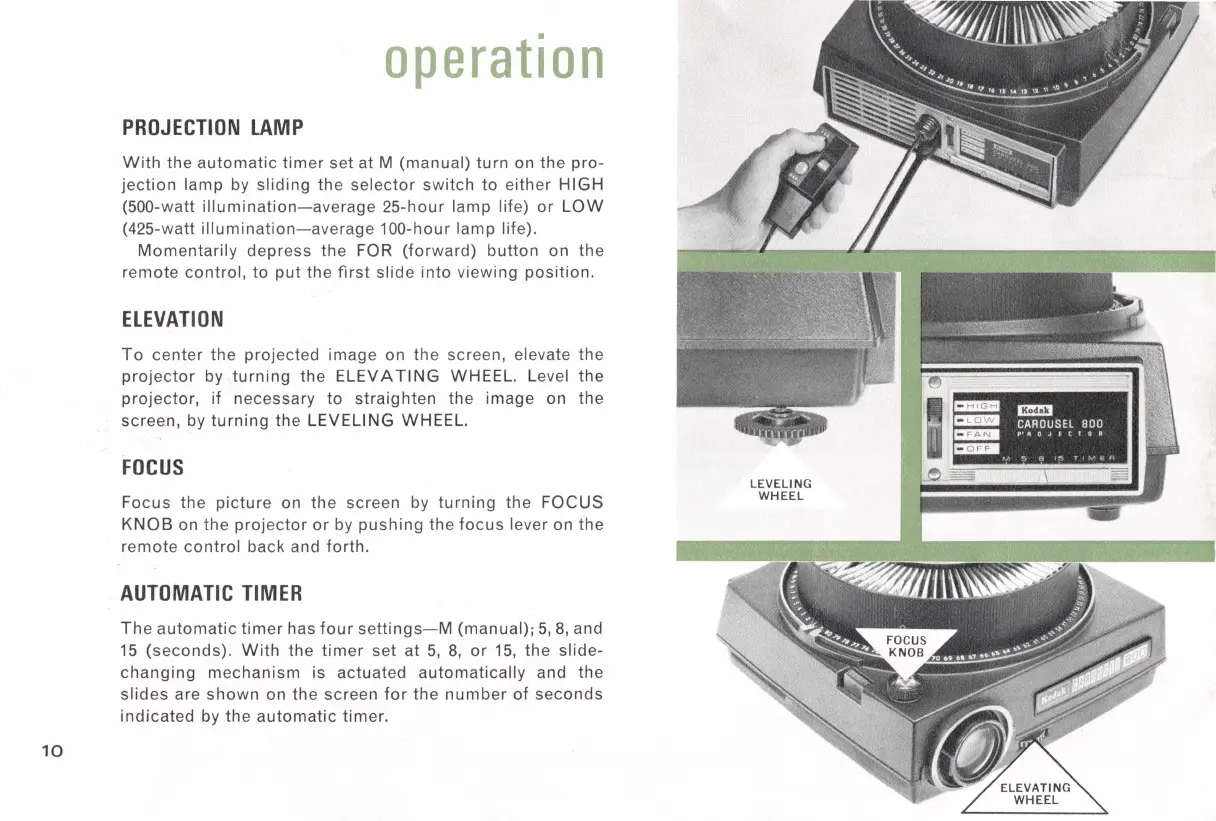
PROJECTION
LAMP
With
the
automatic
timer
set
at M
(manual)
turn
on the
pro-
jection
lamp
by
sliding
the
selector
switch
to
either
HIGH
(500-watt
illumination-average
25-hour
lamp
life)
or
LOW
(425-watt
illumination-average
100-hour
lamp
life).
Momentarily
depress
the FOR
(forward)
button
on
the
remote
control,
to
put
the
first
slide
into
viewing
position.
ELEVATION
To
center
the
projected
image on the screen, elevate the
projector
by
turning
the
ELEVATING
WHEEL. Level the
projector,
if
necessary
to
straighten
the
image
on the
screen,
by
turning
the
LEVELING
WHEEL.
FOCUS
Focus
the
picture
on
the
screen by
turning
the FOCUS
KNOB
on the
projector
or
by
pushing
the
focus
lever on the
remote
control
back and
forth.
AUTOMATIC
TIMER
The
automatic
timer
has
four
settings-M
(manual);
5,
8,
and
15
(seconds).
With
the
timer
set
at
5,
8,
or
15,
the
slide-
changing
mechanism
is actuated
automatically
and the
slides
are
shown
on the screen
for
the
number
of
seconds
indicated
by the
automatic
timer.
LEVELING
WHEEL
:.~
'vl:qi;I,•
mm:i
mm
Cl!lim
CAROUSEL
800
a::::11£1111
V'II
OJ
E C t O
II
C&Da
r,,
~
a
~
T,
v
1e;,
'

Related product manuals