J
J
REMOTE
CONTROL
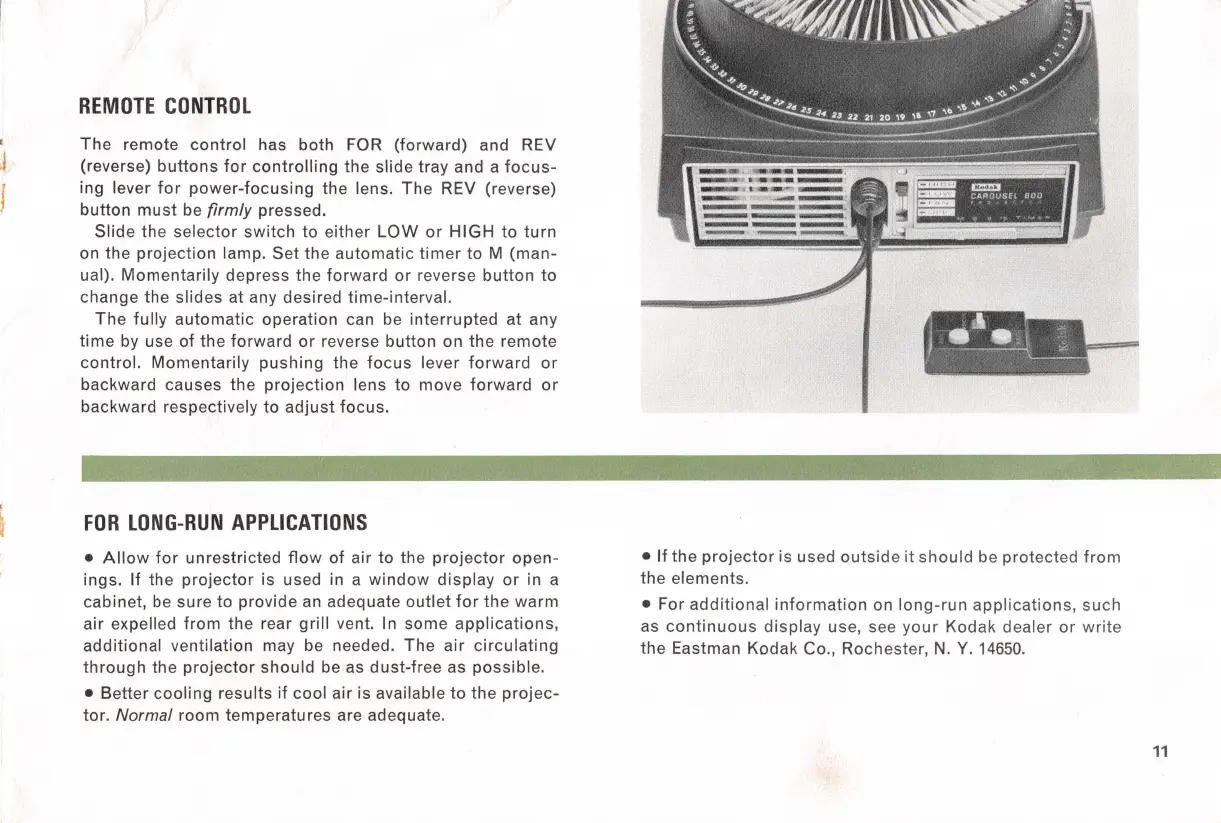
The
remote
control
has both
FOR
(forward) and REV
(reverse)
buttons
for
controlling
the
slide tray and a
focus-
ing lever
for
power-focusing
the lens.
The
REV
(reverse)
button
must
be firmly pressed.
Slide
the selector switch
to
either
LOW
or
HIGH
to
turn
on the projection lamp.
Set
the automatic
timer
to
M (man-
ual). Momentarily depress
the
forward
or
reverse
button
to
change the slides at any desired time-interval.
The
fully
automatic
operation can be
interrupted
at any
time
by use
of
the
forward
or
reverse button
on
the
remote
control. Momentarily
pushing
the
focus
lever
forward
or
backward causes the
projection
lens
to
move
forward
or
backward respectively
to
adjust
focus.
FOR
LONG-RUN
APPLICATIONS
•
Allow
for
unrestricted
flow
of air
to
the
projector
open-
ings.
If
the
projector
is used in a
window
display
or
in a
cabinet,
be
sure
to
provide an adequate outlet
for
the
warm
air expelled
from
the rear
grill
vent. In some
applications,
additional ventilation may be needed.
The
air
circulating
through
the
projector
should
be as dust-free as possible.
• Better
cooling
results
if
cool air is available
to
the
projec-
tor. Normal room temperatures are adequate.
•
If
the
projector
is used
outside
it
should
be protected
from
the
elements.
• For
additional
information
on
long-run
applications,
such
as
continuous
display
use, see
your
Kodak dealer or
write
the
Eastman Kodak Co., Rochester,
N.
Y.
14650.
11



 To Next Page