EasyManua.ls Logo

Kodak CAROUSEL 800 - Page 12

Kodak CAROUSEL 800
20 pages
Print Icon
To Next Page IconTo Next Page
To Previous Page IconTo Previous Page
Loading...
12
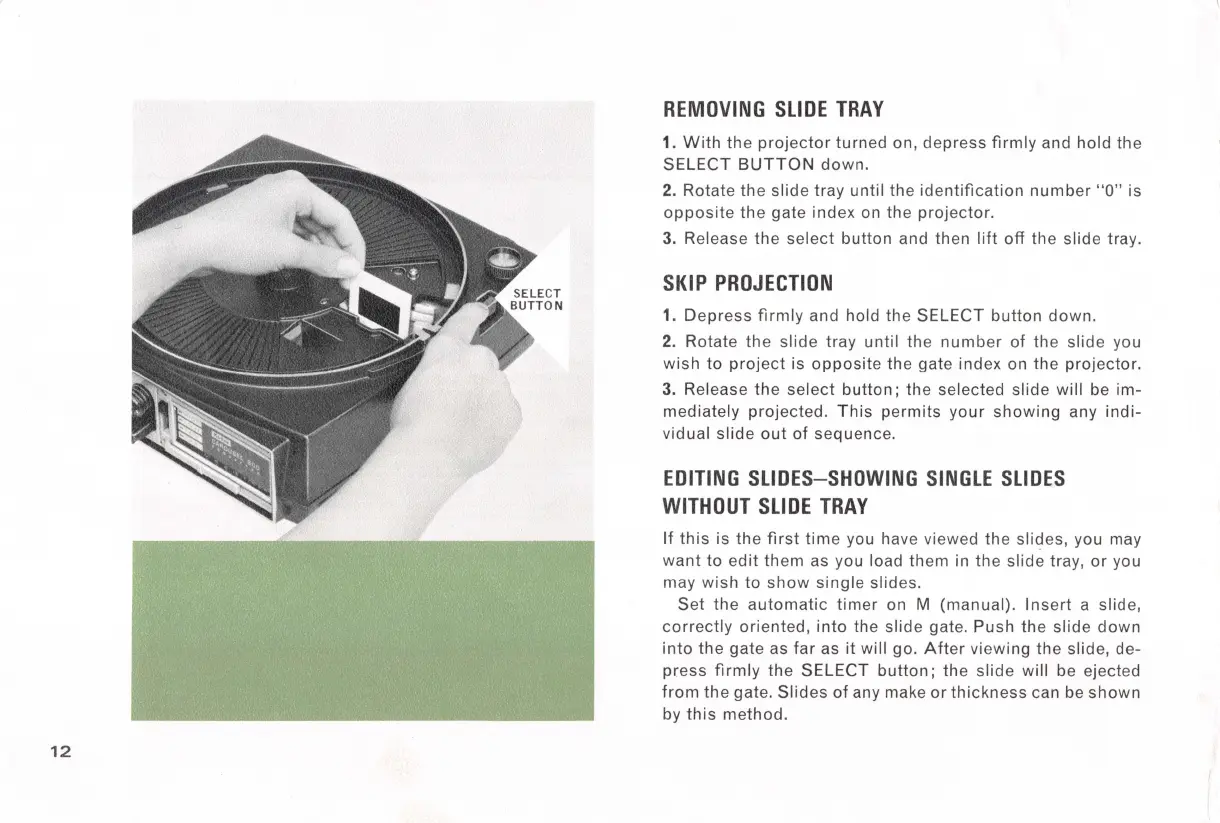
REMOVING
SLIDE
TRAY
1.
With
the
projector
turned
on,
depress
firmly
and hold the
SELECT
BUTTON
down.
2. Rotate
the
slide tray until the
identification
number
"O" is
opposite
the gate index on the
projector.
3. Release the
select
button and then
lift
off
the slide tray.
SKIP
PROJECTION
1.
Depress
firmly
and hold the SELECT button
down.
2. Rotate
the
slide
tray until the
number
of the slide you
wish
to
project
is
opposite
the gate index on the projector.
3. Release the
select
button;
the selected slide will be im-
mediately projected.
This
permits
your
showing
any
indi-
vidual
slide
out
of
sequence.
EDITING
SLIDES-SHOWING
SINGLE
SLIDES
WITHOUT
SLIDE
TRAY
If
this
is
the
first
time
you have viewed the slides, you may
want
to
edit
them
as you load them in the slide tray,
or
you
may
wish
to
show
single
slides.
Set
the
automatic
timer
on M (manual).
Insert
a slide,
correctly
oriented,
into
the slide gate.
Push
the
slide
down
into
the gate as
far
as
it
will go.
After
viewing the slide, de-
press
firmly
the SELECT
button;
the
slide
will be ejected
from
the
gate.
Slides
of
any make
or
thickness
can
be
shown
by
this
method.

Related product manuals