K71000 Automatic PMCC Flash Point Analyzer
Operation and Instruction Manual
K71000-Manual -25-
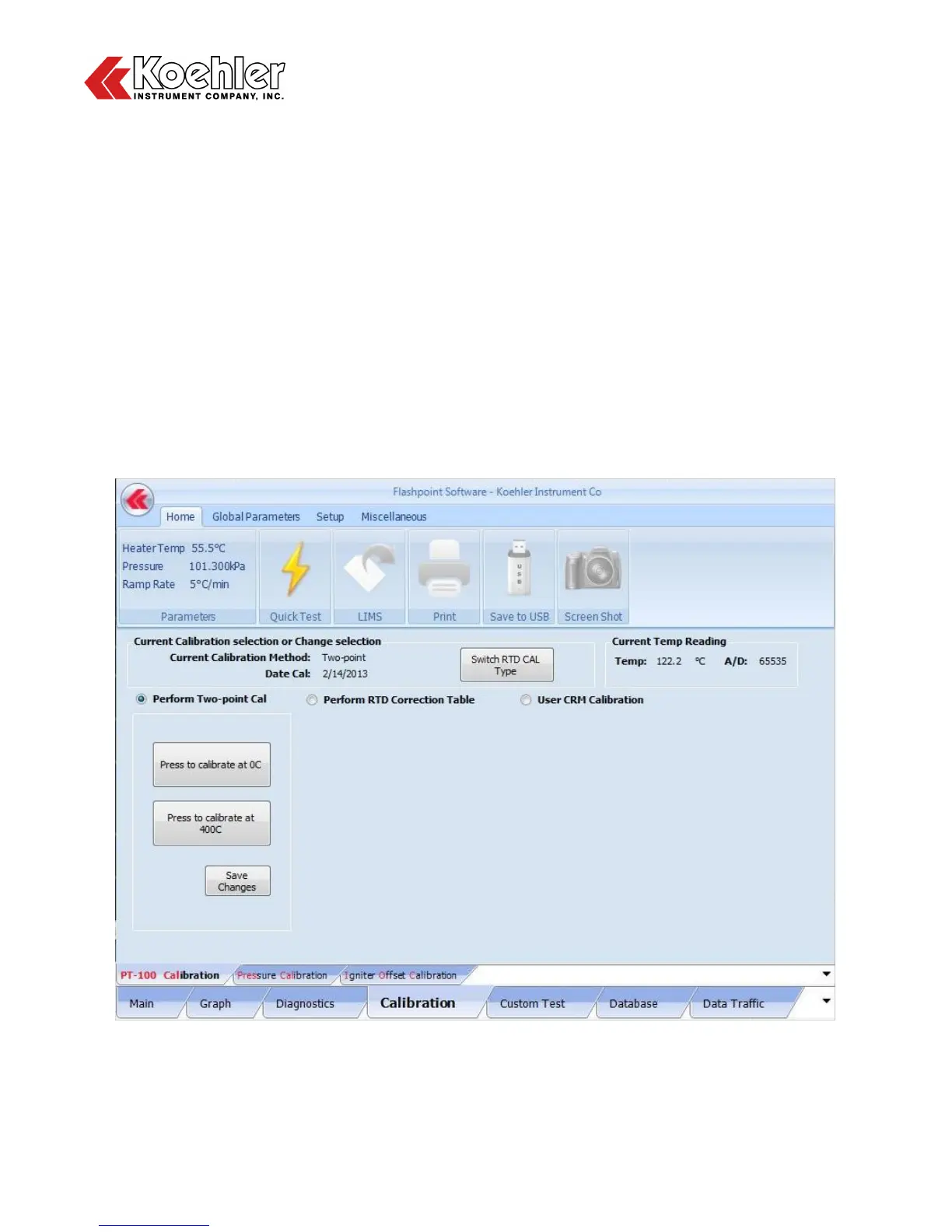
8. Calibration Screen - Clicking on the Calibration Tab located at the Lower Tab Section of the Main
Menu will bring up the Calibration Screen. The Calibration Screen is comprised of three calibration
submenus: PT-100 Calibration, Pressure Calibration and Igniter Offset Calibration>
a. PT100 Calibration - Three types of PT100 Calibration can be performed:
- Two Point Calibration
- RTD Correction Table
- User CRM Calibration
Two Point Calibration as shown in Figure 14 below is performed using an external PT100
Simulator Box (Available as an Additional Accessory).
1. Remove the PT100 ground plug from the side of the cover assembly
2. Insert the PT100 Simulator Box Connector
3. Set the Simulator Box to 0°C by turning the dial to the 0°C position
4. Click the Press to Calibrate at 0°C button
5. Set the Simulator Box to 400°C by turning the dial to the 400°C position
6. Click the Press to Calibrate at 400°C button
7. Click the Save Changes button
Figure 14: Calibration Screen_Two Point Calibration


 To Next Page