K71000 Automatic PMCC Flash Point Analyzer
Operation and Instruction Manual
K71000-Manual -31-
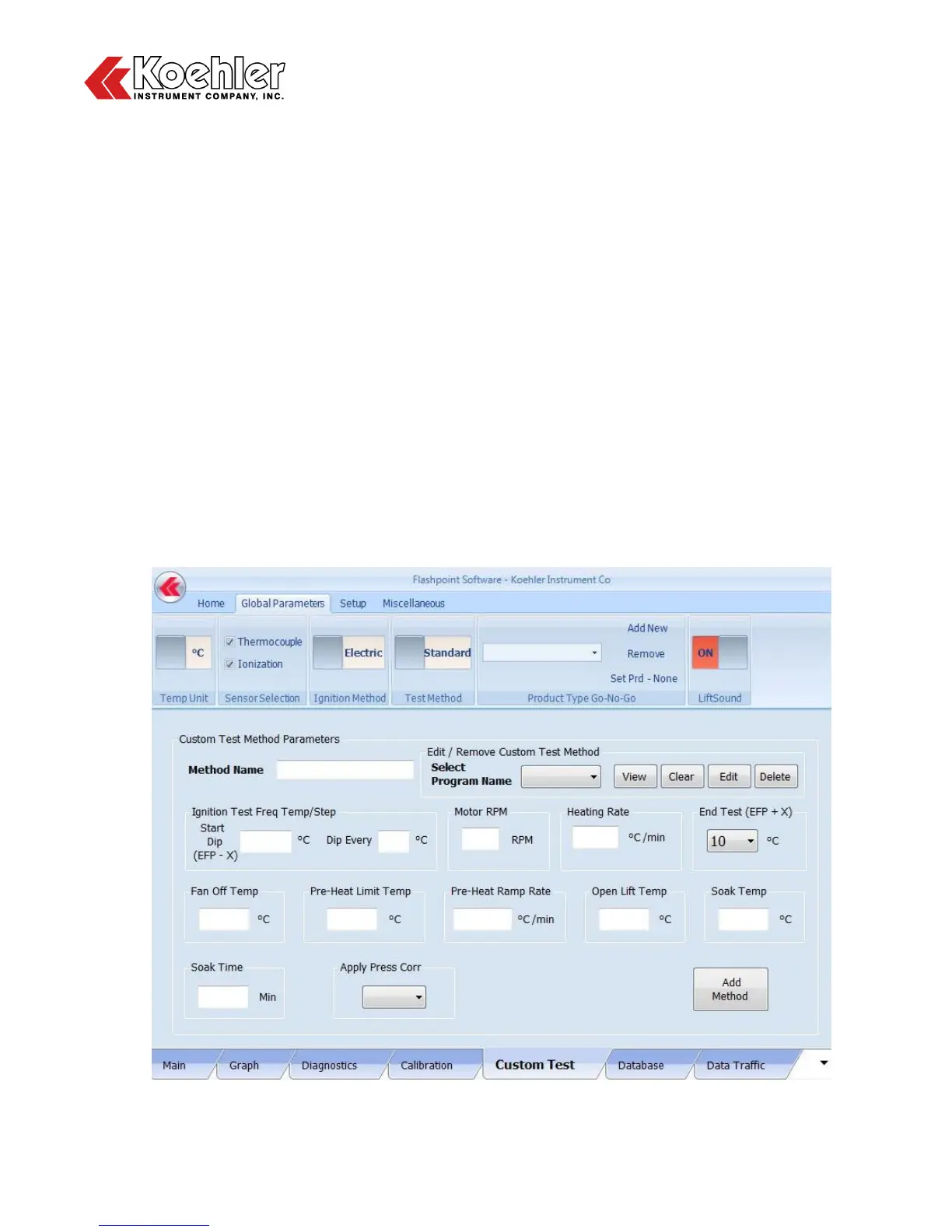
9. Custom Test Screen - Clicking on the Custom Test Tab located at the Lower Tab Section of the
Main Menu will bring up the Custom Test Method Parameters Menu as shown in Figure 20:
a. To set up a Custom Test Method:
1. Input Method Name
2. Input Test Method Parameters
- Start Dip Temperature (Expected Flash Point (EFP) - X) (°C)
- Dip Frequency (°C)
- Motor Speed (RPM)
- Heating Rate (°C/min)
- End Test Temperature (EFP + X) (°C)
- Fan Off Temperature (°C)
- Pre-Heat Limit Temperature (°C)
- Pre-Heat Ramp Rate (°C/min)
- Open Lift Temperature (°C)
- Soak Temperature (°C) (Typically used only for Asphalt / Bitumen Applications)
- Soak Time (°C) (Typically used only for Asphalt / Bitumen Applications)
- Apply Pressure Correction (YES/NO)
3. Click Add Method button
b. The Custom Test Method Screen can also be used to View, Clear, Edit and Delete Custom Test
Methods. Select a Test Method from the Select Program Name pull down tab and click on the
appropriate action button to the right to apply: View, Clear, Edit, Delete
Figure 20: Custom Test Method Screen


 To Next Page