K71000 Automatic PMCC Flash Point Analyzer
Operation and Instruction Manual
K71000-Manual -32-
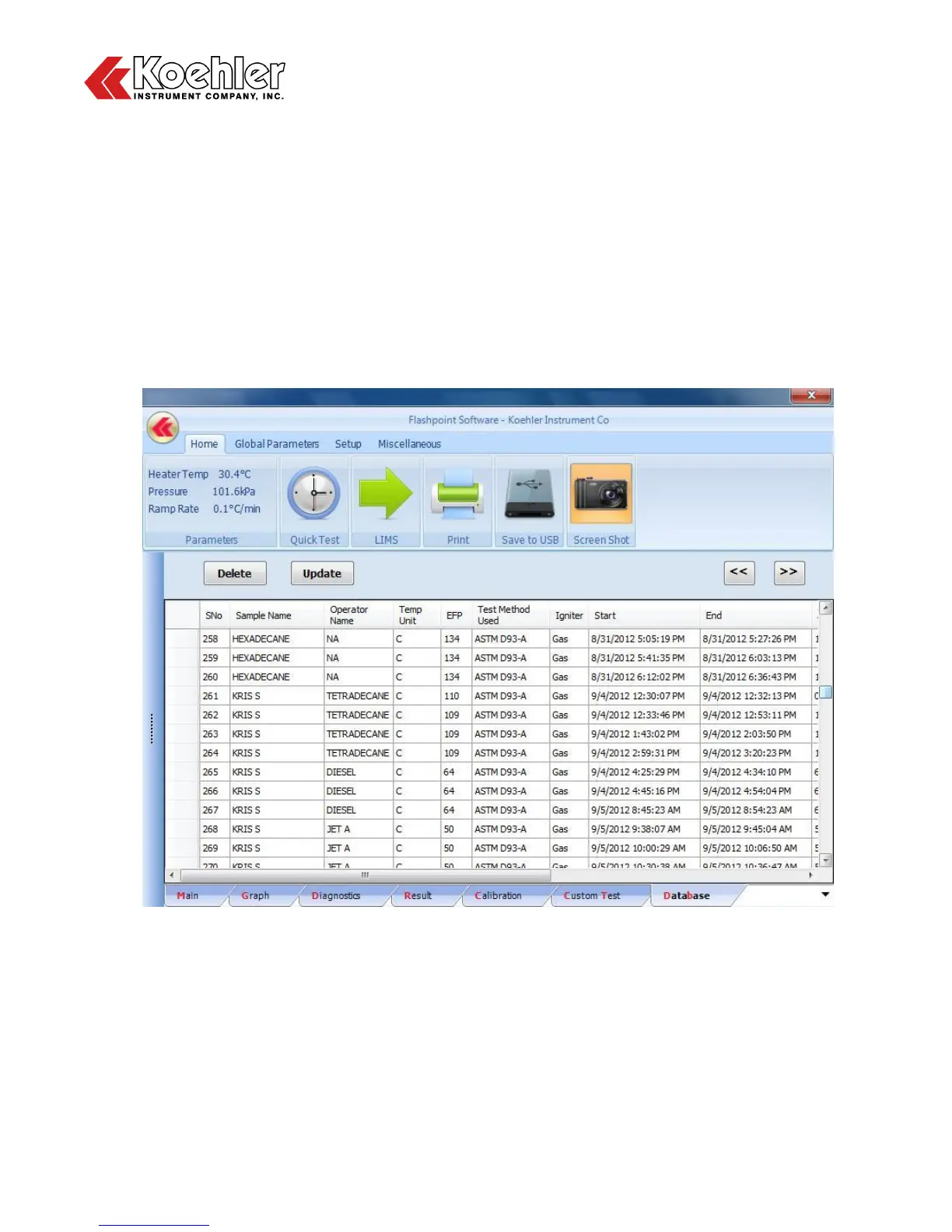
10. Database Screen - Clicking on the Database tab will display the Analyzers Database as shown in
Figure 21 below. A maximum of 50 results will be accessible in this menu, the excess of which will be
sent to an archive folder in the PCs hardware.
After a test is complete the result and corresponding test input and parameter data will automatically
be sent to the database. Each test is listed in a single row with the information separated by column.
The user also has the option to delete or update the database list by clicking the Delete or Update
buttons.
In addition, the user can also export selected data to LIMS, sent to Print or Save to USB from the
Database Screen. Please note that each Icon will only become active (illuminate) if the respective
external hardware is connected to the analyzer. E.g. the LIMS Icon will illuminate when the Ethernet
or RS232 cable is connected to the Analyzer.
Figure 21: Database Screen


 To Next Page