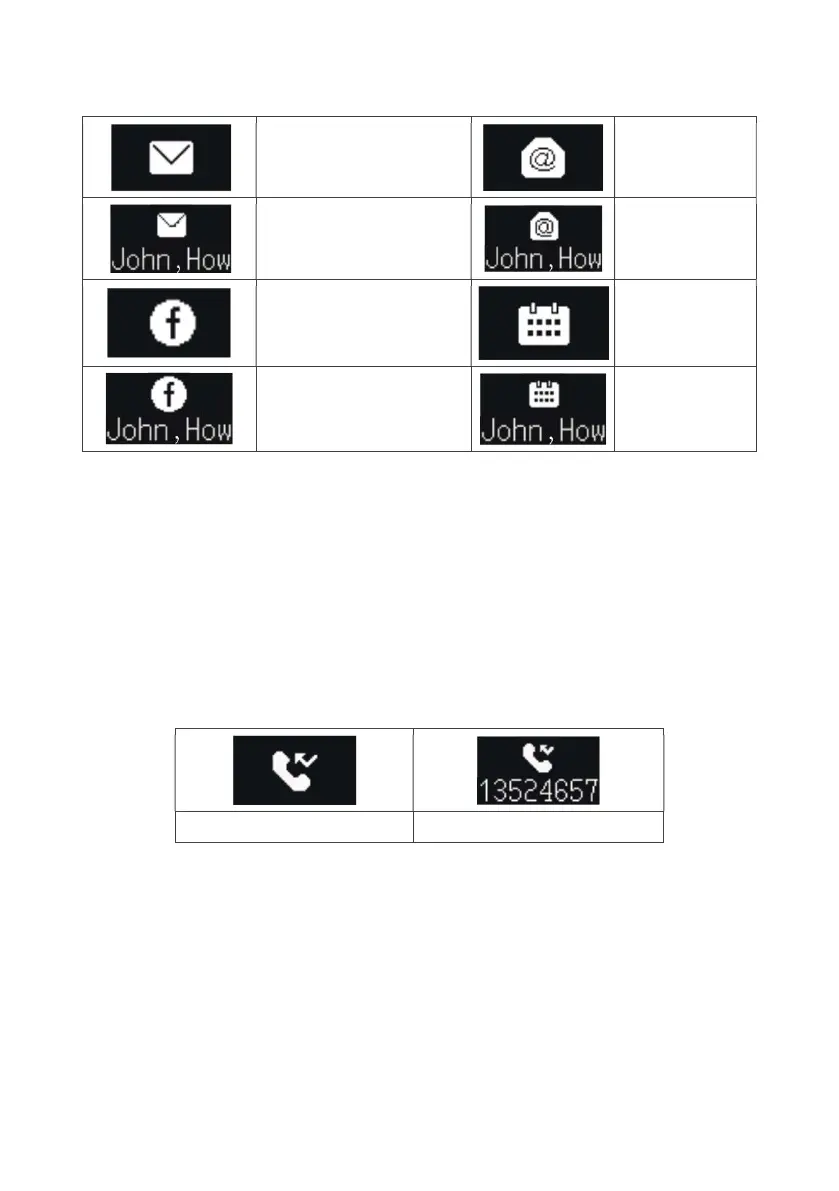
Message, social media, email, and calendar notifications
Message notification
Email
notification
Message content
Email content
Social media notification
Calendar
notification
Social media content
Calendar
content
After the notification displays for two seconds, the display will scroll through the notification
content until completed and then return to the previous interface.
During scrolling, press the middle button to view the next item and if there is no next item,
return to the previous interface.
While not viewing/scrolling, long press the middle button to cancel all message viewing and
return to the previous interface.
Missed call reminder
Missed call notification Missed call content
If the caller number exists in the phone address book, the name in the phone address book
is displayed.
If it is not saved in the phone address book, the caller ID is displayed.
If the name or number is too long, it will scroll.
After the notification displays for two seconds, the display will scroll through the notification
content until completed and then return to the previous interface.
During scrolling, press the middle button to view the next item and if there is no next item,
return to the previous interface.
While not viewing/scrolling, long-press the middle button to cancel all message viewing
and return to the previous interface.



 To Next Page