TP-6735 7/17 93Section 6 Disassembly/Reassembly
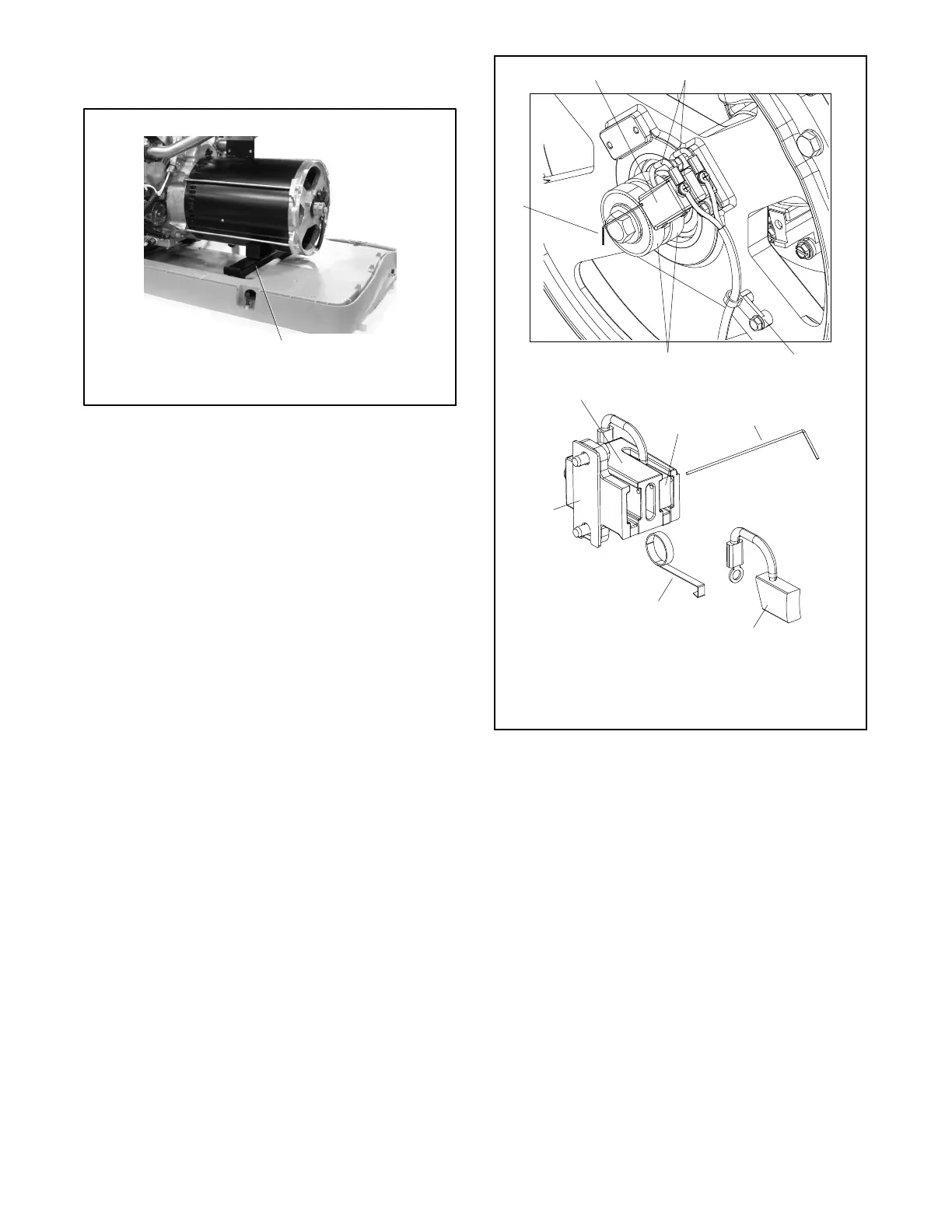
23. Remove the alternator support bracket from the
alternator shell. See Figure 6-13.
1
TP-6735
1. Alternator support bracket
Figure 6-13 Alternator Support Bracket
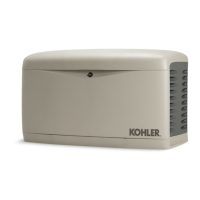
24. Remove the cable tie that attaches the brush leads
to the end bracket. See Figure 6-14 or
Figure 6-15.
25. Check the brushes. See Figure 6-14 or
Figure 6-15.
Note: The brushes are spring-loaded. Be sure to
insert a retaining wire to hold the brushes as
described below.
a. Raise the brushes in the brush holder and
insert a small piece of wire into the brush holder
retainer wire hole.
b. Remove the brush holder from the end bracket.
c. Inspect the brushes. Replace brushes if they
show uneven wear or when they are worn to
half of their original size. See Section 5.6,
Brushes.
1 2
4
5
7
6
1
2
1. Brush holder
2. Brush(es)
3. Cable tie
4. Slip rings
5. Retainer wire
6. Spring
7. Shim
GM67344
2
5
3
Figure 6-14 Alternator End Bracket and Brush
Assembly (original)



 To Next Page