- 13 -
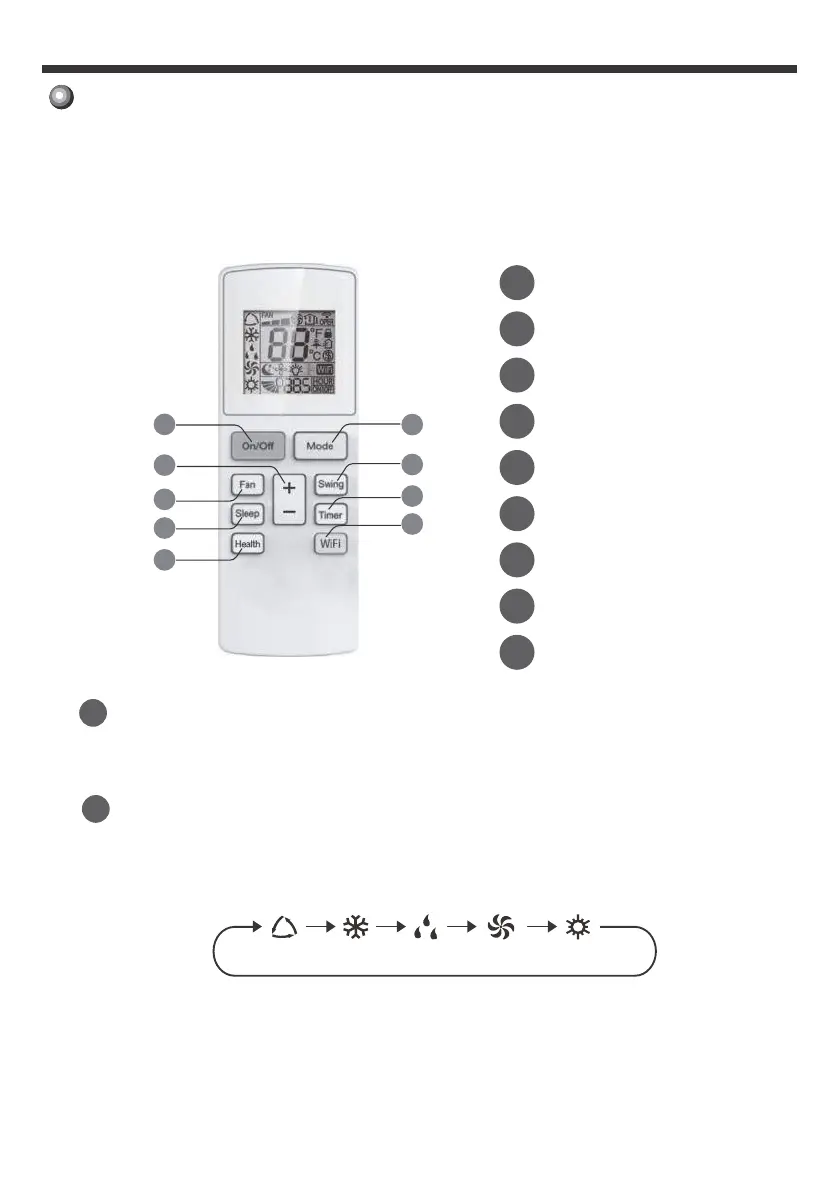
Remote control operation procedure
Dry HeatCoolAuto
Fan
Only
1
On/Off button
Press this button to turn on the unit.
Press this button again to turn off the unit.
2
●Cool: Under this mode, air conditioner operates under cooling mode. Cooling
indicator will be on. Press “Fan Speed” button can adjust the fan speed.
●Auto: Under this mode, the unit will operate automatically according to
1
On/Off button
2
Mode button
3
4
Swing button
5
Fan button
6
Sleep button
7
Timer button
8
Health button
9
WiFi button
2
4
7
9
8
6
5
3
1
+ / - button
Note: This is a general use remote controller for air conditioners. For some
function, which the model doesn't have, if the corresponding button on the
remote controller was pressed the unit will just keep its original running status.
the ambient temperature. In this case, set temperature cannot be adjusted.
Mode Button
(for some models only)
selecting.
below. A corresponding icon will appear on the remote display after
You can select your preferred operation mode on the following illustration



 To Next Page