UAB KOMFOVENT we reserve the right to make changes without prior notice
C5.1-20-05
7
2.3. Parameters overview
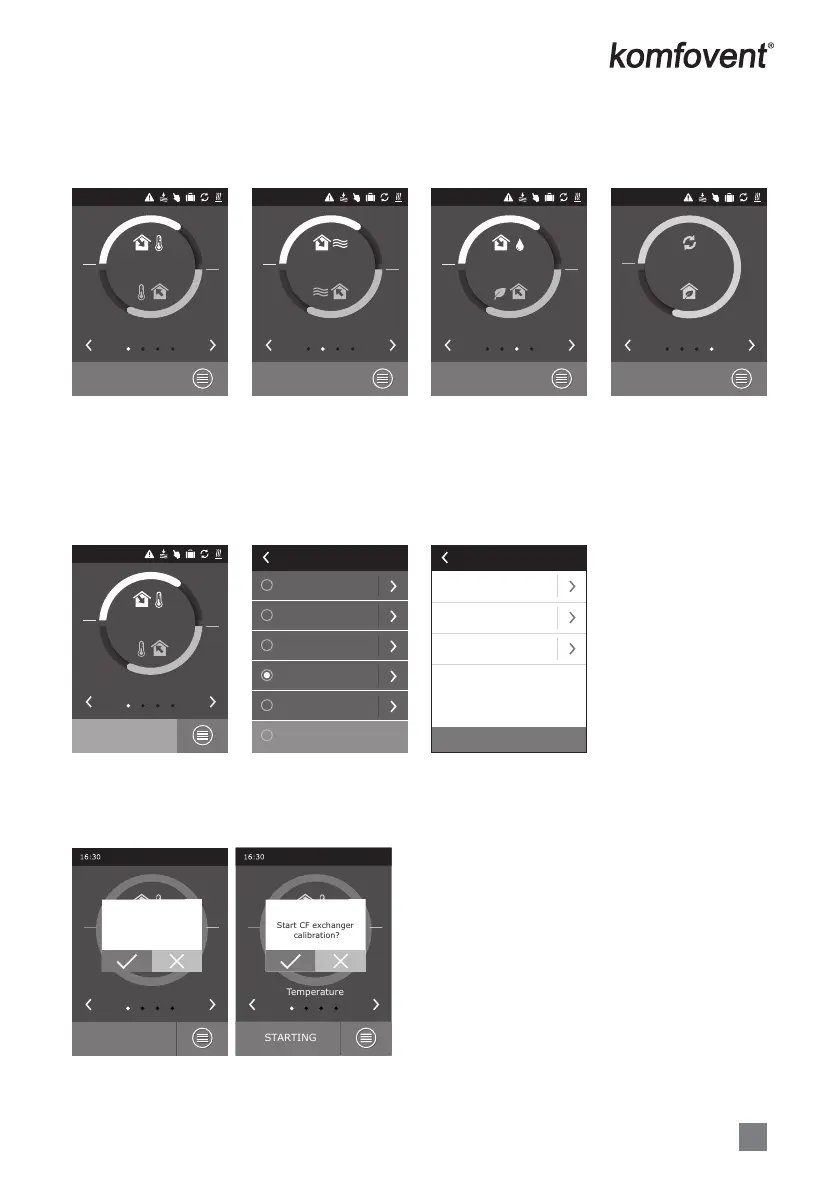
The main parameters of the unit are indicated in four main windows of the panel: temperatures indication, air
ow, air quality (humidity) and energy saving.
All other unit parameters are presented in the menu “Overview” (see 9 page).
ECONOMY 1
16:30
90%
18 kW
Energy saving
Reset settings
ECONOMY 1
Supply air ow
1250 m
3
/h
Extract air ow
1250 m
3
/h
Setpoint
20 °C
Operation modes
COMFORT 1
COMFORT 2
ECONOMY 1
ECONOMY 1
SPECIAL
OFF
ECONOMY 1
60% RH
800 ppm
Air quality
16:30
ECONOMY 1
12500 m
3
/h
13100 m
3
/h
Air ow
16:30
ECONOMY 1
21,9 °C
21,3 °C
Temperature
16:30
ECONOMY 1
21,9 °C
21,3 °C
Temperature
16:30
2.4. Operation modes selection
Six operation modes are possible, one of them user can select directly from control panel main window:
• Two Comfort and two Economy modes, for each of them the user can set air ow and temperature.
• Special mode allows the user not only to set air ow and temperature, but also to select blocking or using
heating, cooling and other functions.
• OFF mode completely turns o the unit.
When AHU is stopped, by pressing modes button, it is possible to start the unit on the last active ventilation
mode.
When starting CF type AHU for the rst time, it will be needed to perform heat exchanger calibration, which
is used for frost prevention function (See 2.5.1.3).
Temperature
ON?
OFF
Temperature
Start CF exchanger
calibration?
STARTING


 To Next Page