Network Printing in a Windows Environment
6
C350 6-17
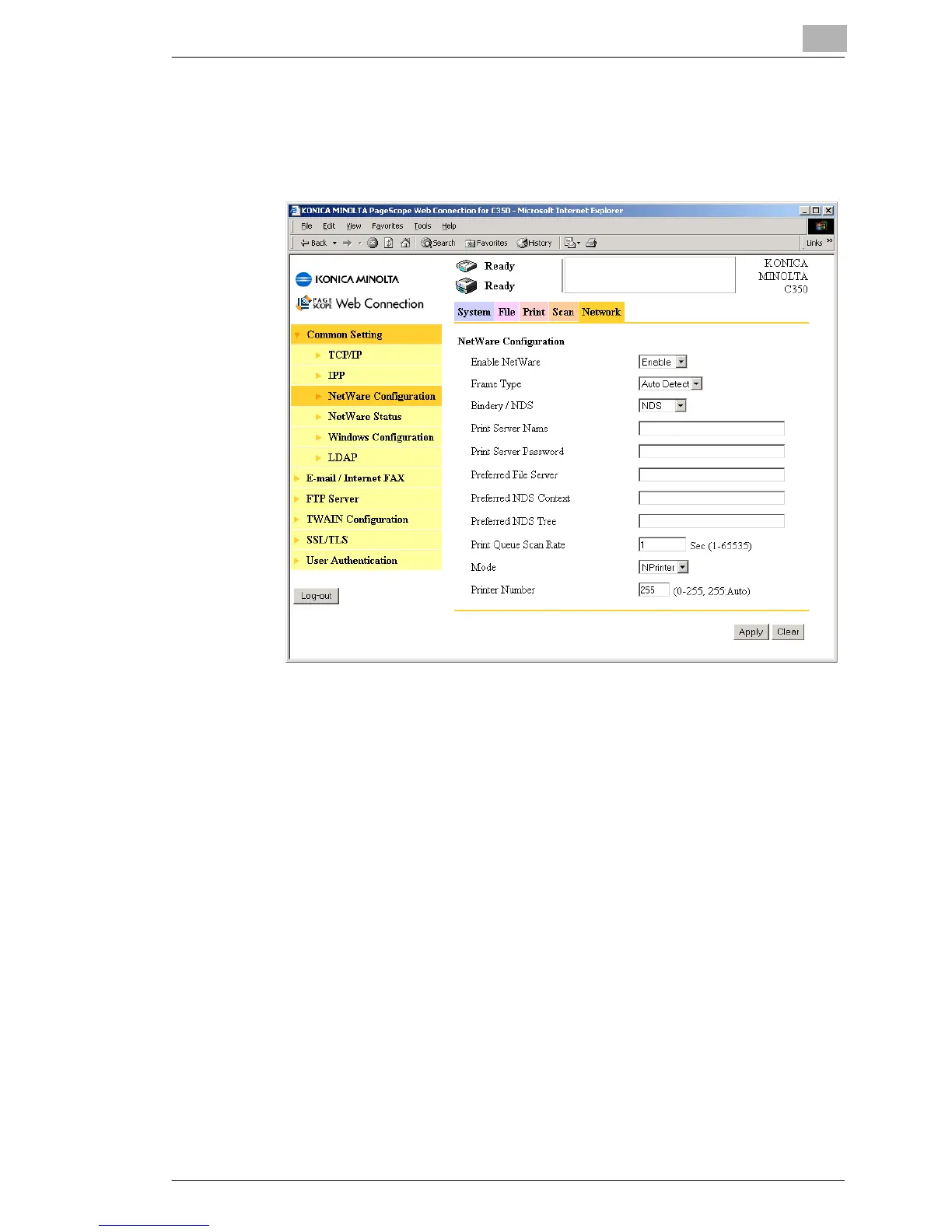
5 In Administrator mode of PageScope Web Connection, click NetWare
Configuration in the sub-menu that appeared after clicking Common
Setting on the “Network” tab, and then specify the settings for this
machine.
❍ Enable NetWare: Select “Enable”.
❍ Frame Type: Select “Auto Detect”. (Selects the frame type
according to the network environment.)
❍ Bindery/NDS: Select “NDS”.
❍ Print Server Name:
Print server name created in step 4
❍ Print Server Password:
Set only if set on the NetWare Server.
❍ Preferred NDS Context:
Name of the tree node that PServer loads
❍ Preferred NDS Tree:
Enter “1”. (Change as necessary.)
❍ Mode: Select “NPrinter”.
❍ Printer Number: 255
(Set the number assigned to the printer (0 to
254) or 255.)








 To Next Page