8 System Resources
Kontron User's Guide ETX CD 51
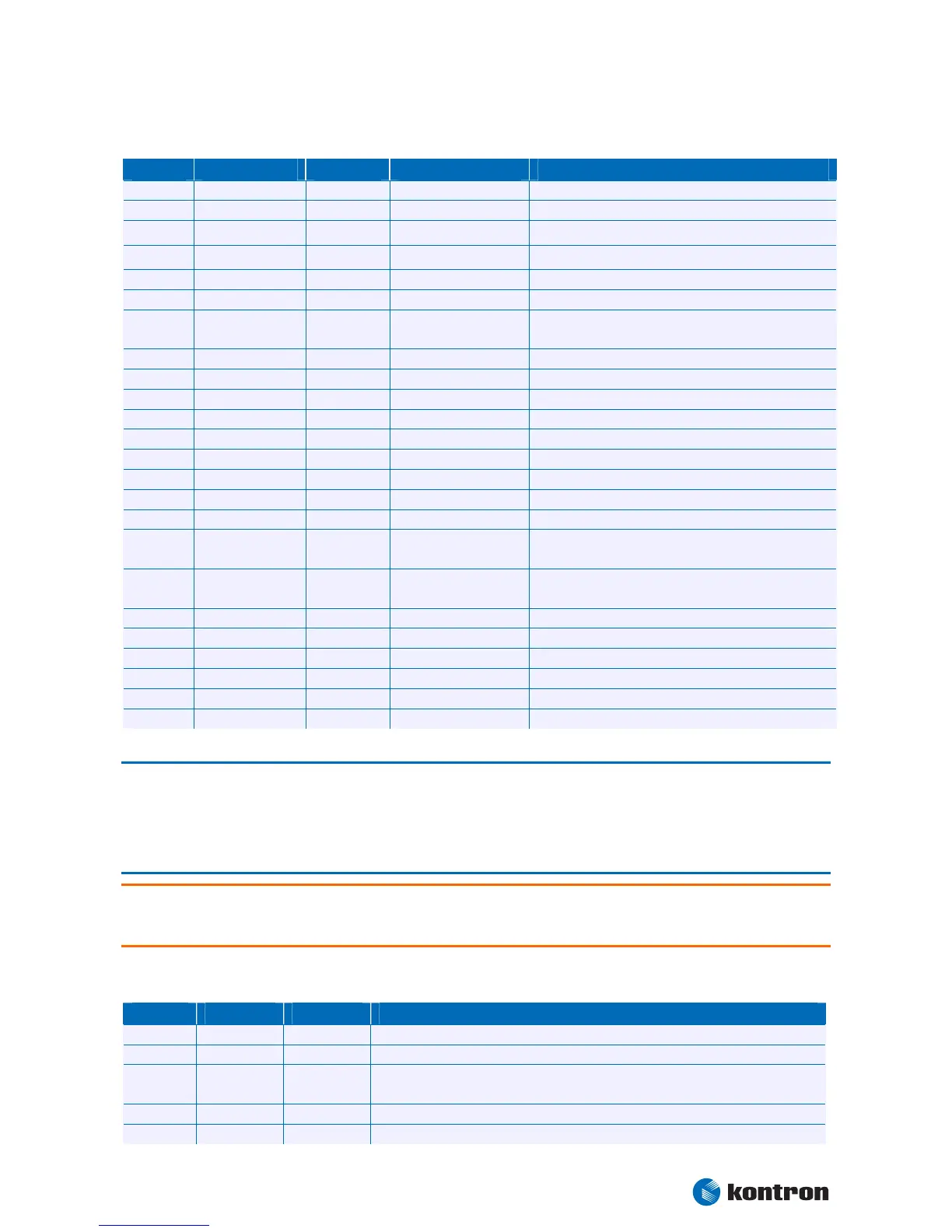
In APIC mode:
IRQ # Used For Available Available for PCI Comment
0 Timer0 No No
1 Keyboard No No
2 Slave 8259 No
No
3 COM2 No
Yes
Note (1)
4 COM1 No Yes Note (1)
5 PCI/LPT2 Yes Yes Note (2)
6
Floppy Drive
Controller
No Yes Note (1)
7 LPT1 No Yes Note (1)
8 RTC No No
9 SCI No No System Control Interrupt (3)
10 COM3 Yes Yes Note (2)
11 COM4 Yes Yes Note (2)
12 PS/2 Mouse No Yes Note (1)
13 FPU No No
14 IDE0 No No
15 SATA No No Note (3)
16 PIRQ[A] For PCI
PCI IRQ line 1 + USB UHCI controller #0 + Graphics
controller
17 PIRQ[B] For PCI
PCI IRQ line 2 + AC97 Audio controller + USB UHCI
controller #1
18 PIRQ[C] For PCI PCI IRQ line 3 + USB UHCI controller #2 + Native IDE
19 PIRQ[D] For PCI PCI IRQ line 4 + USB UHCI controller #3
20 PIRQ[E] No Lan Controller
21 PIRQ[F] No
22 PIRQ[G] No
23 PIRQ[H] No USB EHCI controller
Note: 1 If the “Used For” device is disabled in setup, the corresponding interrupt is available for other devices.
2 Unavailable if baseboard is equipped with an I/O controller SMC FDC37C669, and the device is enabled in
setup.
3 Unavailable in SATA legacy mode. It cannot be used for PCI, but for ISA bus, when SATA is in enhanced
mode.
Warning: The ETX®-CD is always booting in PIC mode. This might lead to the fact, that there are no interrupts
for PCI devices available when all onboard and SuperI/O interfaces are enabled. Then the system stops
without booting. The only solution is to deactivate interfaces.
8.2 Direct Memory Access (DMA) Channels
DMA # Used for Available Comment
0 Yes
1 Yes
2 FDC No
If the “used-for” device is disabled in setup, the corresponding DMA channel is
available for other devices.
3 LPT Yes Unavailable if LPT is used in ECP mode.
4 Cascade No


 To Next Page