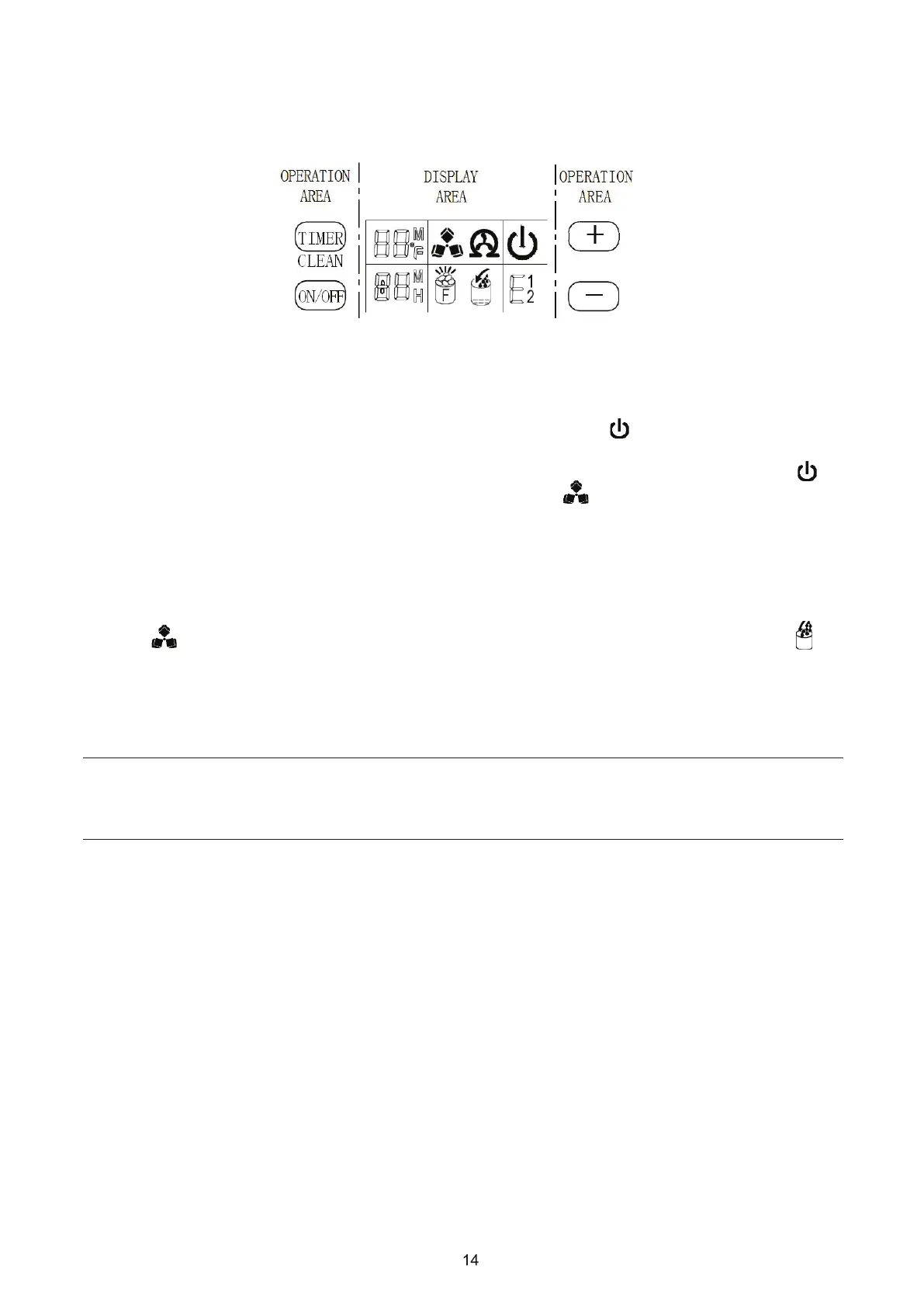
OPERATION OF YOUR UNIT
Operation button and display area diagram
Operation of the ice-making process
1. To start the process, plug in the power plug and the Power symbol will flash in the display
window. Press the ON/OFF button on the control panel and the machine will start to make ice. When
enough water has been added to reach the standard level on the water tank the Power symbol
will stop flashing in the display window. The Operation symbol will rotate, and the ambient
temperature will be displayed in the upper left of the display window. “80F” means the ambient
temperature is 80F, and so on. Several minutes later, when the ice-making process is coming to an
end, the flashing numbers will be displayed in the ambient temperature display area. The flashing
number “10M” means there is 10 minutes left in your ice making cycle.
2. Each ice making cycle is finished with the machine entering a deicing process. The Operation
symbol will flash when entering this part of the cycle. The arrow on the Water Intake
symbol will flash until the water reaches the standard level in the water tank needed for the deicing
process. When the adequate amount of water in the tank has been met, the Water Intake symbol will
turn off. This indicates that the unit h a s entered the next ice making cycle. If the water cannot reach
the standard level, the Water Intake symbol will remain on and the unit will stop working. If this occurs,
the unit needs to be restarted. Otherwise, it will start up automatically after 15 minutes.
Note: Each ice making cycle is around 11-20 minutes. The ice making time may vary according to the
ambient temperature and the water temperature. Expect the first ice making cycle to be longer
because of the high temperature of the water in the tank.
3. Press the “+” and “-“ buttons on the control panel to adjust the ice thickness. The number on the
bottom left of the display window is the setting of the ice making time. The default is “0.” Press the
“+” button one time and the ice making time will increase by one minute. The longer the ice cubes are
in the ice-making process, the thicker they will be. Press the “-” button one time and the ice making
time will decrease by one minute. The ice will be thinner if it is in the ice-making process for less time.
Restart the machine it will go back to default “0.”


 To Next Page