General Menu Parameters:
• Briey press the "SET" button to conrm any changes made.
• Continue adjusting other parameters as needed.
• To save and nalize settings, hold the "SET" button for three seconds.
Time Setting (Optional USB):
• After unlocking the device, simultaneously press and hold both the UP and DOWN
buttons for 3 seconds to access the time settings interface.
• If there's a malfunction with the USB data recorder, a "nDR" message will appear on the
display.
• In the absence of USB issues, you can adjust the time values. Use the UP and DOWN
buttons to toggle between year ("yer"), month ("mtH"), day, hour ("HH"), and minute
("MM"). Conrm your time setting by pressing the "SET" button. Remember to press and
hold the "SET" button for 3 seconds to save and exit. If no buttons are pressed for 10
seconds, the interface will exit without saving. Note: When a USB ash drive is inserted or
removed, the controller will emit a short buzz for half a second.
Data Export (optional USB):
• In standard operation mode and after unlocking, hold the "UP" button for 3 seconds to
access the data export interface.
• If the USB data recorder isn't functioning correctly, "nDR" will appear on the screen. If no
USB ash drive is detected, "nUS" will be shown.
• To select the data range for export, use the UP or DOWN button. Choices range from M1 to
M12. Each represents a month from the current time. Conrm your selection by pressing
and holding the "SET" button for 3 seconds. Note: if the exported data is substantial, the
system might continue exporting after exiting the interface. "ULD" will be displayed
during this process, and the system will automatically exit once the export is complete.
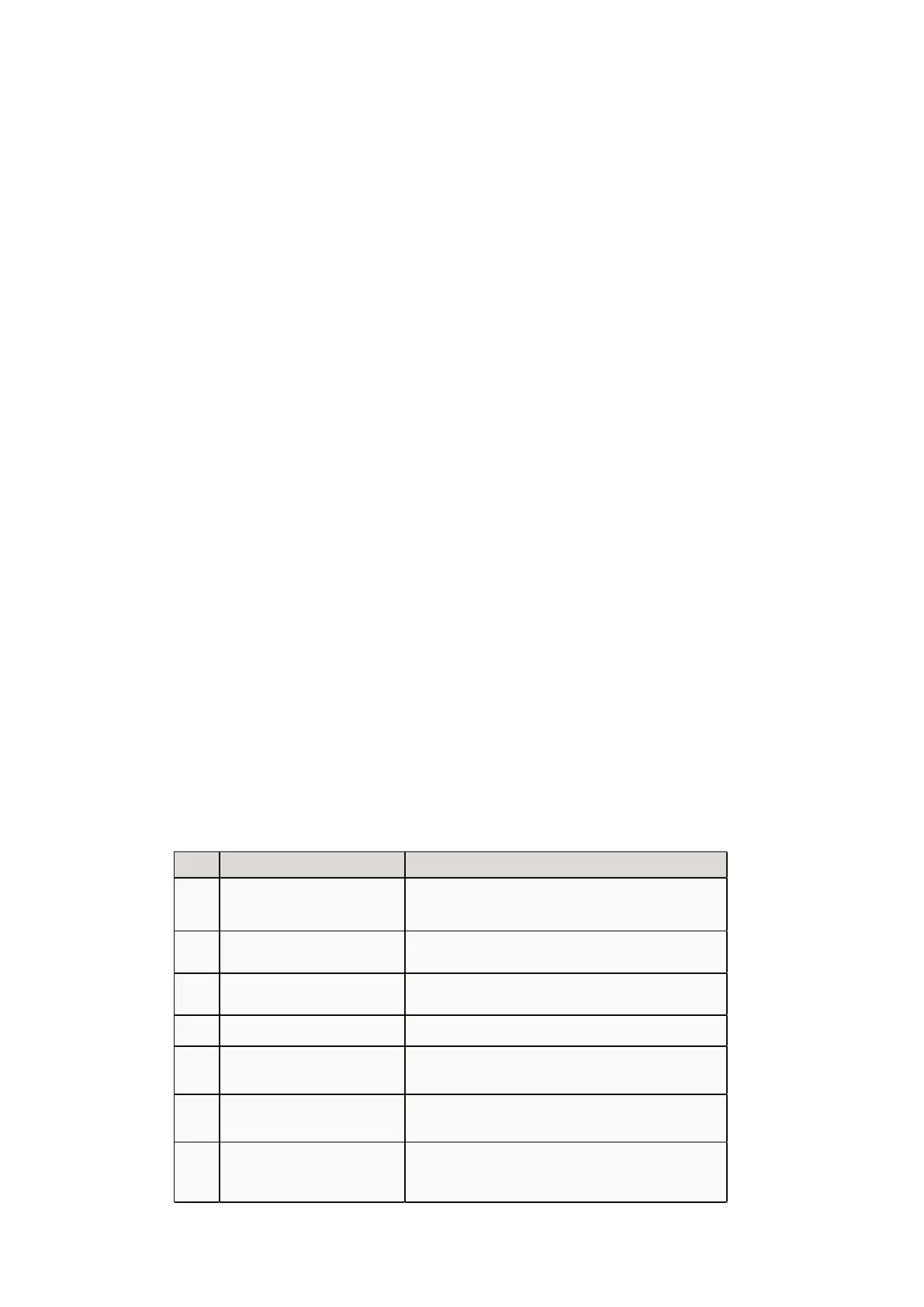
E01 Cabinet temperature sensor fault
The alarm sign flashes, E01 is displayed, the buzzer sounds
immediately, and the compressor is in proportional operation
E02 Display sensor fault
The alarm sign flashes, E02 is displayed, and the buzzer
sounds immediately.
AH High (H) temperature alarm
AH and temperature are alternately displayed, the alarm sign
flashes, and the buzzer starts to sound after Δt2 time passes.
AL Low (L) temperature alarm
AL and temperature are alternately displayed, the alarm sign
flashes, and the buzzer starts to sound after Δt2 time passes.
dor Door open or not closed tightly
The alarm sign flashes. After Δt3 time passes, door and
temperature are alternately displayed and buzzing starts.
None Ambient temperature > 95°F
The alarm symbol flashes; the cabinet temperature and the
ambient temperature are displayed alternately.
None Power outage
The alarm symbol is displayed; the buzzer sounds
intermittently for 2 min; the temperature is displayed
intermittently for 20h.
Alarm Description


 To Next Page
 Loading...