Need help?
Do you have a question about the KoolMore KM-PHR-45C and is the answer not in the manual?
Addresses risks associated with fire and flammable materials.
Lists crucial warnings and cautions for safe use and maintenance.
Details accurate temperature control and efficient cooling technology.
Highlights safety features like alarms and user-centric design elements.
Guidelines for moving the unit and ideal environmental conditions.
Criteria for choosing a location and critical safety warnings.
Initial steps to take after unpacking and before operation.
Instructions for accessory verification, door handle, and back bracket.
Steps for initial setup, power connection, and switch activation.
Memory feature, warnings, and inspection requirements.
Details operating temperature, humidity, storage, and usage advice.
Explains the controller display and operation of its buttons.
Interprets controller symbols and how to adjust parameters.
Guides for time setting, USB data export, and alarm descriptions.
Safety warnings, cleaning instructions, and defrosting.
Procedures for storing the unit and its disposal.
Lists common problems and their troubleshooting methods.
Details the warranty period, coverage, and how to claim service.
Lists specific conditions and damages not covered by the warranty.
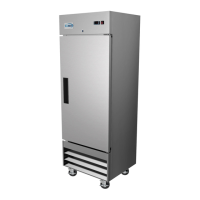
This document provides a comprehensive user manual for the KoolMore Countertop Pharmacy Refrigerator, model KM-PHR-45C, designed for commercial, industrial, or institutional use. It emphasizes safe operation, proper installation, and maintenance to ensure optimal performance and longevity.
The primary function of the KoolMore Countertop Pharmacy Refrigerator is to store medicines, vaccines, reagents, and other temperature-sensitive materials within a precise temperature range of 2°C to 8°C (35.6°F to 46.4°F). This medical cooler is engineered for accurate temperature control, displaying temperatures with an accuracy of 0.1°C and maintaining in-box fluctuations of ±2°C. A key feature for data management is the integrated USB interface, which allows for convenient storage of temperature data at any time, ensuring compliance and record-keeping.
The refrigerator boasts efficient refrigeration capabilities, maintaining a uniform temperature throughout its interior. This is achieved through the use of embedded air duct and air curtain technologies, which optimize cooling distribution and minimize temperature variations.
Safety is a paramount concern in the design and operation of this appliance. It includes several safety features such as alarms for high and low temperatures, power failure, and sensor issues. These alarm temperatures are customizable to suit specific storage requirements. For enhanced sample protection, the refrigerator is equipped with a safety door lock. The manual also highlights critical safety warnings, including the importance of proper grounding to prevent electrical shocks, avoiding obstruction of ventilation openings, and not damaging the refrigerant circuit. It explicitly states that the equipment should only be installed and repaired by suitably qualified personnel due to the use of flammable refrigerants. Users are cautioned against puncturing refrigerant tubing and are advised to consult the repair manual or owner's guide before attempting any service. Proper disposal in accordance with federal and local regulations is also emphasized for the flammable refrigerant.
From a user-friendly design perspective, the refrigerator features multi-layer encryption shelves with adjustable heights, allowing for flexible storage configurations. Energy-saving inner LED lights illuminate the interior, making it easy to view contents without excessive power consumption. The appliance operates within a 115V±10% voltage range, making it suitable for standard US electrical outlets.
Installation requires careful attention to the environment. The refrigerator is designed for indoor use in a location with a pollution level of Class 2 and protection from overvoltage up to Class II. The ideal ambient temperature for optimal performance is between 18°C and 25°C, though it can operate between 16°C and 32°C. Environmental humidity should be kept below 80% RH. The installation site should be stable, free from flammable materials, direct sunlight, excessive dust, and significant mechanical movement or vibration. It should also be positioned at altitudes below 2,000 meters. A dedicated power outlet with proper grounding is essential, and a voltage stabilizer is recommended in areas with fluctuating voltage. After positioning, the unit should remain undisturbed for at least 2 hours before powering on to allow it to acclimate.
Operational instructions detail the initial setup, including connecting the power cord, activating switches, and performing a temperature check over a 24-hour cycle before loading items. Batch filling is recommended to prevent straining the compressor, with each batch not exceeding one-third of the total capacity. The refrigerator is designed with a memory feature, allowing it to resume operation with set values after a power outage. Warnings include waiting at least five minutes before re-energizing after a power-off to protect the compressor and unplugging the unit during extended non-use periods. Regular inspections by a dedicated person are advised to monitor its condition and address any anomalies promptly.
Maintenance features include automatic defrosting for user convenience. Cleaning should be performed monthly using a damp cloth and neutral detergent for significant dirt, followed by rinsing and drying. Users are cautioned against sprinkling water directly on the unit, using hot water or harsh chemicals, and placing heavy items on top. The compressor and mechanical components are sealed and do not require lubrication. For deactivation and storage, the unit should be turned off, unplugged, cleaned, and locked to ensure child safety. At the end of its lifespan, the device must be decommissioned and entrusted to certified recycling entities in accordance with local regulations, with unauthorized dismantling strictly prohibited.
The control panel offers intuitive operation with buttons for setting temperature, navigating parameters, and accessing menu settings. Display symbols provide clear indications of the refrigerator's status, including refrigeration ON/OFF, power supply, lock status, alarm, and defrosting. The manual provides detailed steps for setting the control temperature and general menu parameters, as well as optional time setting and data export functions for models with USB support. A comprehensive alarm description table helps users identify and address issues such as sensor faults, high/low temperature alarms, door open warnings, and power outages.
 General
| Brand | KoolMore |
|---|---|
| Model | KM-PHR-45C |
| Category | Refrigerator |
| Color | Stainless Steel |
| Voltage | 115V |
| Cooling System | Forced Air |
| Energy Efficiency | Energy Star Certified |

 To Next Page