Warning
• Always disconnect the power before conducting any repairs or maintenance to ensure
safety against electrical shock or potential injuries.
• Be cautious about inhaling any medications or suspended particles nearby to avoid health
risks.
Note
• Avoid sprinkling water directly on the unit, as this could affect the electrical components
and induce rust.
• Abstain from using hot water, harsh detergents, or organic solvents when cleaning the
cabinet.
• Do not place heavy items atop the device, which may cause it to deform or undergo undue
pressure.
Device Maintenance
Defrosting: The device features automatic defrosting for user convenience.
Cleaning:
• For optimal performance, cleanse the pharmacy refrigerator monthly.
• A damp cloth can be used to wipe minor external and internal dirt. If the refrigerator has
significant dirt, use a cloth soaked in a neutral detergent. Always ensure to rinse and then
dry with a clean cloth.
• Avoid storing items on or inside the refrigerator that could potentially harm the device or
disrupt its electrical insulation.
• The compressor and related mechanical components are sealed, eliminating the need for
lubrication.
Device Deactivation
• When storing the device in an unsupervised area for extended periods:
• Ensure it's off and unplugged.
• Clean both the interior and exterior using a warm, damp cloth followed by drying.
• Always lock the device to ensure child safety and prevent any unintentional access, reducing
risks like suocation.
End-of-Life Instructions
Once the device approaches its lifespan's conclusion:
• It should be decommissioned and entrusted to certied recycling entities for appropriate scrap-
ping and disposal, in line with local guidelines and regulations.
• It's crucial that individuals without proper credentials refrain from taking apart or tampering
with the device unauthorizedly.
• Any discarded device should be allocated to specied zones, ensuring they remain out of
children's reach to prevent potential hazards.
Fault Troubleshooting Method
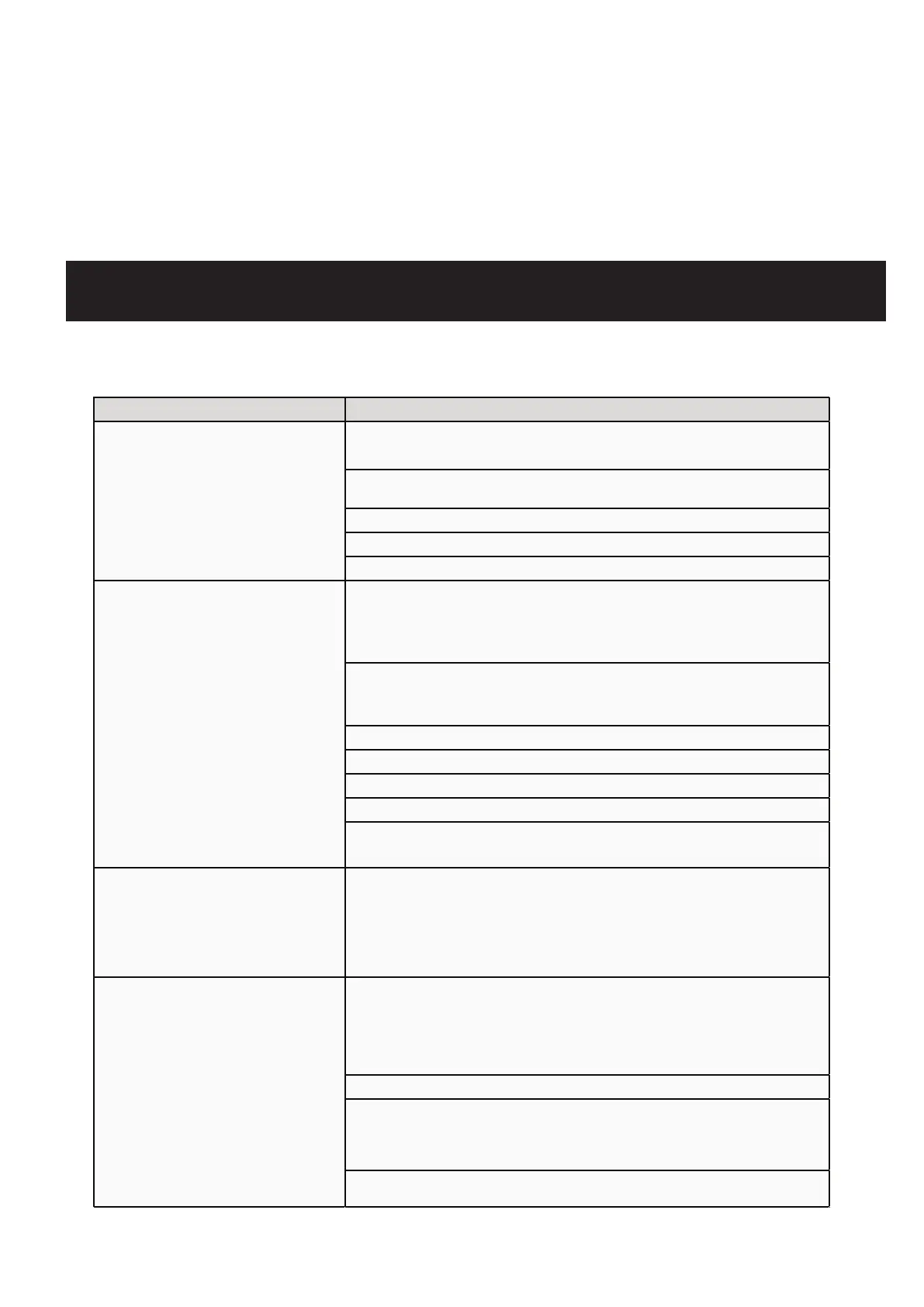
Refrigerator not working - Verify the input power supply meets the requirements.
- Check if the plug and socket are in good contact.
- Inspect if the input and control lines are faulty.
- Determine if the voltage is too low.
- Ensure not too many items are inside or if they're too large.
Refrigeration efficiency is
reduced or the temperature
is higher than expected
- Ensure adequate spacing between stored items.
- Avoid placing the refrigerator in direct sunlight or near other heat
sources.
- Check if the door is being opened too frequently.
- Ascertain if the surrounding temperature is too high.
- See if the air duct is blocked.
- Make sure the refrigerator is level.
- Check if any part of the refrigerator is touching external objects or
walls.
Excessive noise
- Understand that slight differences between actual noise and the
indicated value can occur due to factors like stored items, ambient
sounds, door not being shut properly, and the compressor's
ON/OFF cycle.
Alarm indicator is active and
there's an audible alert
- Confirm if the temperature of a newly added item is outside the
37.4-44.6°F range. The alarm will deactivate after some tim
e.
- Ensure the door is sealed properly. If not, close it securely.
- Check if the battery level is low. The refrigerator will function
normally after being on for a while.
- Determine if the inside temperature exceeds the preset limit.


 To Next Page
 Loading...