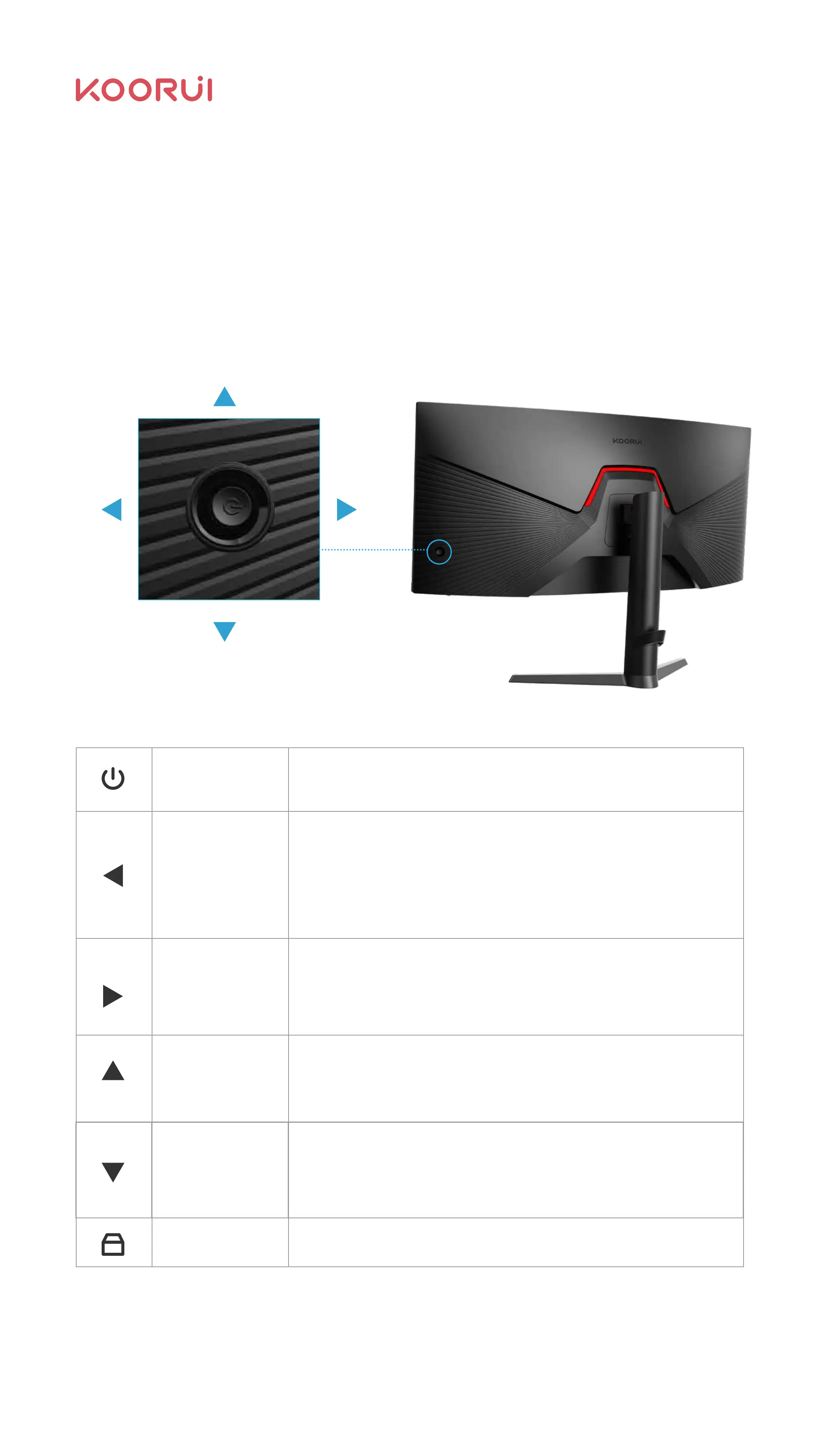
Chapter Ⅲ OSD Function
See the OSD function information table. If you have any questions, please feel free
to contact Koorui after-sales service team.
Select the menu interface to enter the main display interface;
Under the main menu interface: (There are prompts for specific
functions below the menu)
First level menu: Returns the main menu.
Second level/third level menu: Back to the upper level menu.
Alternatively, you can select the left key.
Select the shortcut key 2 below the menu interface;
Under the main menu interface: (There are prompts for specific
functions below the menu)
Go to the next level menu or move the cursor to the right.
Select the shortcut key 1 below the menu interface;
Under the main menu interface: (There are prompts for specific
functions below the menu)
Moves the cursor up or indicates the progress bar increments;
Below the selection menu interface is the return selection menu;
Under the main menu interface: (There are prompts for specific
functions below the menu)
Moves the cursor up or indicates the progress bar increments;
Push the button up or click the button to pop up the selection menu;
Middle key: Power-off.
ON: Normal power-on state. Flashing: power-saving/standby state.
Left key
Right key
Up key
OSD Menu
Down key
Power light
Menu
Select this
feature
Select the
left item
Select the
Right item
11



 To Next Page