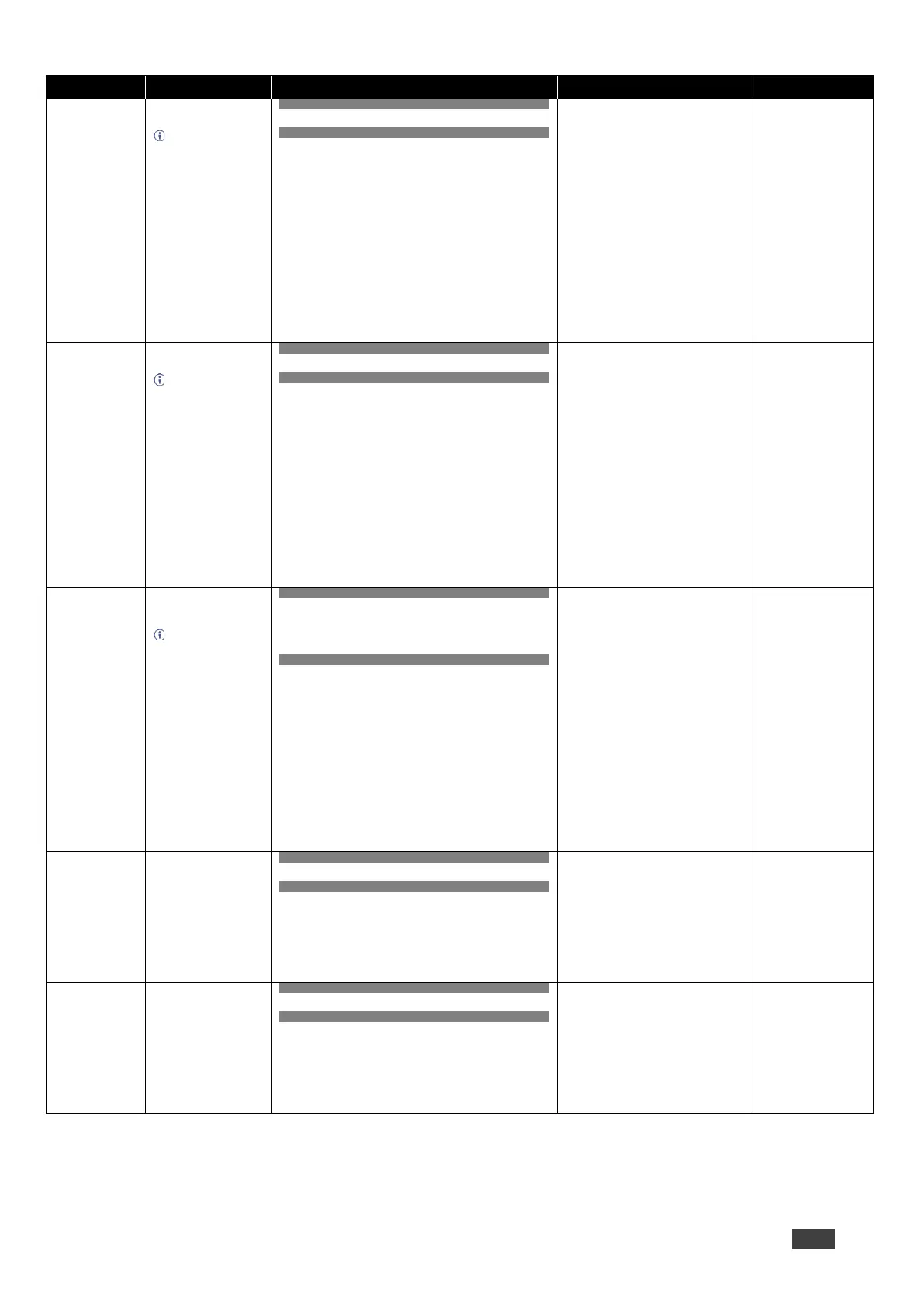
Set image contrast per
output.
Value limits can vary
for different devices.
Value is a property of
input connected to current
output. Changing the
input source might cause
changes in this value
(refer to device
definitions).
In devices that enable
showing multiple outputs
on one display – each in a
separate window – this
command relates only to
the window associated
with the output indicated
in the out-index
parameter.
COMMAND
#CONTRASTout_index,value<CR>
FEEDBACK
~nn@CONTRASTout_index,value<CR><LF>
out_index – Number that indicates the
specific output:
* – All
value – Contrast value (0 to 100)
Set the contrast to 40:
#CONTRAST1,40<CR>
Get image contrast per
output.
Value limits can vary
for different devices.
Value is a property of
input connected to current
window. Changing the
window input source
might cause changes in
this value (refer to device
definitions).
In devices that enable
showing multiple outputs
on one display – each in a
separate window – this
command relates only to
the window associated
with the output indicated
in the out-index
parameter.
COMMAND
#CONTRAST?out_index<CR>
FEEDBACK
~nn@CONTRASTout_index,value<CR><LF>
out_index – Number that indicates the
specific window:
* – All
value – Contrast value (0 to 100)
Get contrast:
#CONTRAST?1<CR>
Copy EDID data from the
output to the input
EEPROM.
Destination bitmap
size depends on device
properties (for 64 inputs it
is a 64-bit word).
Example: bitmap 0x0013
means inputs 1,2 and 5
are loaded with the new
EDID.
In certain products
Safe_mode is an optional
parameter. See the HELP
command for its
availability.
COMMAND
#CPEDIDedid_io,src_id,edid_io,dest_bitmap<CR>
or
#CPEDIDedid_io,src_id,edid_io,dest_bitmap,safe_
mode<CR>
FEEDBACK
~nn@CPEDIDedid_io,src_id,edid_io,dest_bitmap<CR
><LF>
~nn@CPEDIDedid_io,src_id,edid_io,dest_bitmap,sa
fe_mode<CR><LF>
edid_io – EDID source type (usually
output)
1 – Output
2 – Default EDID
src_id – Number of chosen source stage
0 – Default EDID source
1 – Output 1
edid_io – EDID destination type
0 – Input
dest_bitmap – Bitmap representing
destination IDs. Format: XXXX…X, where
X is hex digit. The binary form of every hex
digit represents corresponding
destinations.
0 – indicates that EDID data is not copied
to this destination.
1 – indicates that EDID data is copied to
this destination.
safe_mode – Safe mode
0 – device accepts the EDID as is
without trying to adjust
1 – device tries to adjust the EDID
(default value if no parameter is sent)
Copy the EDID data
from the Output 1 (EDID
source) to the Input:
#CPEDID1,1,0,0x1<
CR>
Copy the EDID data
from the default EDID
source to the Input:
#CPEDID2,0,0,0x1<
CR>
Set window size and
position.
COMMAND
#CRDTout_index,left,top,right,bottom<CR>
FEEDBACK
~nn@CRDTout_index,left,top,right,bottom<CR><LF>
out_index – Number that indicates the
specific window:
1 – Win A
2 – Win B
3 – Win C
4 – Win D
*– All
left – Left coordinate (0 to 210)
top – Top coordinate (0 to 90)
width – (30 to 240)
height – (30 to 120)
Set window 2 size and
position:
#CRDT2,0,0,90,45<
CR>
Get window size and
position.
COMMAND
#CRDT?out_index<CR>
FEEDBACK
~nn@CRDTout_index,left,top,right,bottom<CR><LF>
out_index – Number that indicates the
specific window:
1 – Win A
2 – Win B
3 – Win C
4 – Win D
*– All
left – Left coordinate (0 to 210)
top – Top coordinate (0 to 90)
width – (30 to 240)
height – (30 to 120)
Get window 2 size and
position:
#CRDT?2<CR>


 To Next Page