3 ELECTRICAL CONNECTIONS
32
OPTIMASS / 400
www.krohne.com 10/2022 - 4003491806- AD OPTIMASS 400 Atex R06 en
3.2 Electronics and I/O terminal compartments
When working on the MFC 400 converter electronics and / or the I/O terminal compartments, the
following points must be noted:
• The covers on the electronics compartment have a flameproof thread that is a tight fit. When
removing / re-fitting the covers, take care and do not use a lot of force.
• Keep the threads clean and apply Teflon grease (for example NONTRIBOS
®
type Li EP) before
re-fitting the cover. The grease will help to prevent corrosion that will cause the threads to
lock together.
• To open the compartment covers, first remove the hexagonal retention lock using a 2.5mm
hex-head tool. After re-fitting the cover, you MUST re-fit the retention lock.
3.2.1 I/O terminal compartment
The I/O terminal compartment can be opened for a short period of time, where the electronics
are energised and the meter is in a hazardous area. For example, to check the wiring
configuration. However the following conditions MUST all be met:
1. the I/O terminal compartment has an “increased safety” ignition protection type (standard),
and;
2. the I/O circuits have an “intrinsic safety” protection type, and;
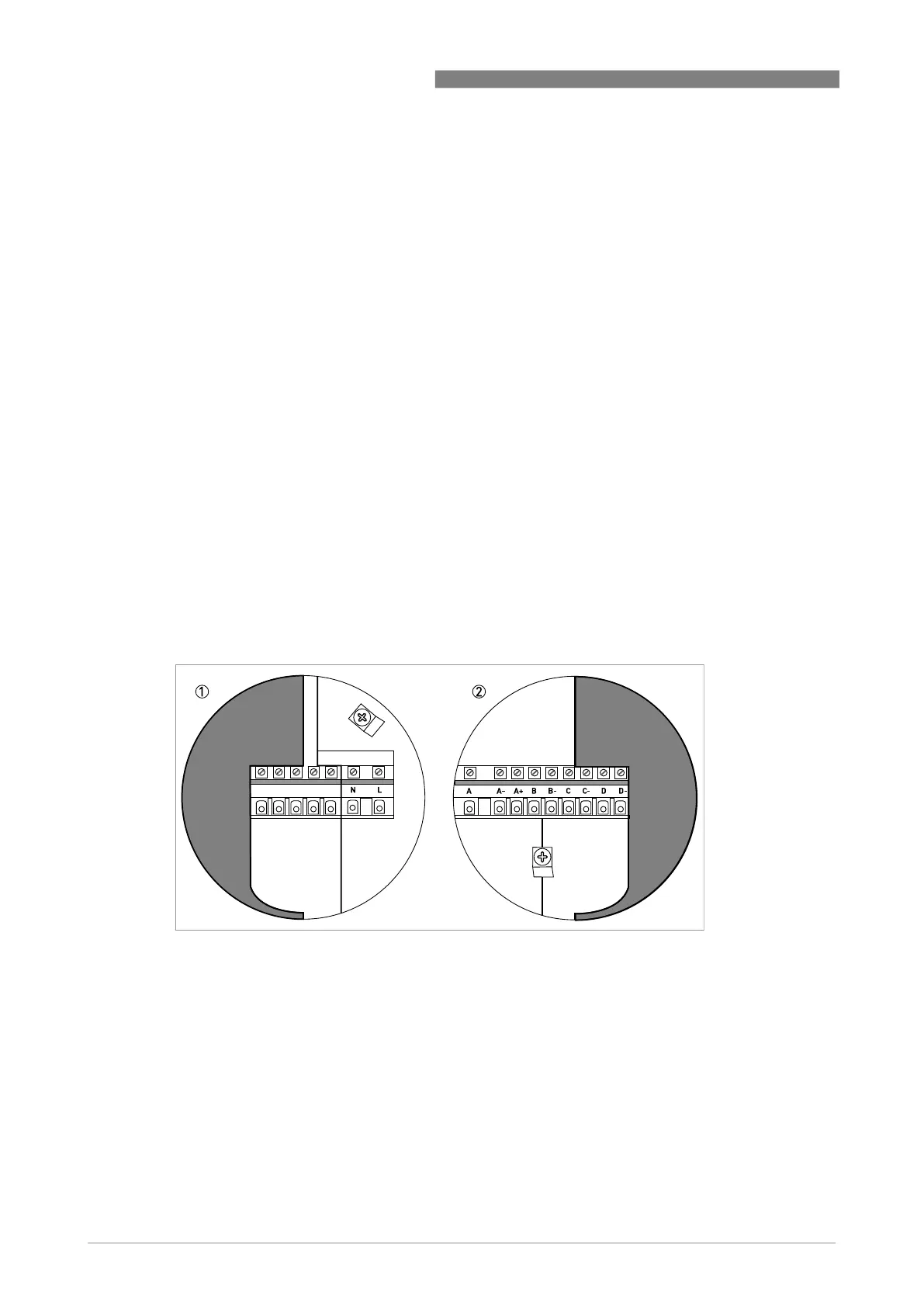
3. the touch guard (cover) for the power supply terminals (L,N) is closed (see illustration).
Work on I/O terminals A…D can be done with the electronics energised, but you MUST follow the
regulations regarding intrinsically safe circuits.
When the work has been finished, replace the cover. You MUST re-fit the retention lock.
Power supply touch guard (cover)
1 Touch guard (cover) open
2 Touch guard (cover) closed



 To Next Page