EN
page 31
2. OPERATION
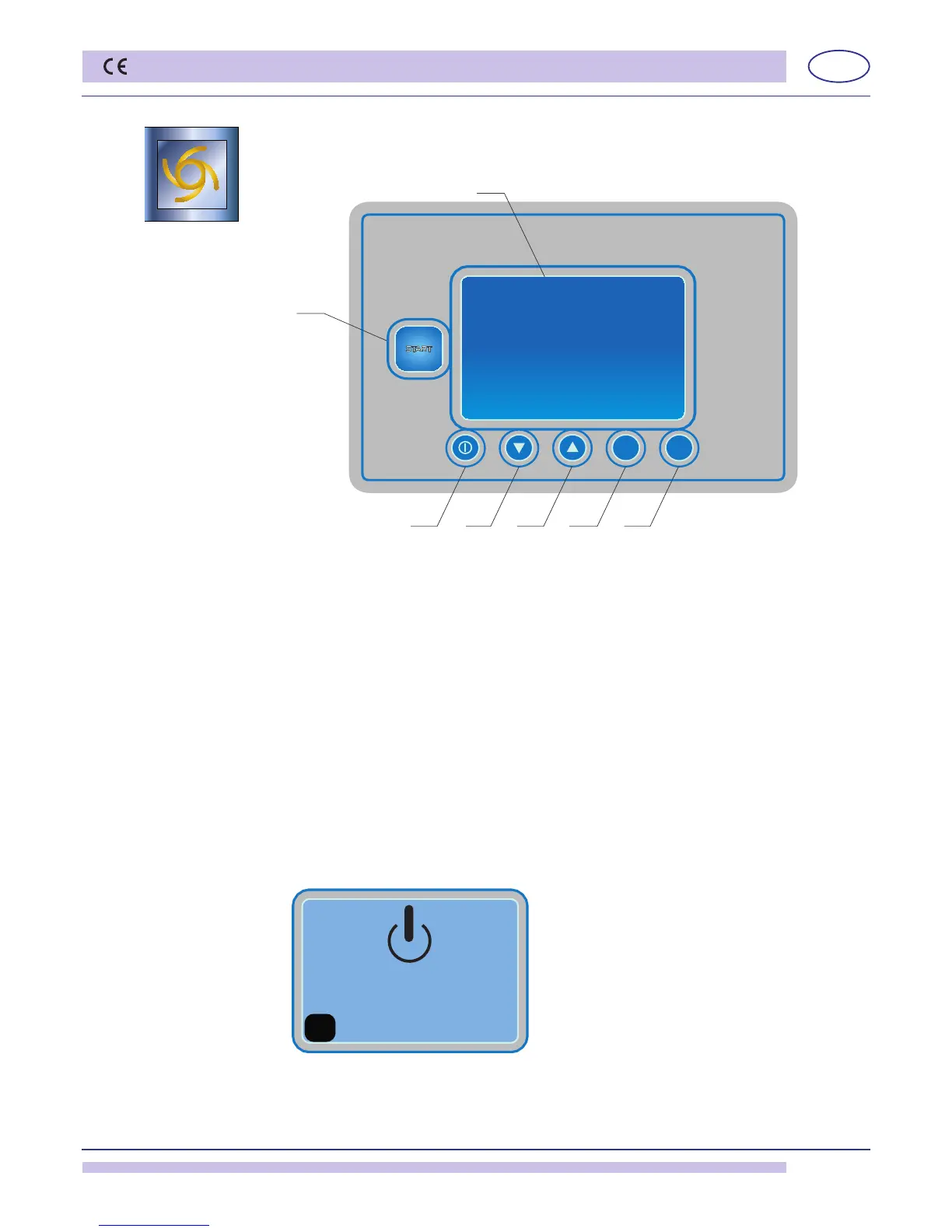
2.1 Control panel and relative symbols
A: Cycle Start/Stop.
Multi-chromatic button:
Firmredlight:machinelling/heating;
Flashingredlight:alarmsignal(checkthecodeonthealarmchartchap.11);
Greenlight:machineready.Selectcycle;
Firmbluelight:machineinoperation;
Flashingbluelight:machineinstand-by,anti-freezefunction (see chap. 2.6).
B: Machine power ON/OFF (in stand-by only).
C:CycleSelection;
D:CycleSelection;
E:Cutout;
F:Cutout;
G: LCD Display
2.2 Machine start-up
2.2.1 Start-up
• Putthesurfaceltersinplace.
DONOTusetheappliancewithoutthelters.
• Shutthedishwasherdoor.
• Turnthewatervalve“open”.
Pict. 1
• TurnthemainpowerswitchON..
• Themachineison"STAND-BY".
In the "G" display, the message "STAND-BY" will appear.
• Turnthebutton"B".
The machine start will be active when the "A" button will light.


 To Next Page