— 16 —
CHARGING
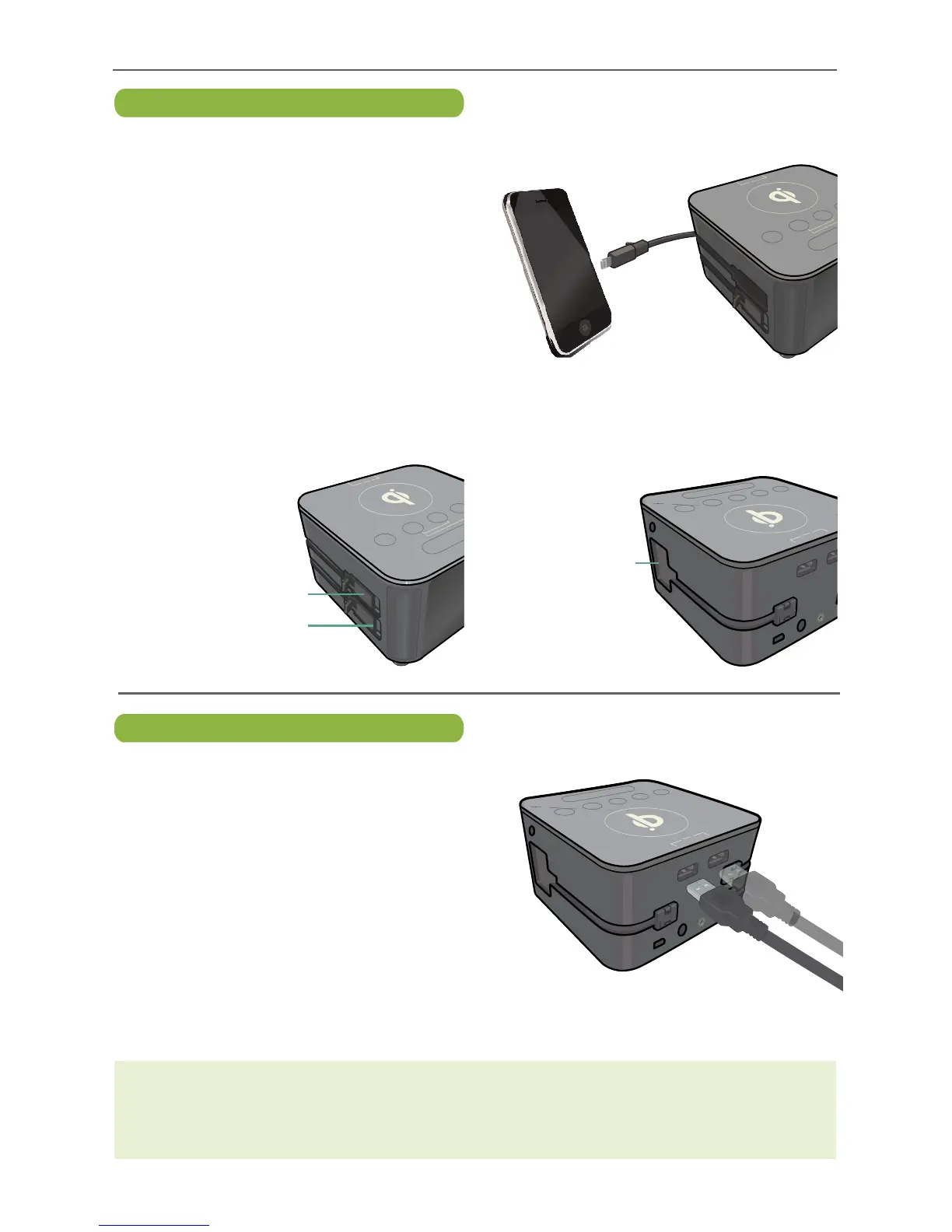
Charging Via USB Ports
u
Charge up to two additional devices
using the two USB ports on the rear of
the unit but it is not recommended as
it could disable the Bluetooth function.
These ports can output 2.4-Amps each.
Each outlet has its own intelligent auto-
configuring USB circuit that allows any
device to charge properly.
These ports are labeled, “iPod/
iPhone” and “iPad” but can be used to
connect most USB cables in order to
accommodate different connections.
Charging Via Wired Chargers
u
Charge up to three devices using the
built-in Charging Cables. Simply pull out
the desired connector and insert it into
your device.
Apple
®
Lightning Connector Used for
charging newer Apple devices with the
Lightning jack.
Apple
®
30-Pin Connector: Used for
charging older Apple devices with the
30-pin jack.
Micro USB Connector: Used for
charging devices that utilize the Micro
USB jack.


 To Next Page