M102
11
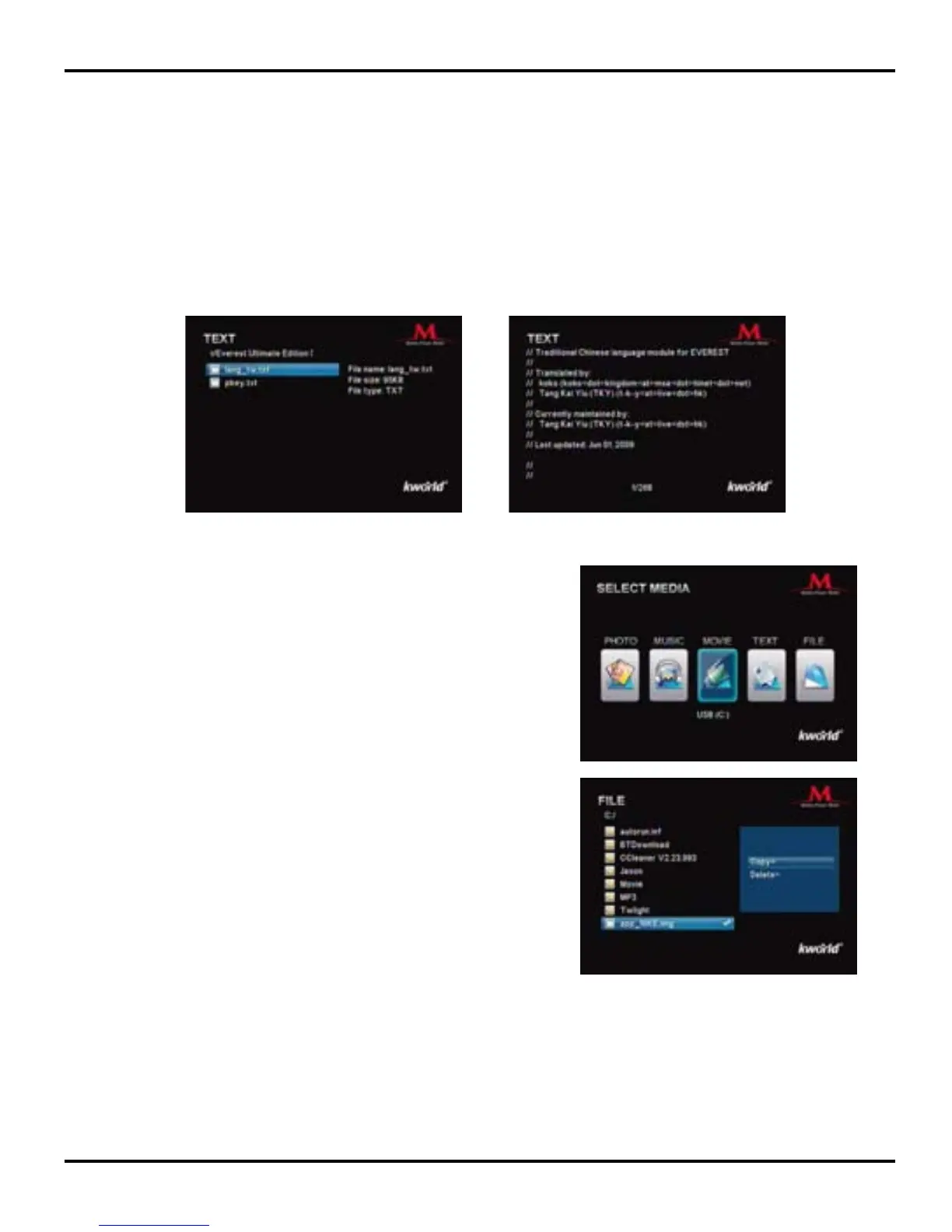
For Text Files Viewing:
Please press the “▼/▲” key to select text les and press “OK” to start full-screen mode. Use the
“▼/▲” key on the Remote to scroll up and down the text le.
5.File: Select the File icon on the Main Menu and
press the “OK” key to enter File Listing page.
Please press the ▼/▲ keys on the remote to
browse the les and press the “►” key to conrm
your selection, and then a check mark will appear
on the right of the selected file. To cancel the
selection, simply press the same key again.
4. Text: Select the Text icon on the Main Menu and press the “OK” key to enter Text le
listing page.
Background Music: You can play background music during the photo slideshow by pressing
“BGM” key on the remote.
File Copy/Delete: Press the “OSD” key on the Remote
to enable le option (Copy/Delete). Press ▼/▲ keys
to select Copy or Delete, and then the “OK” key to
confirm. To cancel the selection, simply press the
“OSD” key to return to the le menu.
To make a copy of a le, please select the le and use the ▼/▲/◄/► keys to select the le
location you wish to store it, then press the “OK” key to conrm the le path selected. Press the
“OK” key again to conrm the copy.
To delete a le, select the le and press the “OK” key to conrm, then the les will be deleted.
Note: The le path for the copied le should be different from the one of the original le.



 To Next Page