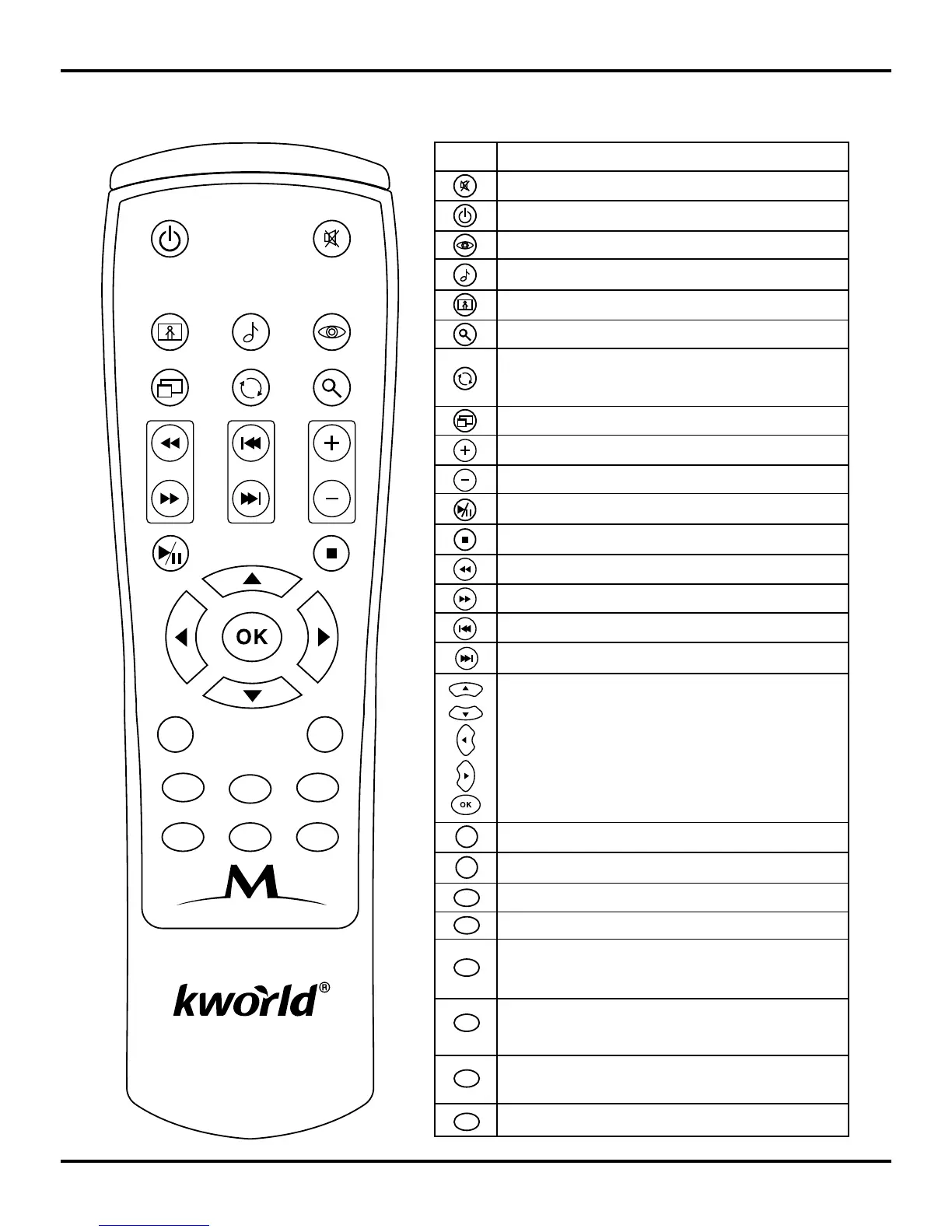
Key
Function
Volume up
Switch between different aspect ratio
Volume down
Play/Pause
Stop
Rewind
Fast Forward
Previous
Next
BGM: Playback background music
Exit: Exit or Back to previous page
OSD: OSD menu / Info
Menu: Enter Main Menu page
Blue: Subtitle
Video Standard: Switch between different output
modes (YPbPr/Composite…). It only works in the
Menu page.
Red (the “Memory” button): saves the part of video
you are watching into the memory space of your
storage device that you connect to this media player
Green (the “Resume” button): resumes to the part of
video that you saved with the Red button.
Arrow key, Up
Arrow key, Down
Arrow Key, Left
Arrow Key, Right
OK key, Select and confirm
Turn: The photo will rotate 90 degrees clockwise
each time this button is pressed Switch between
different aspect ratio
Zoom: Zoom image
Photo: Enter Photo page.
Music: Enter Music page.
Movie: Enter Movie page.
Power on/off: activate Stand by mode
Mute: Enable/Disable Mute function.
Media Player M102
Photo Music Movie
16:9/4:3 Turn Zoom
Vol
BGMExit
OSD Menu
Video Standard



 To Next Page