EasyManua.ls Logo

KWorld PLUSTV 1680ex - User Manual

KWorld PLUSTV 1680ex
18 pages
Print Icon
To Next Page IconTo Next Page
Loading...
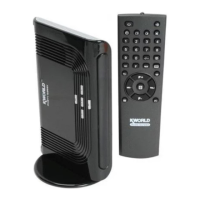
PLUSTV 1680ex
USER’S MANUAL
Ver 1.0

Questions and Answers

  • K
    Krystal DavisAug 14, 2025
    What to do if my KWorld TV Accessories have sound but no picture?
    • J
      Justin DavisAug 15, 2025
      If your KWorld TV Accessories are showing normal sound but no picture, it might be due to a poorly connected monitor. Alternatively, strong interference in the TV signal could be causing the monitor to enter a protection state.
  • M
    Maureen BlairAug 18, 2025
    Why does my KWorld PLUSTV 1680ex TV Accessories have snow spots or lines in the picture?
    • D
      Dr. Shari WhiteAug 18, 2025
      If you're experiencing snow spots, oblique lines, or vertical lines in the picture on your KWorld TV Accessories, the issue may be due to a weak signal from the antenna. Consider adding an antenna amplifier to boost the signal. It could also be caused by a defective connection of the antenna, or the wire in antenna cable is breaking off or failure of TV station.
  • R
    Rebecca WhiteAug 21, 2025
    How to fix a KWorld PLUSTV 1680ex remote control that isn’t working?
    • P
      Peter NguyenAug 21, 2025
      If your KWorld TV Accessories remote control isn’t working properly or has low sensitivity, first check if the batteries are installed correctly. The batteries may also be weak, or the signal from the remote control could be obstructed or disturbed.
  • A
    Audrey Thompson MDAug 25, 2025
    Why is there no sound on my KWorld PLUSTV 1680ex TV Accessories?
    • R
      Regina WestAug 26, 2025
      If you're getting a picture without sound on your KWorld TV Accessories, ensure the multimedia speaker is connected properly and that the volume is turned on. You can turn on the volume by clicking the Volume + button.
  • V
    vdavisAug 27, 2025
    What to do if PC picture on KWorld PLUSTV 1680ex has no picture or abnormal color?
    • P
      Pamela GarciaAug 28, 2025
      If you're not getting any picture or the color is abnormal when using PC input with your KWorld TV Accessories, check if the VGA cable is connected well and if the PC is running normally.
  • M
    Mario WilliamsAug 31, 2025
    How to fix no color on KWorld PLUSTV 1680ex TV Accessories?
    • W
      William WilliamsAug 31, 2025
      To resolve a 'no color' issue with your KWorld TV Accessories: * Adjust the chroma option under the PICTURE menu. * If the program is black and white colored, this is normal. * Ensure the picture system is set correctly under the PICTURE menu.
  • W
    wmillerSep 3, 2025
    Why is there no picture after turning on PIP on KWorld PLUSTV 1680ex TV Accessories?
    • A
      Ashley MartinSep 3, 2025
      The KWorld TV Accessories may not be displaying a picture after PIP is turned on because of the output mode of display card in PC is not standard. See section 3 for details.
  • J
    Jeffery BlevinsSep 7, 2025
    Why do my KWorld TV Accessories have no picture and no sound?
    • C
      Christy RodriguezSep 7, 2025
      If your KWorld TV Accessories show no picture and no sound, check the power connection and ensure the plug is properly connected. Also, verify that the receiver is not in standby mode.
  • T
    Terry HowardSep 10, 2025
    What to do if PIP is invalid on KWorld TV Accessories?
    • A
      Anne CaseySep 12, 2025
      Check if there is PC signal input.

Summary

Instruction

PLUSTV 1680 EX Functions and Features

Details advanced scanning, resolution, aspect ratio, PIP, and noise reduction features.

PLUSTV 1680 EX Packaged Contents

Lists all hardware and accessories included with the PLUSTV 1680EX.

PLUSTV 1680 EX Technical Specifications

Outlines power input, TV system support, video inputs/outputs, and supported resolutions.

Remote Control Instructions

PLUSTV 1680 EX Remote Control Diagram and Button Functions

Explains the functions of each button on the remote control with a diagram.

Hardware and Installation

PLUSTV 1680 EX Product and Panel Overview

Identifies physical buttons, ports, and the LED indicator on the device.

PLUSTV 1680 EX Rear Panel Port Descriptions

Details the various input and output ports located on the back of the PLUSTV 1680EX.

PLUSTV 1680 EX Connection Illustration

Shows how to connect external devices like speakers, game boxes, and cameras.

PLUSTV 1680 EX Initial Installation and Channel Scan

Guides users through the initial hardware setup and TV channel scanning process.

Menu Display and Operation

PLUSTV 1680 EX Menu Options Overview

Explains the Picture, System, Display Setup, and Auxiliary menu options.

PLUSTV 1680 EX Program Searching Guide

Describes how to connect the antenna and perform auto or manual channel scanning.

PLUSTV 1680 EX PIP Function Operations

Details how to use the Picture-in-Picture (PIP) feature while in PC mode.

Game Function Operations

PLUSTV 1680 EX Game Mode and Controls

Explains how to enter the game mode and describes the controls and gameplay.

Troubleshooting

PLUSTV 1680 EX TV Part Troubleshooting

Lists common TV-related issues and their solutions, like no picture or sound.

PLUSTV 1680 EX PIP Function Troubleshooting

Addresses problems specific to the Picture-in-Picture (PIP) function.

PLUSTV 1680 EX PIP Mode Compatibility

Lists PC display modes where the PIP function operates correctly.

KWorld PLUSTV 1680ex Specifications

General IconGeneral
CategoryTV Accessories
TV StandardsNTSC, PAL, SECAM
Video InputComposite, S-Video
Audio InputStereo Audio
Remote ControlYes
FM RadioYes
TV Tuner TypeAnalog
CompatibilityPC
Video Capture Resolution720x480 (NTSC), 720x576 (PAL/SECAM)
Supported OSWindows XP, Vista, 7