4
2. Remote control instructions
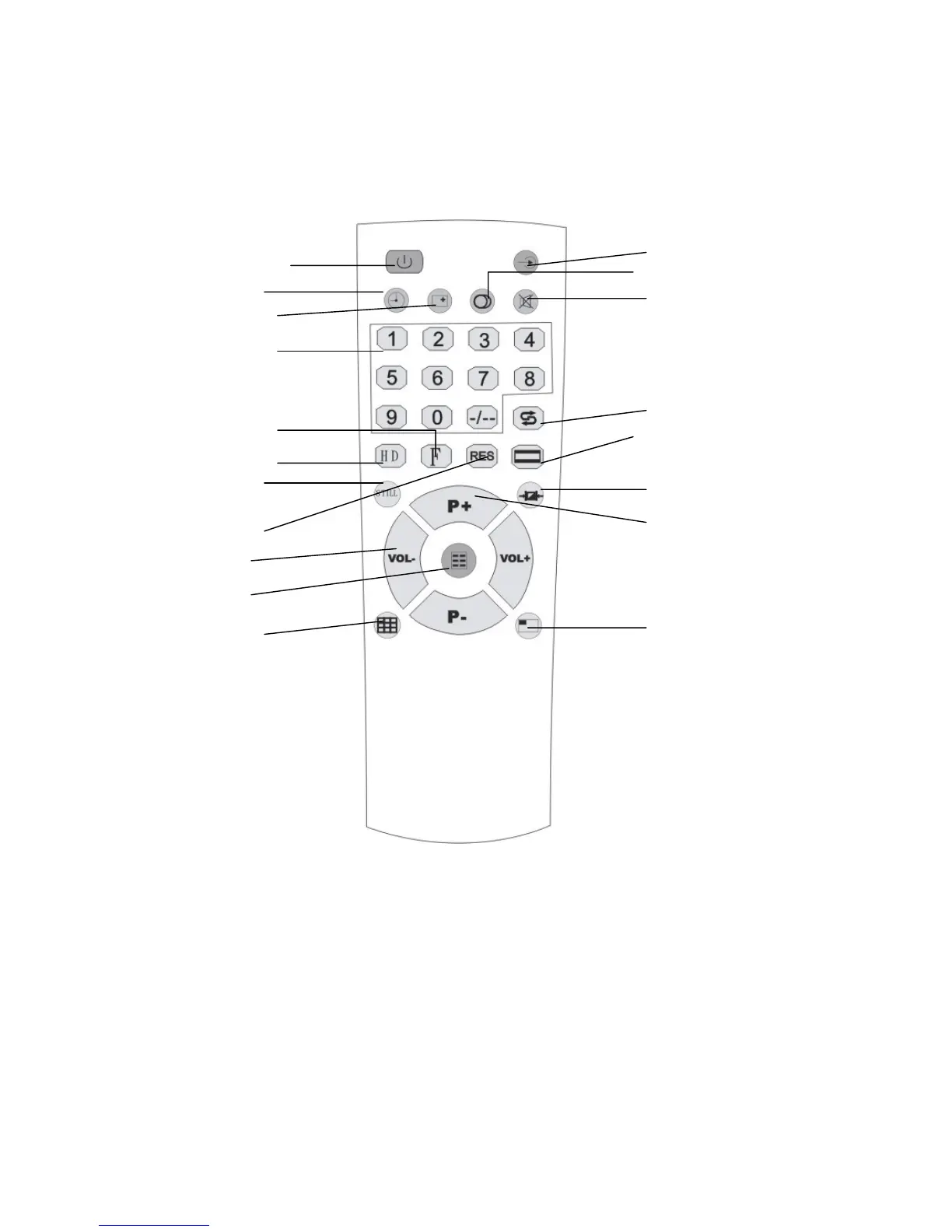
2.1 Diagram of remote control and buttons description
1. Power/Standby button: Used for power up/standby. At standby mode, it is PC
direct connection state.
2. Mute button: Clicking this button to make the sound disappear. You can click the
button again or click Volume +/Volume - button to resume the sounds.
3. 0-9, -/-- buttons: Used for the selection of channel number.
4. Return button: Used for the skip to the previous program.
5. Timing button: Click this button continuously, the timing of 15-180 minutes for
shutdown and “OFF” will be displayed on the screen in turn. If you set the time
for shutdown, the product will automatically be powered off when the time you
1. Power / Standby
5. Timing button
6. Display button
3. 0-9 Channel
19. HD button
18. Factory Default
13. Still Picture
14. Output Mode
11. Volume +/-
9. Menu button
15. TV Wall button
7. Video button
12. NICAM button
2. Mute
4. Return button
16. Aspect Ratio button
8. Mode button
10. Channel +/-
17. PIP Function


 To Next Page