User Guide for the Kyocera Xcursion Phone 3
Getting to know your phone
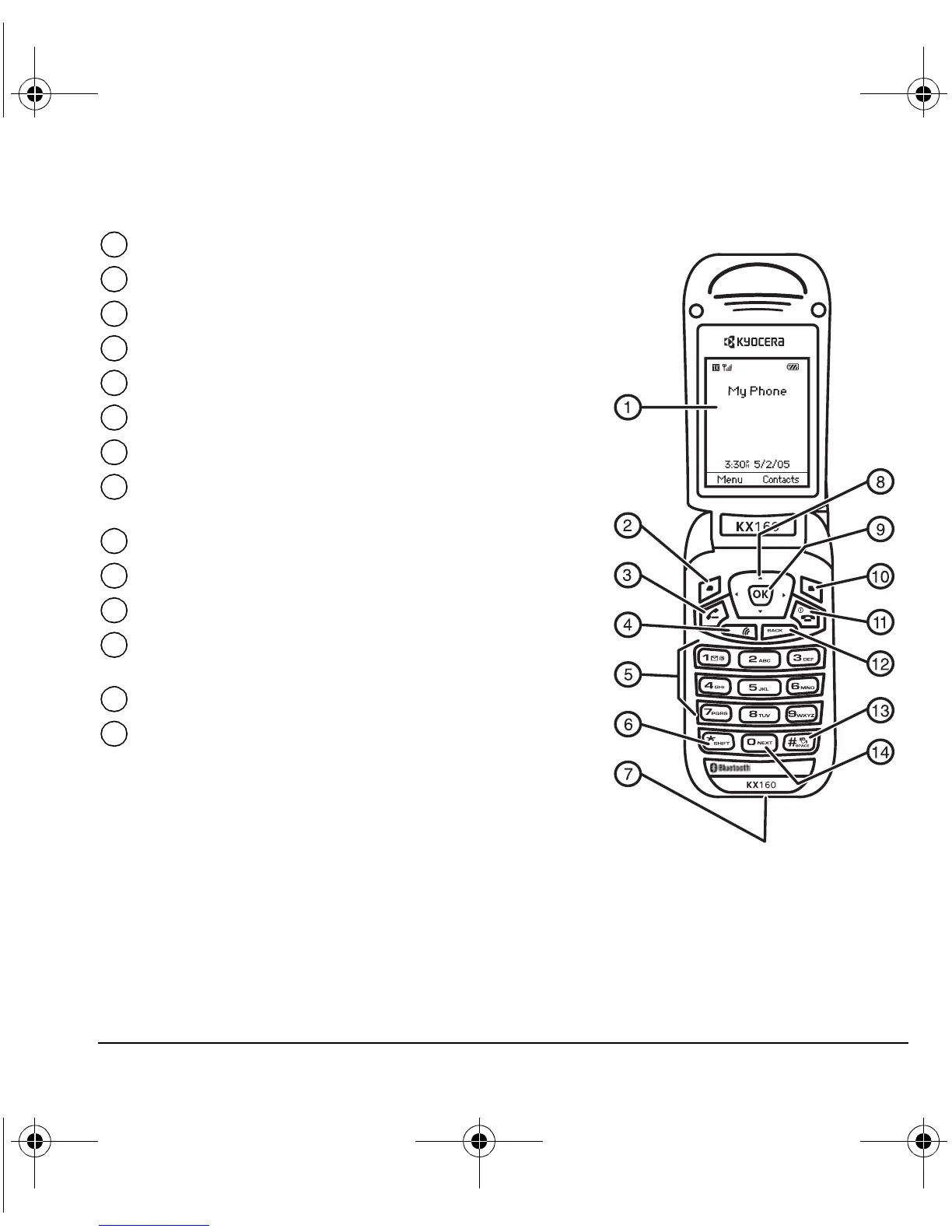
Home screen.
Left softkey accesses menus and functions.
Send/Talk key starts or answers calls.
Speakerphone key activates the speakerphone.
Keypad for entering numbers, letters, or symbols.
* Shift key changes the text mode in text entry.
Jacks for AC adapter (included)*.
Navigation key positions cursor during text entry.
Scrolls through list.
OK key selects a menu item or option.
Right softkey to access Contacts and other menu options.
End/Power key turns the phone on and off. Ends a call.
Back key erases characters in text entry. Returns to previous
screen. Activates the flashlight when pressed and held.
# Space key enters a space during text entry. Activates Silent mode.
0 Next key cycles through word choices during text entry.
1
2
3
4
5
6
7
8
9
10
11
12
13
14
82-N8671-1EN.book Page 3 Tuesday, October 4, 2005 3:49 PM










 To Next Page