20
Tips:
1. Make sure the option of AM/PM is set correctly.
2. You can only select from options of 15, 30, 45 an 00 when setting MINUTE.
3. Make sure the remote and the robot are as close as possible when setting the
schedule.
4. Only one schedule can be set when using the remote, and the schedule can be
cancelled permanently by long pressing on the remote. Two beeps from the
robot indicate the successful setting.
SLEEP MODE
To reduce battery consumption, the robot will go into the Sleep Mode when it is idle for
5 minutes, press on the robot or any button on the remote to wake it up. The you can
press the corresponding button to operate the robot to clean as needed.
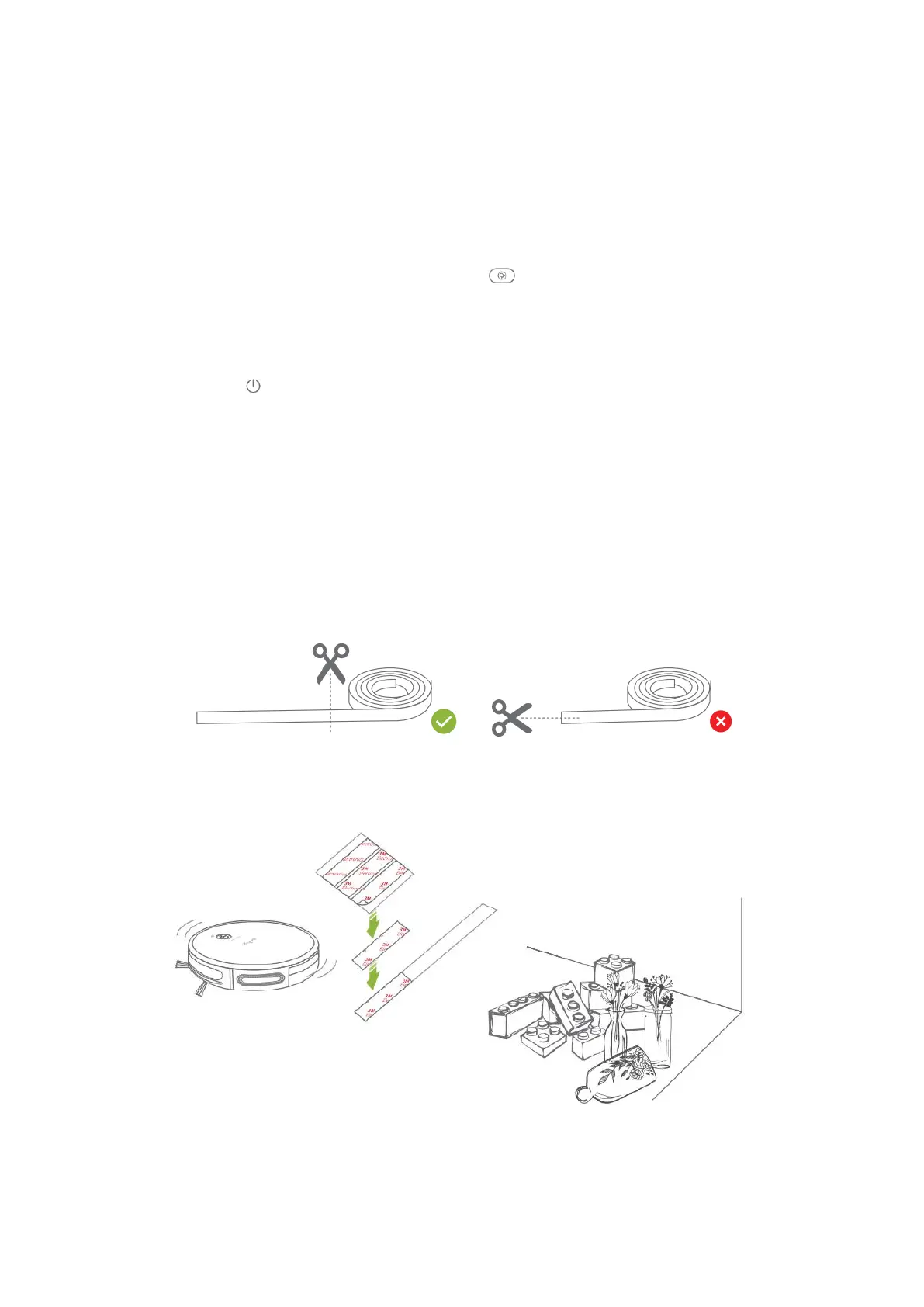
USING THE MAGNETIC STRIP
Magnetic Strip aims to set no-go areas such as pet food bowls or beds, as well as to
prevent entering rooms if desired.
Step 1:
Verify the area you do not want the robot to access.
Step 2:
Correctly measure the length and width of the area, then cut the strip to proper length.
Step 3:
Peel of a piece of 3M Adhesive Pad, then affix it to one side of the Magnetic Strip, so do
the other 3M Adhesive Pads.
Tip:
The number of Adhesive Pads varies depending on the strip length.


 To Next Page