Model: W86111 www.lacrossetechnology.com/support pg. 2
RESTART .................................................................................................. 7
ATOMIC TIME SEARCH - WWVB ......................................................... 7
POSITION CLOCK .................................................................................. 7
POSITION OUTDOOR SENSOR ........................................................... 7
SPECIFICATIONS ................................................................................... 8
CARE AND MAINTENANCE ................................................................... 9
WARRANTY AND SUPPORT INFORMATION ....................................... 9
FCC STATEMENT .................................................................................. 10
INITIAL SETUP
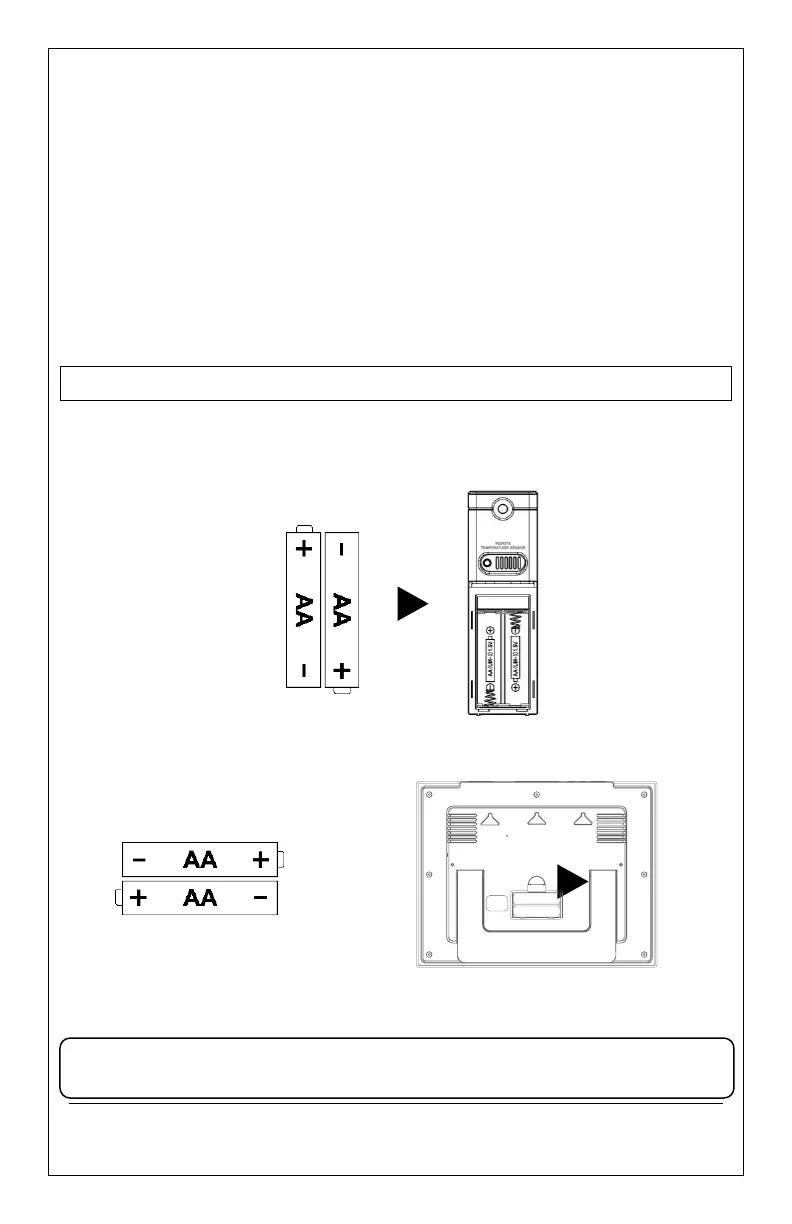
1. Insert 2 new AA batteries (not included) into the TX141v2
sensor. Observe the correct polarity. The red LED will flash
when transmitting.
2. Insert 2 new AA Alkaline batteries (not included) into
the clock. Observe correct polarity.
3. After 5 minutes, place the sensor outside in a shaded
location. Maximum range is 300 feet (91 meters) open air.
Note: If the outdoor Temperature area shows dashes after 3
minutes, remove the batteries and start from step 1.









 To Next Page