Manager Functions continued…
To increase time delay values
To increase time delay values follow the steps in “To
enter time delay values”
To decrease or remove time delay values
To decrease or remove time delay values, the operation
must be performed during the open window before the
user or manager code is entered. To decrease, follow
the steps in “To enter time delay values”
To remove:
Enter the manager code and hold down the last digit
until 2 sets of double beeps sound and the LED stays
on.
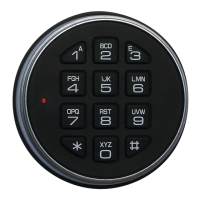
Press 9, a double beep will sound
Enter 00 to indicate the time delay period should be 0
minutes. Enter 00 to indicate the open window should
not be operational.
A double beep will sound. Re-enter the 4 digits to
confirm. A double beep will sound to confirm. The open
window will continue.
Master Functions
Prior to performing a master function, the master code
holder must press and hold 0 until a double beep
sounds to indicate that an 8 digit code is to be used.
To change code
Press and hold 0
Follow the user change code procedure
To audit the lock
Full technical instructions for taking an audit are
available with the audit software. The command
required on the lock is:
Press and hold 0
Enter the master code and hold down the last digit until
2 sets of double beeps sound and the LED stays on
Press 7 to start the audit transmission
Optional Feature – Dual Mode
If the lock has been supplied in dual mode, user 2 is
installed with the default code 2-2-2-2-2-2
To open the lock
Two valid codes must be entered to open the lock, one
of which can be a manager code.
To open the lock when time delay is active
Two valid codes are required to start time delay, and to
open the lock during the open window. User 9 may
override time delay after another valid code has been
entered.
To perform a manager function
A valid user code must be entered before following the
standard manager function procedure.
Optional Feature – Alarm signals
To enter a duress code
If the feature has been enabled, a duress code can be
entered which will open the lock and also send a silent
signal to the alarm system to notify others that the lock
is being opened under duress.
The duress code is the user’s normal code, but the last
digit should be decreased or increased by 1, for
example:
Normal code: 1-2-3-4-5-6
Duress code: 1-2-3-4-5-5 or 1-2-3-4-5-7
Signals if remote block is active
If the lock system is connected to an alarm and an input
signal is received, the lock will beep 5 times either when
a key is pressed or after entry of a valid code.
Optional Feature – Time Delay Override
If the feature has been enabled, User number 9 is able
to override time delay. User 9 can only be added by the
manager if time delay is not active or during the open
window if time delay is active.
Troubleshooting
Any key press results in a triple beep
The lock is in penalty. The LED will flash every 10
seconds. Wait for the 5-minute penalty to elapse to
enter a valid code.
A triple beep sounds
The code or function has not been entered correctly re-
enter.
If a mistake is made during code or function entry
Wait 30 seconds and repeat the function
A key does not beep when pressed
The battery may be depleted. Consult the safe or vault
supplier for information on changing batteries.
Repeated beeps and flashes during opening
The battery is running low. Consult the safe or vault
supplier for information on changing batteries.
The safe or vault door does not open
If the lock system is otherwise operating normally, there
may be a mechanical fault with the safe. Contact a safe
engineer.
User Record


 To Previous Page
 Loading...