LaCie RAID Manager is a software utility for modifying the RAID configuration. See the LaCie RAID Manager
for 2-Bay Devices user manual for details.
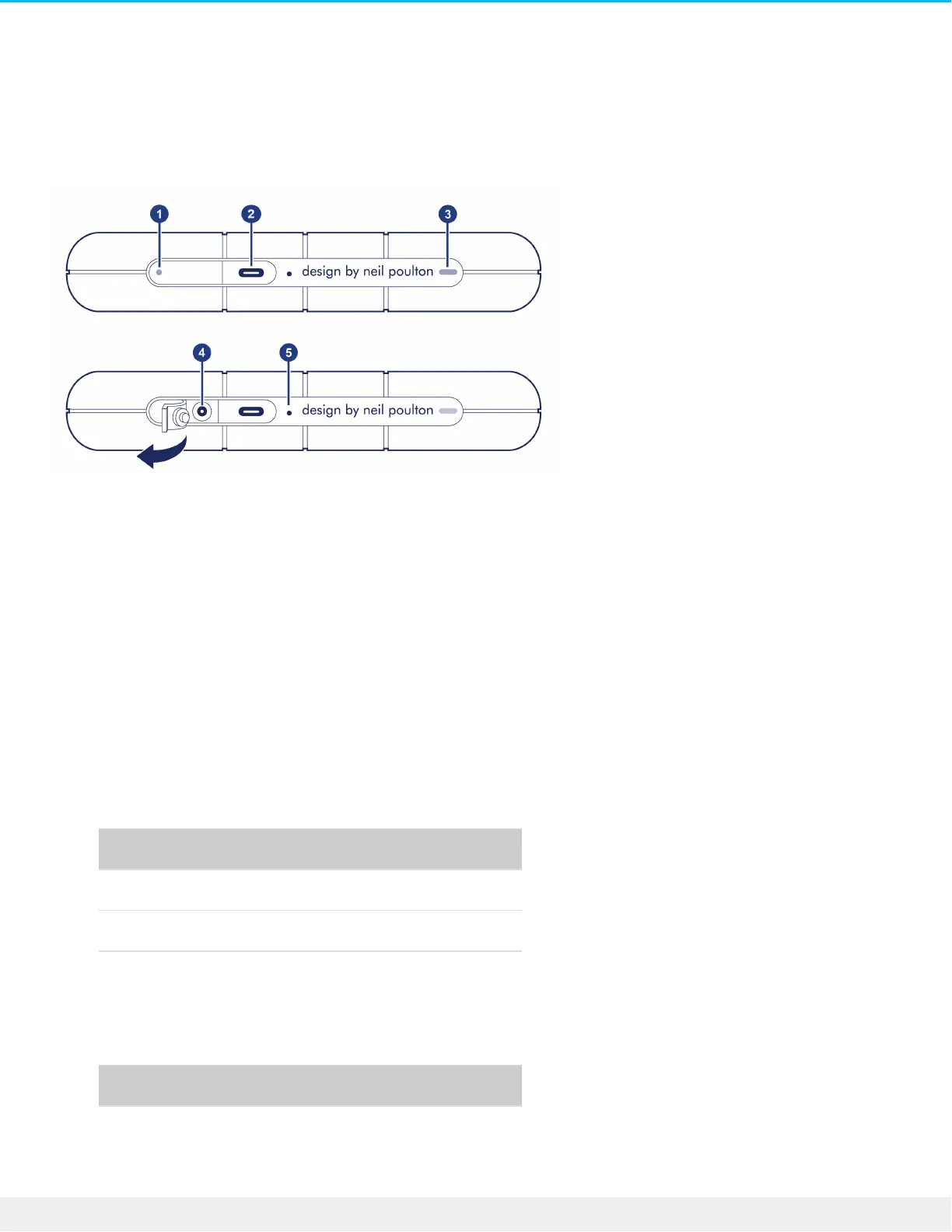
Views
1. Low power LED—Blinks if Rugged RAID Shuttle is not receiving enough power from the USB connection
to your computer, requiring the use of the included power supply. See Activity and Low Power LEDs.
2. USB-C (USB 3.1 Gen 1) port—Connect Rugged RAID Shuttle to a computer. See Getting Connected.
3. Activity LED—Indicates Rugged RAID Shuttle’s current activity. See Activity and Low Power LEDs.
4. Power input—Connect the power cable to this port if needed. Use only the power cable included with
your LaCie Rugged RAID Shuttle. Attaching third-party or other LaCie power cables with incorrect voltage
can damage the device. See Activity and Low Power LEDs.
5. RAID pinhole—Use the pinhole when confirming a change to your RAID level. See Manage RAID.
Specificaons
Enclosure dimensions
Side Dimensions (mm / in)
Length 28 / 1.102
Width 173.96 / 6.849
Depth 151.96 / 5.983
Enclosure weight
Weight (kg / lbs)
0.96 / 2.116
Electrical












 To Next Page