11
Advanced System
Description of Functions:
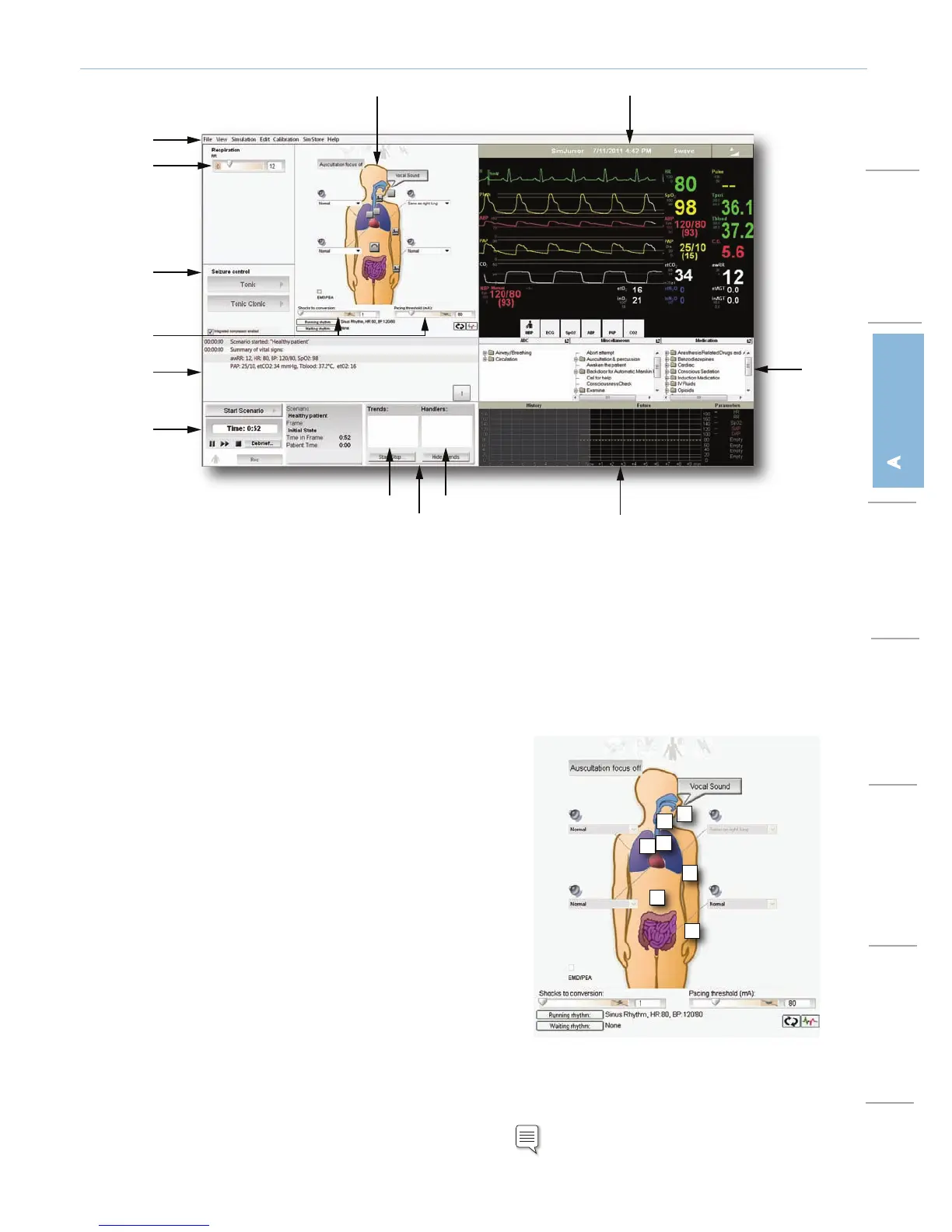
1. Program Menu Bar
– Open and edit file.
– Set up and configure the patient monitor and the simulator.
– Access additional application such as the Scenario Editor.
2. Respiration and Seizure Control
– Adjust the simulator’s respiratory rate.
– Start and stop different types of seizures.
3. Simulator Sounds, Airway, and Circulation
– View and set body sounds for lungs, heart, stomach, and bowel.
– Set vocal sounds. (View sound volume by clicking on the speakers
displayed next to the area you want to configure).
– Set lung function (on/off) and pulse function (central, radial, and
brachial).
– Set tongue edema and stomach distention.
Note: View and configure additional sounds with
the <Edit> menu located at the top of the screen.
1
12
13
2
3
4
5
6
7
8
9
10
11
1. Program Menu Bar
2. Respiratory Control
3. Simulator Sounds, Airway, and Circulation
4. Defibrilation and Pacing Control
5. Instructor Monitor Control
6. Event Windows
7. Debrief Log
8. Trend and Handler Control
9. Running Trends
10. Trend Window
11. Running Handlers
12. Scenario Control
13. Seizure Control
1
2
4
3
5
6
3
1. Tongue Edema
2. Carotid Pulse














 To Next Page