25
5. BATTERY PACK ATTACHMENTS AND REMOVAL
Note: Because the battery pack is provided uncharged, you must charge the battery pack before
using it with the transceiver.
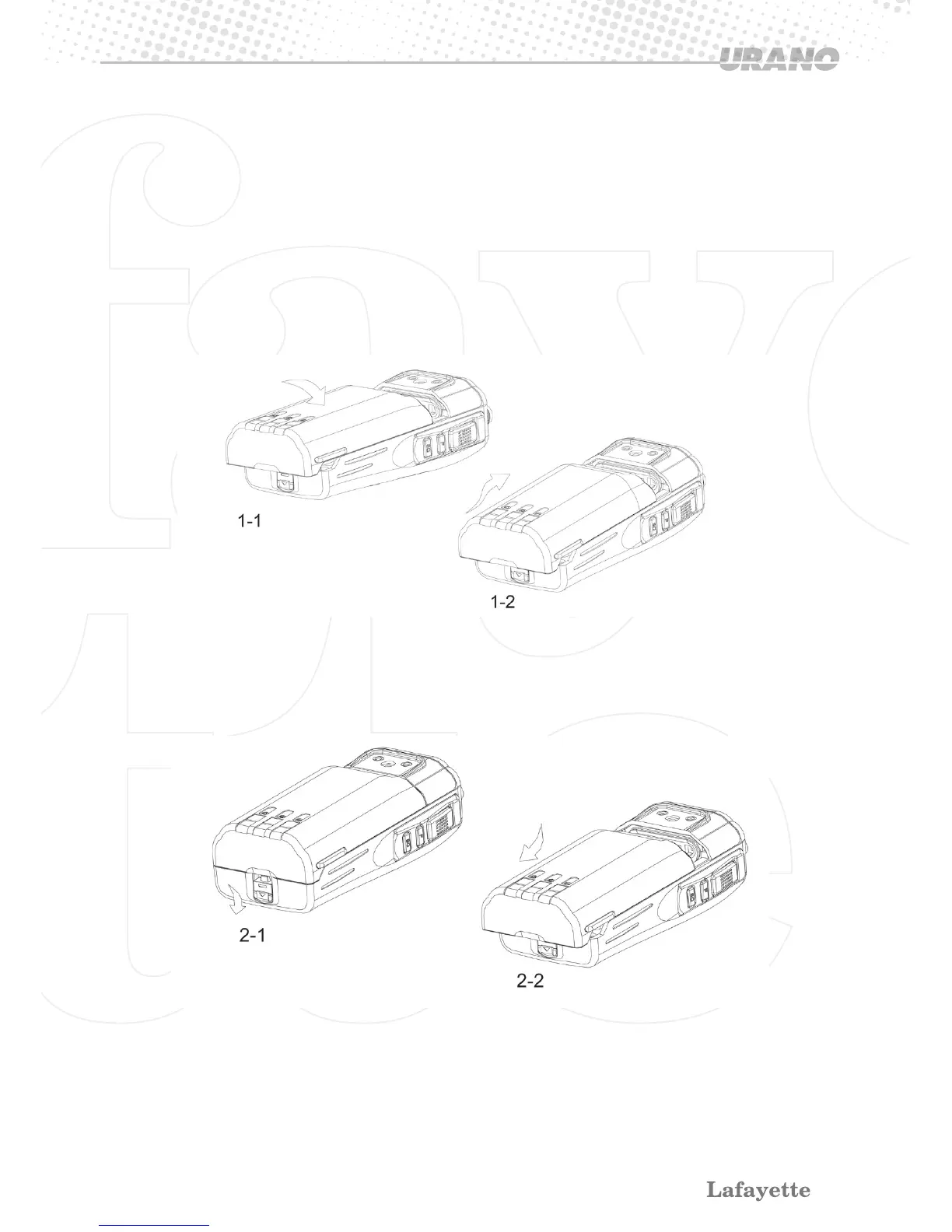
1 Install (See the figure as follow) :
1-1 Match the four grooves at the edge of battery pack with the corresponding guides on the
back of the transceiver.
1-2 Slide the battery pack along the back of the transceiver until the release latch on the base of
the transceiver locks. Meanwhile, a “click” sound is heard.
2 Take off (see the figure as follow):
2-1 To remove the battery pack, pull down the release latch on bottom.
2-2 Slide the battery pack away form the transceiver.
•Do not use the battery if it is damaged, shows cracks, bruises or is damaged
•Replace the battery with a new one after five years, even if still holds a charge. The inside
battery material will deteriorate after a period of time, even with little use.


 To Next Page