ASSEMBLY INSTRUCTION
ASSEMBLY STAGE #4
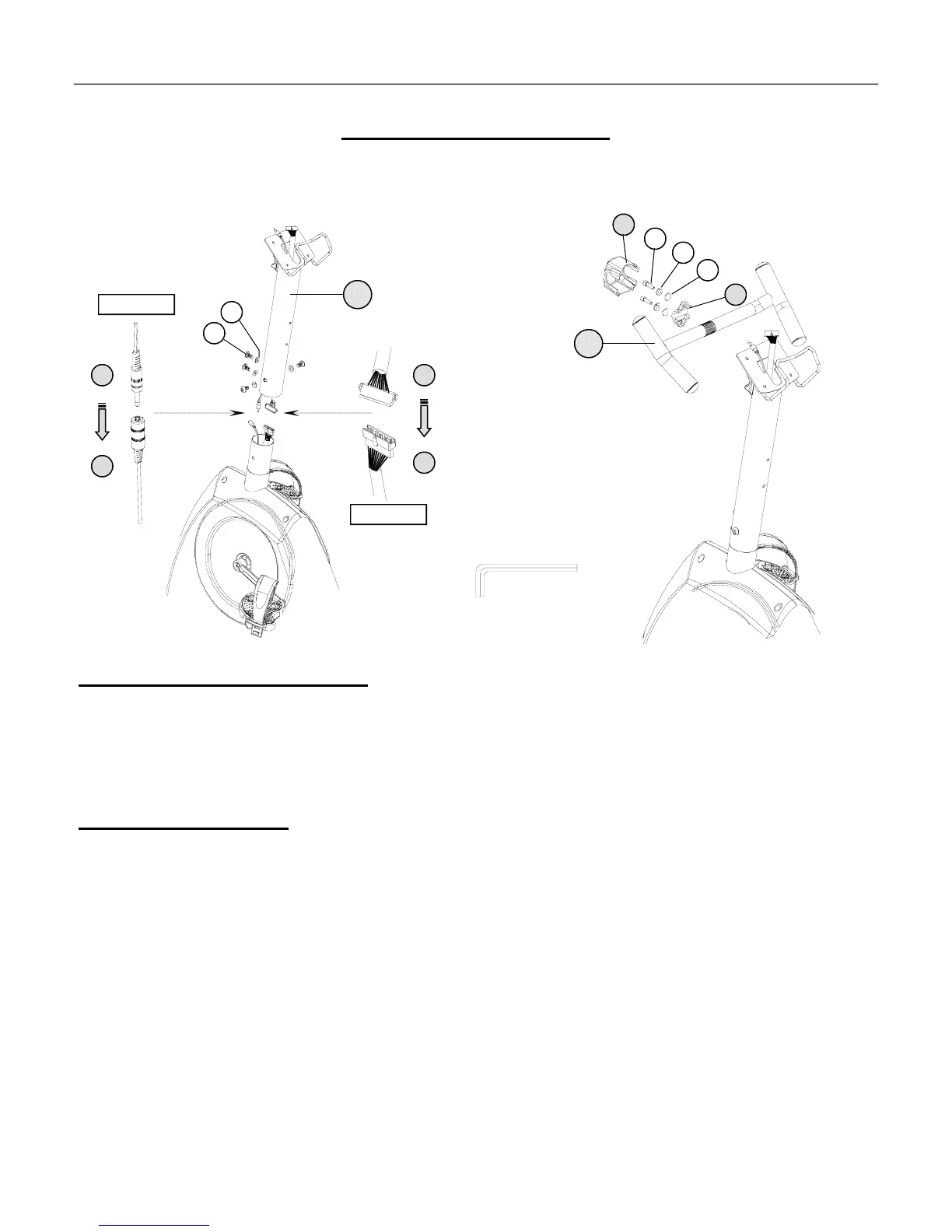
Attach Mast & H-Handlebar to the Main Base
Assembly Hardware Required: (*Hardware is Preinstalled in Base Assembly)
#30 Truss Head Socket Bolts* Qty. 4 #33 Spring Washer Qty. 2
#31 Curved Washer* Qty. 4 #34 Flat Washer Qty. 2
#32 Allen Bolt Qty. 2
Assembly Description:
A) Remove the preinstalled hardware from the mast mounting area of the Base Assembly.
B) Connect the Upper Heart Rate Cable (#18) to the Lower Heart Rate Cable (#19). (FIGURE #4)
C) Connect the Upper Data Cable Assembly (#20) to the Lower Data Cable Assembly (#21). (FIGURE #5)
D) Tuck the excess cable lengths into frame tubing and slide the Handlebar Mast (#13) down on to the Base
Assembly (#1). Align the mounting holes and secure the mast in place by using the previously installed; 4-Truss
Head Socket Bolts (#30) and 4-Curved Washers (#31).
E) Secure the H-Shaped Handlebar (#14) to the front cradle mounting of the Handlebar Mast (#14) using the
Mounting Clamp (#16), 2-Allen Bolts (#32), 2-Spring Washers (#33) , and 2-Flat Washers (#34).
F) Once the H-Handlebar is secure, place the Mounting Cover (#15) over the hardware / clamping area..
♦ Assembly Stage #4 completed
34
16
33
32
15
18
19
21
20
13
30
PAGE 9
USE TOOL
14
31
FIGURE #4
FIGURE #5



 To Next Page