16
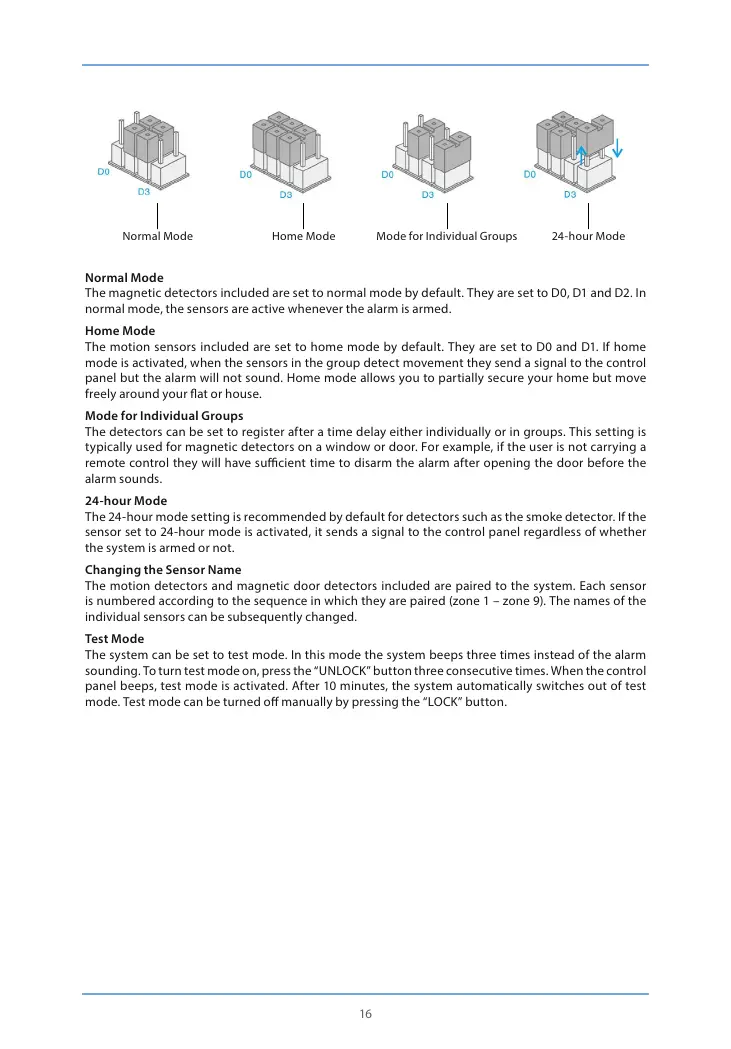
Normal Mode Home Mode Mode for Individual Groups 24-hour Mode
Normal Mode
The magnetic detectors included are set to normal mode by default. They are set to D0, D1 and D2. In
normal mode, the sensors are active whenever the alarm is armed.
Home Mode
The motion sensors included are set to home mode by default. They are set to D0 and D1. If home
mode is activated, when the sensors in the group detect movement they send a signal to the control
panel but the alarm will not sound. Home mode allows you to partially secure your home but move
freely around your at or house.
Mode for Individual Groups
The detectors can be set to register after a time delay either individually or in groups. This setting is
typically used for magnetic detectors on a window or door. For example, if the user is not carrying a
remote control they will have sucient time to disarm the alarm after opening the door before the
alarm sounds.
24-hour Mode
The 24-hour mode setting is recommended by default for detectors such as the smoke detector. If the
sensor set to 24-hour mode is activated, it sends a signal to the control panel regardless of whether
the system is armed or not.
Changing the Sensor Name
The motion detectors and magnetic door detectors included are paired to the system. Each sensor
is numbered according to the sequence in which they are paired (zone 1 – zone 9). The names of the
individual sensors can be subsequently changed.
Test Mode
The system can be set to test mode. In this mode the system beeps three times instead of the alarm
sounding. To turn test mode on, press the “UNLOCK” button three consecutive times. When the control
panel beeps, test mode is activated. After 10 minutes, the system automatically switches out of test
mode. Test mode can be turned o manually by pressing the “LOCK” button.


 To Next Page