6
Further Settings
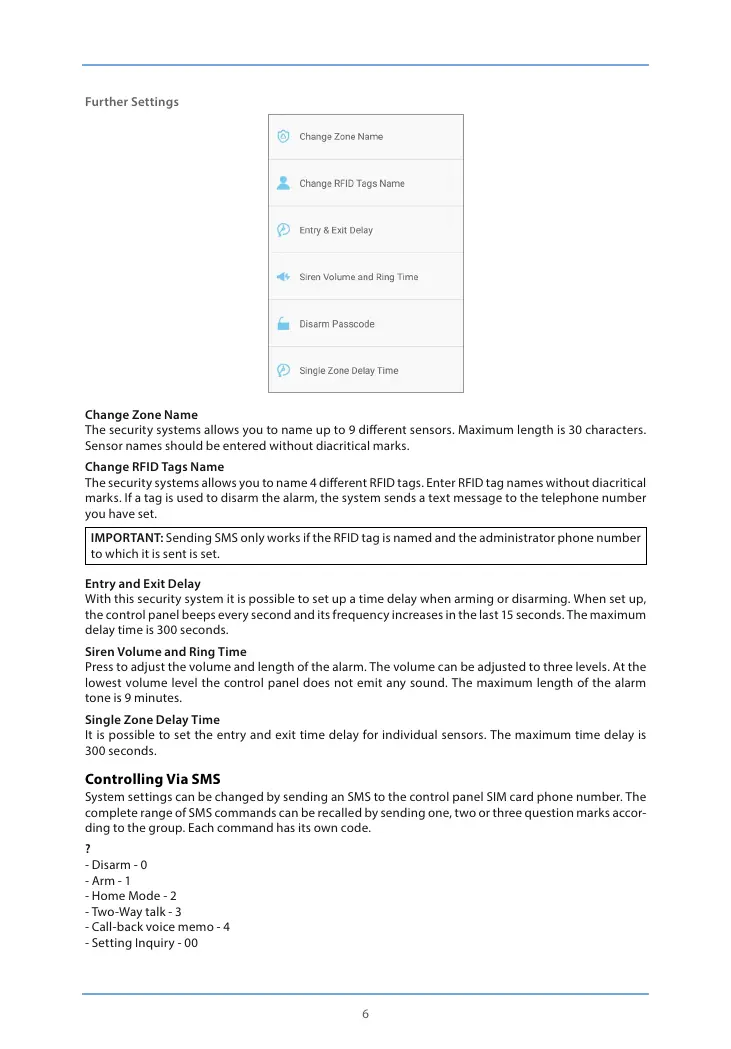
Change Zone Name
The security systems allows you to name up to 9 dierent sensors. Maximum length is 30 characters.
Sensor names should be entered without diacritical marks.
Change RFID Tags Name
The security systems allows you to name 4 dierent RFID tags. Enter RFID tag names without diacritical
marks. If a tag is used to disarm the alarm, the system sends a text message to the telephone number
you have set.
IMPORTANT: Sending SMS only works if the RFID tag is named and the administrator phone number
to which it is sent is set.
Entry and Exit Delay
With this security system it is possible to set up a time delay when arming or disarming. When set up,
the control panel beeps every second and its frequency increases in the last 15 seconds. The maximum
delay time is 300 seconds.
Siren Volume and Ring Time
Press to adjust the volume and length of the alarm. The volume can be adjusted to three levels. At the
lowest volume level the control panel does not emit any sound. The maximum length of the alarm
tone is 9 minutes.
Single Zone Delay Time
It is possible to set the entry and exit time delay for individual sensors. The maximum time delay is
300 seconds.
Controlling Via SMS
System settings can be changed by sending an SMS to the control panel SIM card phone number. The
complete range of SMS commands can be recalled by sending one, two or three question marks accor-
ding to the group. Each command has its own code.
?
- Disarm - 0
- Arm - 1
- Home Mode - 2
- Two-Way talk - 3
- Call-back voice memo - 4
- Setting Inquiry - 00


 To Next Page